
As a Shopify expert, I often speak with merchants who are exhausted by the manual labor required to run a high-stakes promotion. They find themselves awake at midnight, frantically refreshing their admin dashboard to publish a new theme or toggle sale banners. This manual approach is not only taxing on your team but also introduces a significant risk of human error that can lead to broken layouts, missed start times, and lost revenue.
In the fast-paced world of e-commerce, timing is everything. Whether you are launching a limited-time flash sale or preparing for a major seasonal event like Black Friday, the ability to automate your storefront updates is a competitive necessity. Merchants seeking to scale their operations realize that manual updates are a bottleneck. They look for solutions that provide a "set it and forget it" experience, allowing them to focus on marketing and customer service rather than technical execution.
The Operational Burden of Manual Flash Sales
Running a successful flash sale involves multiple moving parts. You need to update your homepage, adjust navigation menus, and often swap entire themes to reflect sale branding. Without automation, these tasks require real-time intervention.
Here are the primary challenges merchants face when managing promotions manually:
- Loss of Precision: Launching a sale exactly at midnight requires someone to be online and active. If the person responsible is delayed by even a few minutes, it can result in customer frustration and lost sales.
- High Error Potential: Manually changing visibility settings for sections and blocks under pressure often leads to mistakes, such as showing "Coming Soon" banners after the sale has already started.
- Inefficient Resource Use: High-level staff members should not spend their time performing repetitive administrative tasks that could be handled by software.
- Difficulty with Reversion: Ending a sale is just as critical as starting one. Forgetting to revert the theme to its original state after a promotion ends can lead to a confusing customer experience and accidental discounts.
By moving toward storefront automation, you can eliminate these pain points. For those utilizing ecommerce maintenance services, adding automated scheduling is the next logical step in optimizing your workflow.
Introducing Maestro Theme Scheduler: Your Automation Partner
At XCO Agency, we understand that custom shopify themes require sophisticated management. This is why we developed the Maestro Theme Scheduler app. It is designed to empower Shopify and Shopify Plus merchants to automate their storefront changes with surgical precision.
The app allows you to schedule when a specific theme version goes live and when it should be replaced. Beyond full theme publishing, it offers granular control over individual sections and blocks. This means you can design your sale banners and promotional sections well in advance and tell the system exactly when to show them and when to hide them.

How to Schedule Your Flash Sale in 5 Minutes
Setting up a fully automated flash sale does not have to be a complex project. With the right tools, you can configure your entire promotion in a matter of minutes. Follow these simple steps to automate your next event.
Step 1: Prepare Your Sale Theme or Sections
Before opening the scheduler, ensure your creative assets are ready. You might create a duplicate of your live theme and modify it with sale-specific colors, banners, and discount information. Alternatively, you can use your existing theme and simply prepare the sections that will be toggled on during the sale.
Step 2: Open Maestro Theme Scheduler
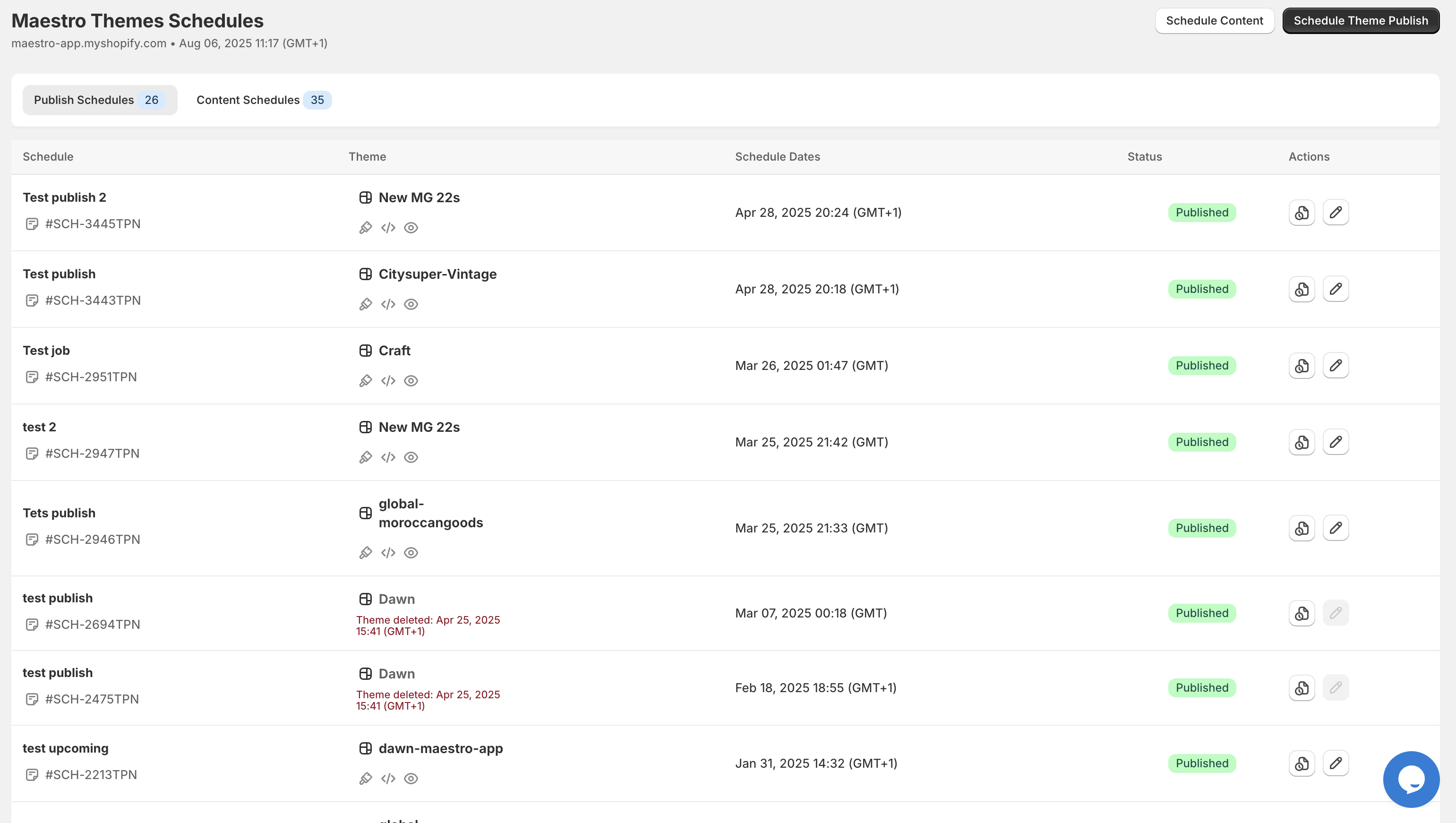
Navigate to your Shopify admin and open the Maestro Theme Scheduler app. The interface is designed for clarity, giving you a birds-eye view of all your planned updates.
Step 3: Create a New Schedule
Click on the "New Schedule" button to begin. You will be prompted to give your event a name. Use a clear name like "Spring Flash Sale 2026" to keep your dashboard organized.
- Select the Theme: Choose the theme you want to publish.
- Set the Start Date and Time: Pick the exact moment the sale should begin.
- Set the End Date and Time: Specify when the theme should revert to the previous version.
Step 4: Configure Recurring Events (Optional)
If you run weekly promotions or recurring weekend sales, you can utilize the recurrence feature. This allows you to set the sale to go live every Friday at 6:00 PM and end on Sunday at midnight without ever having to touch the settings again.
Step 5: Review and Save
Double-check your times and time zones. Once you are satisfied, save the schedule. The app will now handle the heavy lifting, ensuring your store transforms at the exact second you specified.

Automating Section and Block Visibility
Sometimes, you do not need to change your entire theme. You might just want to show a specific "Flash Sale Header" or a "Limited Time Offer" block on your homepage. Maestro Theme Scheduler provides the flexibility to automate visibility at the component level.
This feature is particularly useful for maintaining custom shopify themes. Instead of overwriting code, you can simply:
- Navigate to the Theme Editor: Open the Dawn theme or your custom theme editor.
- Select the Section: Click on the section or block you wish to schedule.
- Apply the Schedule: Use the Maestro integration within the editor to set the visibility dates for that specific element.
- Save: The section will remain hidden from customers until the scheduled start time.
This granular control ensures that your store’s UX remains consistent and professional, even during high-traffic periods.

Why Shopify Plus Merchants Need Storefront Automation
For high-volume merchants, shopify plus development often involves managing multiple storefronts and complex promotional calendars. The stakes are much higher; a technical glitch during a flash sale can result in thousands of dollars in lost revenue per minute.
Automation is a vital step for Shopify Plus users for several reasons:
- Consistency Across Regions: If you operate multiple expansion stores, you can sync your promotional launches across different time zones effortlessly.
- Integration with Launchpad: While Shopify Plus offers Launchpad, Maestro Theme Scheduler provides a more visual and intuitive way to manage specific theme elements and recurring schedules that Launchpad might not cover as flexibly.
- Reduced Developer Dependency: Marketing teams can manage these updates themselves without needing a developer to push code changes or manual updates at odd hours.
Utilizing a dedicated tool like Maestro helps streamline the ecommerce maintenance services required to keep a Plus store running at peak performance.
Maximizing Conversion During Your Flash Sale
Automation gets the content live, but the quality of that content determines your conversion rate. Once you have scheduled your theme changes, consider these additional optimizations to ensure your sale is a success:
- Use Countdown Timers: Create a sense of urgency by including a countdown timer in your scheduled blocks.
- Optimize Mobile UX: Ensure that your sale banners do not obstruct key navigation elements on mobile devices.
- Clear Call to Actions: Use high-contrast buttons that guide users directly to your sale collection.
- Sync with Product Availability: Use the Maestro Products Scheduler to ensure products are published or hidden in alignment with your theme changes.
A Proactive Step Toward E-commerce Maturity
Transitioning from manual updates to storefront automation is a hallmark of a maturing e-commerce brand. It reflects a commitment to operational excellence and a respect for both your team's time and your customers' experience.
By implementing tools like the Maestro Theme Scheduler, you are not just "scheduling a sale." You are building a resilient system that supports growth, reduces stress, and ensures that your brand always puts its best foot forward, no matter the time of day.
As a Shopify expert, I have seen firsthand how this "set it and forget it" approach transforms businesses. It moves your team away from the "panic and publish" cycle and toward a strategic, proactive workflow.
Are you ready to stop losing sleep over your storefront updates? Start by auditing your current promotional process. Identify the manual tasks that consume the most time and replace them with automated workflows. Whether you are a boutique store or a global Shopify Plus enterprise, the five minutes you spend scheduling your next sale today will pay dividends in saved time and increased revenue tomorrow.
Explore how Maestro Theme Scheduler can revolutionize your workflow and give you the peace of mind you deserve. Reach out to XCO Agency today to discuss how we can help you optimize your Shopify store for maximum impact.