
As a Shopify expert, I often see merchants struggling with the grueling reality of manual storefront updates. Picture this: it is 11:59 PM on the night before Black Friday. Instead of resting for the busy day ahead, you are glued to your laptop, waiting for the clock to strike midnight so you can manually hit "Publish" on a new theme. This manual process is not just exhausting; it is prone to human error and limits your ability to scale.
In the fast-paced world of e-commerce, timing is everything. Whether you are launching a flash sale, updating your brand for a new season, or rolling out custom Shopify themes for a specific event, the ability to automate these transitions is vital. This is where the Maestro Theme Scheduler comes into play. It is designed to transform your workflow from a manual chore into a "set it and forget it" system.
Why Storefront Automation is Seeking You Out
Modern e-commerce merchants are seeking ways to regain their time. They want to focus on growth strategies and customer acquisition rather than the technical minutiae of clicking "save" at a specific hour. If you find yourself staying up late to change banners or feeling anxious about whether your promotional content went live on time, you are the exact merchant who needs automation.
By utilizing automated scheduling, you can achieve several key benefits:
- Eliminate Human Error: No more forgetting to publish a theme or accidentally leaving a "Sale" banner up after the promotion ends.
- Improve Work-Life Balance: Schedule your updates during business hours and let the app handle the midnight launches.
- Perfect Syncing: Ensure your storefront reflects your marketing emails and social media ads the second they go live.
- Enhanced Scalability: Manage multiple promotions across different time zones without hiring extra staff just for site updates.
What is Maestro Theme Scheduler?
Maestro Theme Scheduler is a powerful tool built specifically for Shopify and Shopify Plus merchants. It bridges the gap between theme development and live storefront management. Essentially, it allows you to choose any theme in your library and schedule it to become live at a precise date and time. It also offers more granular control, such as scheduling specific sections or blocks to appear or disappear without changing the entire theme.
This level of control is essential for brands that invest heavily in custom Shopify themes. When you have a beautifully designed site, you want the transition between different versions to be seamless and professional.

The Core Features of Automation
1. Scheduled Theme Publishing
This is the flagship feature. You can select a draft theme that you have been working on and tell the app exactly when it should replace your current live theme. This is particularly useful for major site overhauls or seasonal changes where the entire look and feel of the store shifts.
2. Section and Block Visibility
Sometimes, you do not need to change your whole theme. You might just want to show a "Free Shipping" banner for forty-eight hours. With Maestro, you can schedule specific sections or blocks within a theme to be visible only during a specific window. This is a game-changer for ecommerce maintenance services because it allows for micro-updates that keep the store fresh without a full redeploy.
3. Recurring Schedules
If you run a "Deal of the Week" or a "Flash Sale Friday," you can set up recurring schedules. This means the app will automatically toggle content on and off every week at the same time, requiring zero manual intervention after the initial setup.
Elevating Shopify Plus Development
For those involved in shopify plus development, the stakes are higher. High-volume merchants often have complex requirements involving multiple storefronts and global audiences. Maestro Theme Scheduler supports these sophisticated needs by providing a reliable infrastructure for content deployment.
When you are managing a large-scale operation, every second of downtime or every visual glitch can result in significant lost revenue. Automating your storefront changes ensures that your high-traffic periods are met with a perfectly prepared site, every single time.
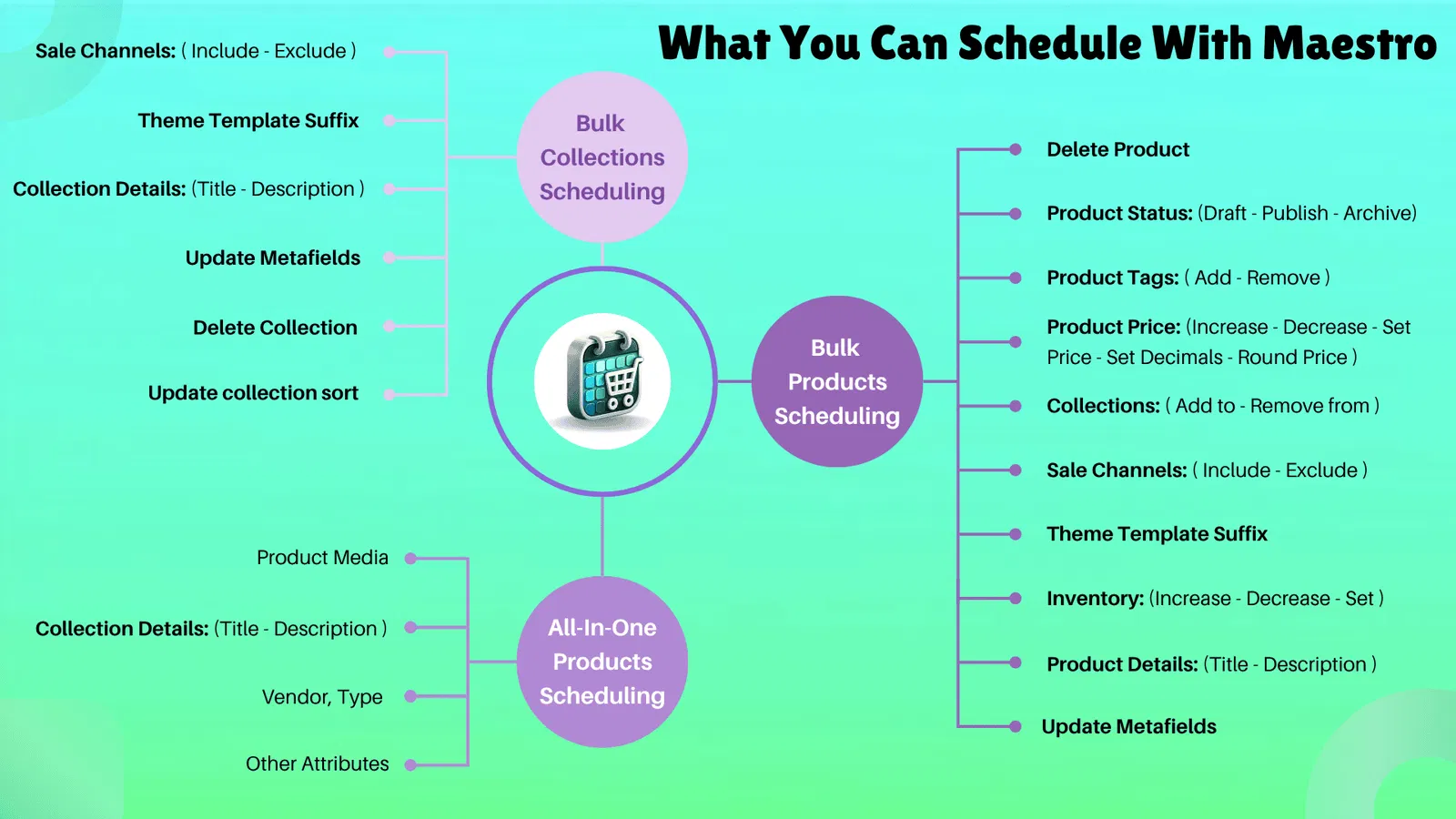
Step-by-Step: How to Automate Your First Storefront Change
Setting up an automated change is simpler than you might think. Follow these steps to get started:
- Prepare Your Theme: Navigate to your Shopify Admin and go to Online Store > Themes. Create a duplicate of your current theme or work on a new draft. Customize it with your promotional banners, new products, or seasonal colors.
- Open Maestro Theme Scheduler: Access the app from your Shopify dashboard.
- Create a New Task: Click on the "Create Schedule" button. You will be prompted to choose what you want to schedule: a full theme, a section, or a block.
- Select Your Target: Choose the theme you just prepared from the dropdown menu.
- Set the Timeline: Use the calendar interface to select the start date and time. If you want the change to be temporary, select an end date and time for when the store should revert to its previous state.
- Review and Save: Double-check your settings to ensure the time zone is correct. Once satisfied, click "Schedule."
The app will now monitor the clock and execute the change precisely when requested. You can view all your upcoming schedules in a clear dashboard, giving you a bird-eye view of your marketing calendar.

Use Cases: When to Use the Scheduler
The versatility of Maestro makes it suitable for a wide range of scenarios:
- Black Friday Cyber Monday (BFCM): This is the ultimate test for any e-commerce store. Use the scheduler to roll out your BFCM theme at midnight and revert to your standard theme the moment the sale ends.
- Product Launches: Align your site's visual components with a specific product drop. Have the hero image and featured collection appear exactly when your announcement email hits customers' inboxes.
- Holiday Decorations: Automatically add a festive header for December and have it disappear on January 1st.
- Flash Sales: Create urgency by scheduling a countdown timer or a "limited time" banner that only exists during the sale period.
- Global Events: If you operate in multiple regions, schedule updates to coincide with local holidays or peak shopping hours in specific time zones.
Integration with Ecommerce Maintenance Services
At XCO Agency, we believe that automation is a core pillar of effective ecommerce maintenance services. Maintenance is not just about fixing bugs; it is about keeping the store dynamic and relevant. By integrating Maestro Theme Scheduler into your routine, you are taking a proactive step toward a more professional and efficient operation.
Instead of reactive changes, you move toward a strategy of planned, automated growth. This reduces the stress on your development team and allows your marketing team to work further in advance. When the tech is handled, the creative ideas can flourish.

The Impact on Customer Experience
Beyond the internal benefits for your team, automation significantly improves the customer experience. Customers expect consistency. If they see an ad for a 20% discount but arrive at a store that looks the same as it did yesterday with no mention of the sale, trust is broken.
Maestro ensures that the "promise" made in your marketing is immediately fulfilled on the storefront. Smooth transitions between themes and sections create a professional atmosphere that signals to the customer that your brand is organized and attentive to detail.
Conclusion: A Vital Step for Growing Brands
Automating your storefront changes is no longer a luxury reserved for the biggest retailers; it is a vital step for any merchant looking to stay competitive. By removing the manual burden of theme publishing, you free up resources to focus on what truly matters: building your brand and serving your customers.
The "set it and forget it" nature of Maestro Theme Scheduler provides peace of mind that is invaluable during high-stakes sales periods. It ensures that your custom Shopify themes are always displayed at the right time, to the right people, without you needing to be awake to make it happen.
If you are ready to stop managing your store by the clock and start managing it by strategy, it is time to explore what automation can do for you.
Ready to streamline your Shopify operations? Book a meeting with us today or learn more about the Maestro Theme Scheduler to see how we can help you optimize your storefront for maximum impact and minimum stress.