
As a Shopify expert, I often work with merchants who are scaling so fast that their manual processes are starting to break. They are seeking a way to reclaim their time without sacrificing the quality of their storefront. If you have ever found yourself hovering over the "Publish" button at midnight because you have a product drop or a seasonal sale starting at the stroke of twelve, you know the struggle is real.
Manual store management is not just exhausting. It is a recipe for human error. One missed tag or a forgotten price update can lead to lost revenue or a confusing customer experience. This is where a robust product scheduler changes the game for your shopify store setup. Instead of being tied to your computer, you can automate your entire catalog lifecycle.
In this post, I will break down why the Product Scheduler by Maestro is the secret weapon for high-growth brands. From the Draft Helper to automated price rounding, we will look at how automation drives better conversion rate optimization and simplifies your ecommerce maintenance services.
The Chaos of Manual Product Launches
Before we dive into the solution, we must acknowledge the problem. Most merchants manage their stores using what I call the "Emergency Room" method. Everything is urgent, everything is manual, and someone is always on call.
When you are preparing for a major launch, you usually have to:
- Manually switch products from "Draft" to "Active" status.
- Update tags to ensure products appear in the correct smart collections.
- Change prices across hundreds of SKUs for a limited-time sale.
- Remember to revert those prices once the sale ends.
- Monitor inventory levels to hide out-of-stock items.
This approach is not scalable. As your catalog grows, the risk of making a mistake grows with it. By integrating automation into your shopify store setup, you move from a reactive state to a proactive one.

Introducing the Draft Helper: Your Launch Day Best Friend
One of the most powerful features within the Maestro ecosystem is the "Draft Helper." Think of this as your personal assistant that never sleeps. When you are setting up new arrivals, you likely keep them in "Draft" mode to prevent customers from seeing them prematurely.
The Draft Helper allows you to schedule the exact moment a product transitions from a draft to a live, purchasable item. Here is how it enhances your workflow:
- Preparation in Advance: You can upload your entire seasonal collection weeks early.
- Precision Timing: Set the activation time down to the minute to align with your marketing emails or social media posts.
- Channel Control: Choose which sales channels the product becomes active on, ensuring a synchronized launch across your website and social shops.
This level of control ensures that your shopify store setup is always professional and perfectly timed. You no longer need to be at your desk to hit the "Go" button.
Automated Tag Management for Seasonal Sales
Tags are the invisible glue that holds a Shopify store together. They control everything from filtering menus to automated collections and even third-party app triggers. However, managing tags manually is a nightmare during a sale.
As a Shopify expert, I recommend using the Product Scheduler to automate tag additions and removals. For example, if you are running a "Summer Clearance" event, you can schedule the app to:
- Add the tag "Summer-Sale" to specific items at 8:00 AM on Monday.
- Remove the "New Arrival" tag to clean up your navigation.
- Automatically remove the "Summer-Sale" tag when the promotion ends on Friday night.
This automation is vital for effective ecommerce maintenance services. It keeps your site organized without requiring constant manual oversight. When your tags are accurate, your smart collections are accurate, and your customers find exactly what they are looking for.
Scheduling Price Changes and Rounding Rules
Price management is a critical component of conversion rate optimization. Nothing kills a conversion faster than a price that looks "off" or a discount that fails to trigger when a customer expects it.
Maestro allows you to schedule price changes for specific products or entire collections. This is a massive win for flash sales or holiday promotions. But the real magic lies in the rounding rules.

When you apply a percentage discount, you often end up with awkward numbers like $17.43. Most high-end brands prefer "clean" pricing, such as $17.00 or $17.99. With the Product Scheduler, you can:
- Set Global Rounding Rules: Automatically round all discounted prices to the nearest .99 or .00.
- Maintain Brand Integrity: Ensure your pricing looks intentional and professional across the entire store.
- Automatic Reversion: Once the sale period ends, the app will revert the prices back to their original state and original rounding format.
This feature significantly boosts the perceived value of your brand and removes the tedious task of manually calculating and updating prices in a spreadsheet.
Inventory Automation and Restock Coordination
Inventory management is often the most stressful part of ecommerce maintenance services. When a popular item sells out, you want to either hide it or move it to the bottom of the collection to maintain a high-quality browsing experience.
The Product Scheduler can help automate how your store reacts to inventory shifts:
- Restock Alerts: Schedule products to move back to the top of "New Arrivals" the moment a restock arrives.
- Availability Logic: Automate the visibility of products based on their stock levels.
- Coming Soon Teasers: Schedule a product to be visible but "unpurchasable" with a "Coming Soon" tag, then automate the transition to "Buy Now" once the stock is officially checked in.
This hands-off approach ensures that your store always looks fresh and stocked, which is a key factor in keeping customers engaged and reducing bounce rates.
Managing Collection Visibility and Sorting
Your collection pages are your digital aisles. If the first ten products a customer sees are out of stock or irrelevant, they will leave. As a Shopify expert, I emphasize that collection sorting is a high-leverage activity for conversion rate optimization.
Maestro allows you to schedule the visibility of entire collections. If you have a "Black Friday" collection, you can set it to appear in your navigation at a specific time and disappear once the event is over.
Furthermore, you can schedule sorting changes. You might want to sort by "Best Selling" during peak traffic hours but switch to "Newest Arrivals" for your loyal return customers who check the site daily.
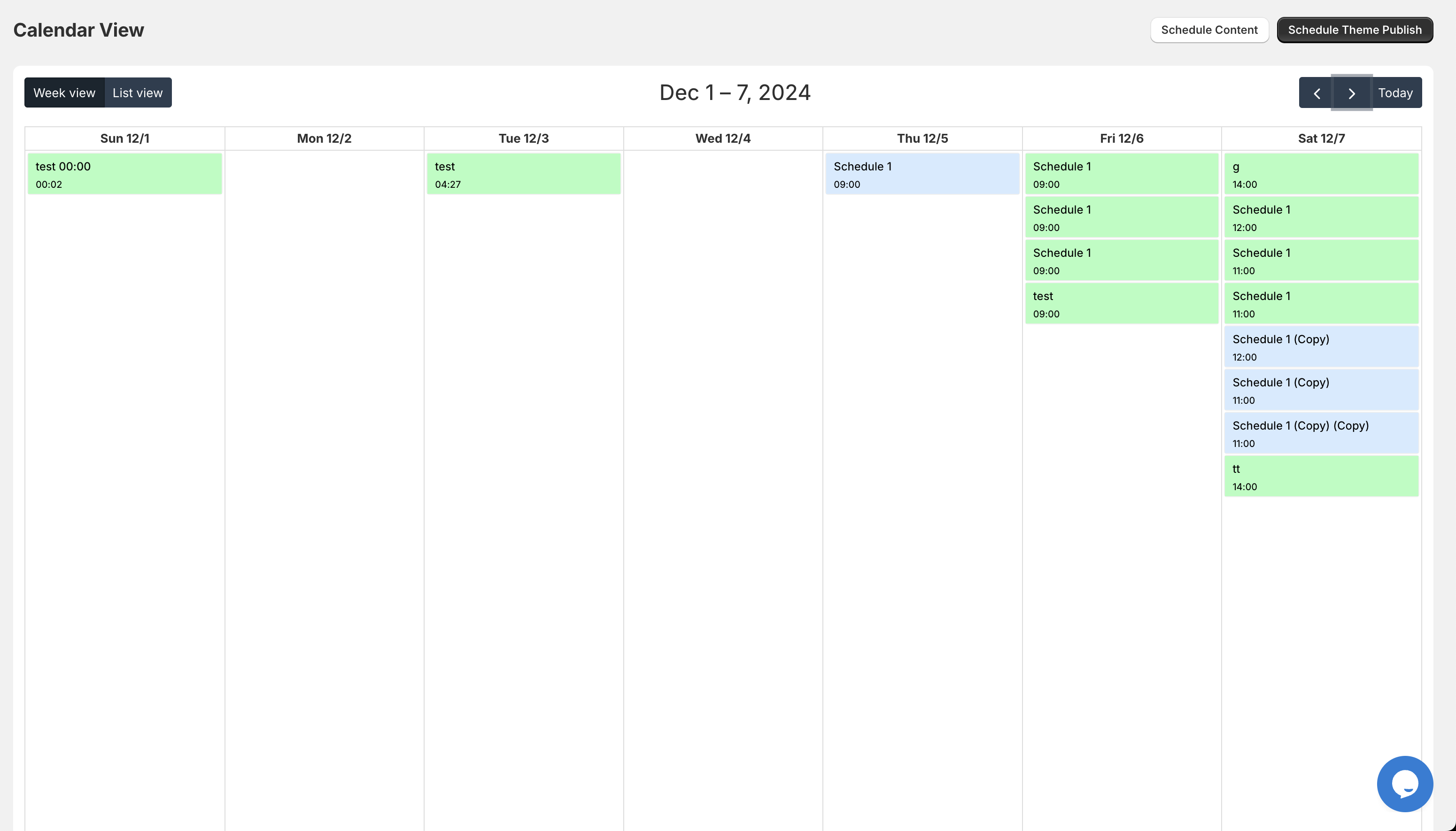
Why Automation is the Future of Shopify Store Setup
The transition from a manual store to an automated one is a milestone in any merchant's journey. It signifies a shift from "working in the business" to "working on the business." By utilizing a product scheduler, you are building a system that scales with you.
Here are the primary benefits of moving to an automated setup:
- Reduced Human Error: Computers do not forget to remove a "Sale" tag at midnight.
- Operational Efficiency: Your team can focus on creative marketing and strategy instead of data entry.
- Consistent Customer Experience: Your store updates happen like clockwork, building trust with your audience.
- Better Work-Life Balance: You can finally enjoy your weekends or sleep through a midnight launch.
If you are looking to take your store to the next level, checking out our Shopify design services or exploring our growth strategies can help you identify more areas where automation can save you time and money.
Step-by-Step: How to Get Started with Maestro
Ready to stop the manual madness? Here is how you can implement these changes:
- Audit Your Workflow: Identify the tasks you do every time you launch a product or run a sale.
- Install Maestro: Navigate to the Maestro Theme Scheduler page to learn more about the app’s capabilities.
- Set Your First Action: Start small by scheduling a single product launch or a tag change for next week.
- Monitor and Scale: Once you see how reliable the automation is, start scheduling entire sales and collection updates.

Conclusion: Take Back Your Time
Managing a Shopify store should not feel like a 24/7 surveillance job. The Product Scheduler by Maestro is more than just a tool. It is a fundamental shift in how you approach your shopify store setup. By automating the repetitive, high-stakes tasks of product management, you free yourself to focus on what actually moves the needle: growing your brand and connecting with your customers.
Whether you are looking for professional ecommerce maintenance services or you want to handle the automation yourself, the goal remains the same. You want a store that works for you, not the other way around.
If you are ready to optimize your operations and see how a professional agency can streamline your backend, feel free to book a meeting with us today. Let's make your next product launch your easiest one yet. For more information on our practices, you can also view our about us page or check out our FAQs.