
As a Shopify expert, I often see merchants scrambling at midnight to launch a sale or frantically clicking through their admin panels at 6:00 AM to revert a homepage banner. Seasonal promotions are the lifeblood of retail, yet the manual labor required to execute them remains one of the biggest bottlenecks for growing brands. Whether you are prepping for a flash sale or a month-long holiday campaign, the goal is always the same: seeking a way to deliver a seamless customer experience without the manual oversight.
The traditional way of managing these events involves a lot of "staying up late" and "hoping things work." This approach is not only stressful but also prone to human error. In the world of high-stakes e-commerce, a forgotten banner or an expired discount code can lead to customer frustration and lost revenue.
Automating your seasonal promotions provides several key advantages:
- Consistency across the store: Ensure your visual marketing matches your active discounts.
- Reduced operational overhead: Set up your entire campaign weeks in advance.
- Improved work-life balance: Avoid the need for manual intervention during holidays or weekends.
- Professional execution: Launch and end sales at precise times down to the second.
Leveraging Shopify Native Automatic Discounts
Before we dive into the visual side of automation, you must first address the transactional side. Shopify provides a built-in way to handle price reductions without forcing customers to remember a code. This is a vital step in creating a frictionless checkout experience.
Here are the simple steps to set up an automatic discount in under five minutes:
- Navigate to Discounts: In your Shopify admin, click on the Discounts tab in the left-hand sidebar.
- Create Discount: Click the Create discount button and select the Automatic discount option.
- Select Discount Type: Choose between Amount off products, Buy X get Y, or Free shipping based on your specific seasonal offer.
- Define the Value: Enter the percentage or fixed amount and select which collections or products the discount applies to.
- Configure Eligibility: Set any minimum purchase amounts or quantity requirements to ensure your margins stay protected.
- Set the Schedule: Enter your start date and time, and crucially, set an end date. This ensures the discount expires automatically without you needing to log in.
Once this is configured, Shopify will handle the pricing logic. However, the discount is only half the battle. If your customers do not know a sale is happening because your theme still looks like a regular Tuesday, your conversion rates will suffer.
The Missing Piece: Automating the Visual Experience
While Shopify handles the "math" of a promotion, it does not natively handle the "visuals" of a theme change on a schedule. This is where many merchants get stuck. They have an automatic discount running, but they still have to manually change their hero image, announcement bar, and promotional sections.
If you are using custom shopify themes, you know that your layout is carefully crafted to convert. Changing these elements manually for every sale is a repetitive task that distracts you from higher-level growth strategies.
This is why we built the Maestro Theme Scheduler. It is designed to bridge the gap between your marketing calendar and your Shopify store's appearance.
Why Visual Automation Matters for Shopify Plus Development
For brands engaged in shopify plus development, the complexity of the store often means that multiple stakeholders are involved in a launch. Manually publishing a theme or toggling sections is risky. Using a tool like Maestro allows for a "set it and forget it" workflow that mirrors the sophistication of your enterprise-level operations.
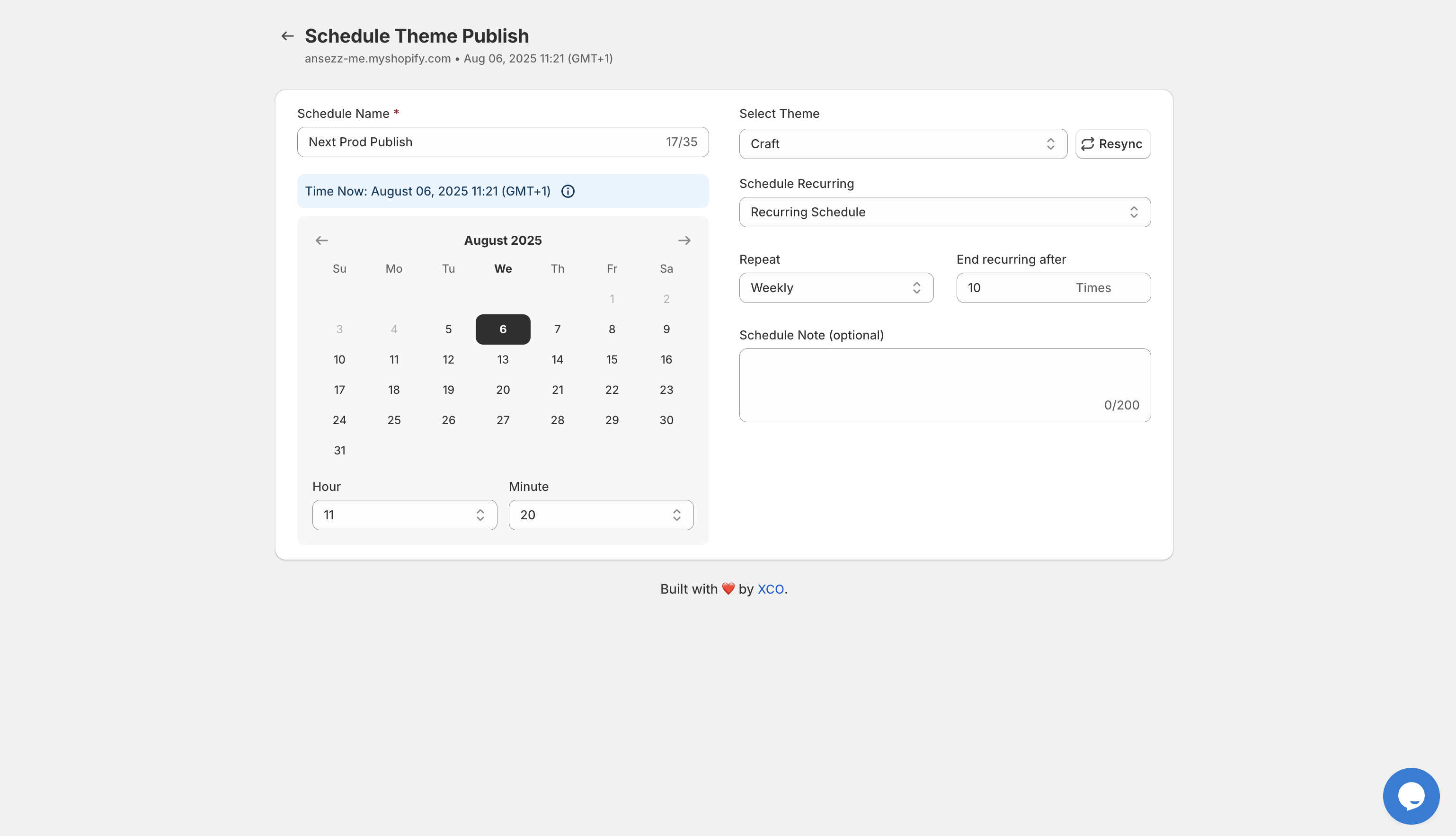
How to Automate Theme Publishing in 5 Minutes
The most efficient way to handle a total site takeover for a seasonal promotion is to prepare a duplicate theme and schedule it to go live. This ensures that every part of the site, from the header to the footer, is perfectly aligned with your campaign.
Here is how you can use Maestro Theme Scheduler to automate this process:
- Select Your Theme: Choose the theme version you have prepared for your seasonal promotion.
- Navigate to Maestro: Open the Maestro app within your Shopify admin.
- Create a New Event: Click on Schedule Theme Publish.
- Set the Timing: Input the exact date and time your sale begins.
- Set the End Date: Schedule your "Regular" theme to republish the moment the sale ends.
- Add Notes: Use the internal notes field to keep your team informed about what this specific schedule is for.
This process eliminates the need for manual theme publishing. Once your domain is connected to the scheduler, the app takes over the heavy lifting.

Granular Control: Automating Sections and Blocks
Sometimes, you don't need a full theme change. You might just want to show a countdown timer or a promotional banner for a 48-hour flash sale. Manually toggling these sections in the Shopify Theme Editor is tedious and requires constant monitoring.
Maestro allows you to automate the visibility of specific sections and blocks within your existing theme. This is perfect for:
- Limited-time offer banners: Show a banner only during the weekend.
- Gift-with-purchase blocks: Display information about a free gift that is only available for a specific window.
- Holiday-specific footers: Add a "Holiday Shipping Deadline" notice that disappears automatically when the deadline passes.
By using these features, you maintain a high level of agility without the constant need for ecommerce maintenance services to manually edit your liquid files or theme settings.
Enhancing Reliability with Ecommerce Maintenance Services
While automation tools like Maestro significantly reduce the workload, high-volume stores often benefit from professional ecommerce maintenance services. This ensures that as you add more automation, your theme remains optimized and bug-free.
A proactive approach to store management involves:
- Theme audits: Ensuring that automated theme changes don't conflict with installed apps.
- Speed optimization: Verifying that promotional sections don't negatively impact your load times.
- Workflow reviews: Auditing your scheduled events to ensure they align with your broader marketing calendar.
When you combine powerful apps like Maestro with expert oversight, you create a robust ecosystem that can handle the most intense seasonal periods, including Black Friday and Cyber Monday, with ease.

Scaling Your Operations with Shopify Plus
If you are operating on Shopify Plus, your needs for automation are even greater. You might be managing multiple stores across different regions or dealing with massive product catalogs. The shopify plus development environment demands tools that can handle bulk actions and complex scheduling.
Maestro supports this by providing a clear timeline of all scheduled events. This allows your team to see exactly what is changing and when. Whether it is a product launch or a seasonal price drop, having a visual record of your automation ensures that everyone stays on the same page.

Conclusion: Take Back Your Time
Automating your seasonal promotions is not just about convenience; it is a vital step in professionalizing your e-commerce operations. By leveraging Shopify's native automatic discounts for pricing and the Maestro Theme Scheduler for visual updates, you can transform a stressful launch day into a hands-off, automated success.
The "set it and forget it" nature of these tools allows you to focus on what really matters: growing your business and serving your customers. Instead of spending five hours manually updating your store, you can spend five minutes setting up your automation and the rest of your time focusing on your next big move.
Ready to streamline your Shopify operations?
- Explore our services: See how we can help with Custom Shopify Themes or Shopify Plus Development.
- Try the app: Start automating your store today with the Maestro Theme Scheduler.
- Get expert advice: If you need help building a comprehensive automation strategy, book a meeting with our team to discuss your needs.
Automation is the key to scaling without burnout. Start small, automate your next seasonal promotion, and see the difference it makes for your workflow and your bottom line.