
As a Shopify expert, I often work with merchants who are exhausted by the manual labor of running an online store. They seek growth, but they are stuck in the weeds of daily maintenance. If you have ever stayed up until midnight just to click "publish" on a new product line, or if you have forgotten to remove a "Sale" tag after a promotion ended, you know exactly what I am talking about.
Managing a high-growth Shopify store requires precision, but human beings are not built for 24/7 precision. We get tired, we get distracted, and we occasionally make typos that can cost thousands in lost revenue. This is why a Product Scheduler is not just a convenience: it is a fundamental shift in how you approach your Shopify store setup and ongoing operations.
In this guide, I will break down why the Product Scheduler by Maestro app is the secret weapon for merchants looking to automate their workflow, enhance their conversion rate optimization, and finally reclaim their weekends.
The Problem With Manual Shopify Store Setup
Before we dive into the solutions, we need to identify the core problem. Most merchants treat their store like a physical brick-and-mortar shop where they have to manually turn the "Open" sign and move products around the shelves every single day.
When you handle everything manually, you face three major risks:
- The Midnight Launch Fatigue: Launching products at the optimal time often means working outside of standard business hours.
- The Human Error Factor: Manually updating tags, prices, and inventory levels for hundreds of SKUs is a recipe for disaster.
- The Scaling Ceiling: You can only manage so many manual updates before your growth plateaus because you simply do not have enough hours in the day.
By shifting to an automated approach, you move from being a store clerk to being a store owner. You transition from reactive firefighting to proactive growth strategies that actually move the needle.

1. Mastering the Launch with the Draft Helper
One of the most requested features in our ecommerce maintenance services is a way to prepare product launches in advance without them accidentally going live too early.
The "Draft Helper" within the Maestro app is designed for this exact scenario. Instead of keeping your products in a permanent state of "Draft" and hoping you remember to publish them at the right moment, you can schedule the transition from draft to active.
How to use the Draft Helper for a seamless launch:
- Prepare your assets: Upload your product images, descriptions, and SEO metadata weeks in advance.
- Set the status: Keep the product as a draft so it remains invisible to customers and search engine crawlers.
- Schedule the trigger: Use the Product Scheduler to set a specific date and time for the product to switch to "Active."
- Sync with marketing: Ensure your email campaigns and social media posts go out at the exact same moment the product becomes available.
This level of automation ensures that your Shopify design services work is showcased exactly when it is meant to be, without any last-minute panicking.
2. Automated Tag Management for Seasonal Sales
Tags are the invisible engine of your Shopify store. They control your collections, your filters, and often your automated marketing flows. However, managing them is a nightmare.
During a seasonal sale, you might need to add a "Summer Sale" tag to 500 items and then remove it exactly when the sale ends. If you miss even five products, your collection pages look messy, and your customer experience suffers.
The benefits of automated tag scheduling:
- Clean Collections: Automatically add products to "New Arrivals" or "Sale" collections and have them removed once the period is over.
- Smart Filtering: Ensure that your sidebar filters only show relevant tags for the current season.
- Hands-Off Clean-up: Schedule the removal of temporary tags so you never have to "audit" your tags manually again.
Automating your tags is a small step that leads to massive gains in conversion rate optimization because it keeps your store organized and easy to navigate for the user.

3. Scheduling Price Changes and Rounding Rules
Pricing is one of the most powerful levers you have for increasing profit. But constantly changing prices for sales or inflation adjustments is tedious.
The Maestro Product Scheduler allows you to schedule price increases or decreases across your entire catalog or specific collections. Even better, it introduces the concept of rounding rules.
Why rounding rules matter for your Shopify store setup:
Psychology plays a huge role in ecommerce. A price of $19.99 often performs better than $20.00. If you are running a 15% off sale, your discounted prices might end up as messy numbers like $17.43.
With Maestro, you can:
- Schedule the discount: Set a start and end time for your sale prices.
- Apply rounding: Automatically round all sale prices to the nearest .99 or .95.
- Maintain margins: Ensure that your automated price drops never go below a certain threshold.
This level of control allows you to run sophisticated pricing strategies that were previously only available to enterprise-level retailers with massive dev teams.
4. Inventory Automation for Restocks
Nothing kills a conversion faster than an "Out of Stock" button. While we cannot manufacture your products for you, we can help you manage the visibility of your inventory.
When a restock arrives, you do not want to spend hours updating the status of every SKU. You can schedule inventory updates to align with when your warehouse team finishes their intake. This ensures that you are not selling items that haven't been unboxed yet, but you are also not leaving money on the table by keeping items marked as "Sold Out" longer than necessary.
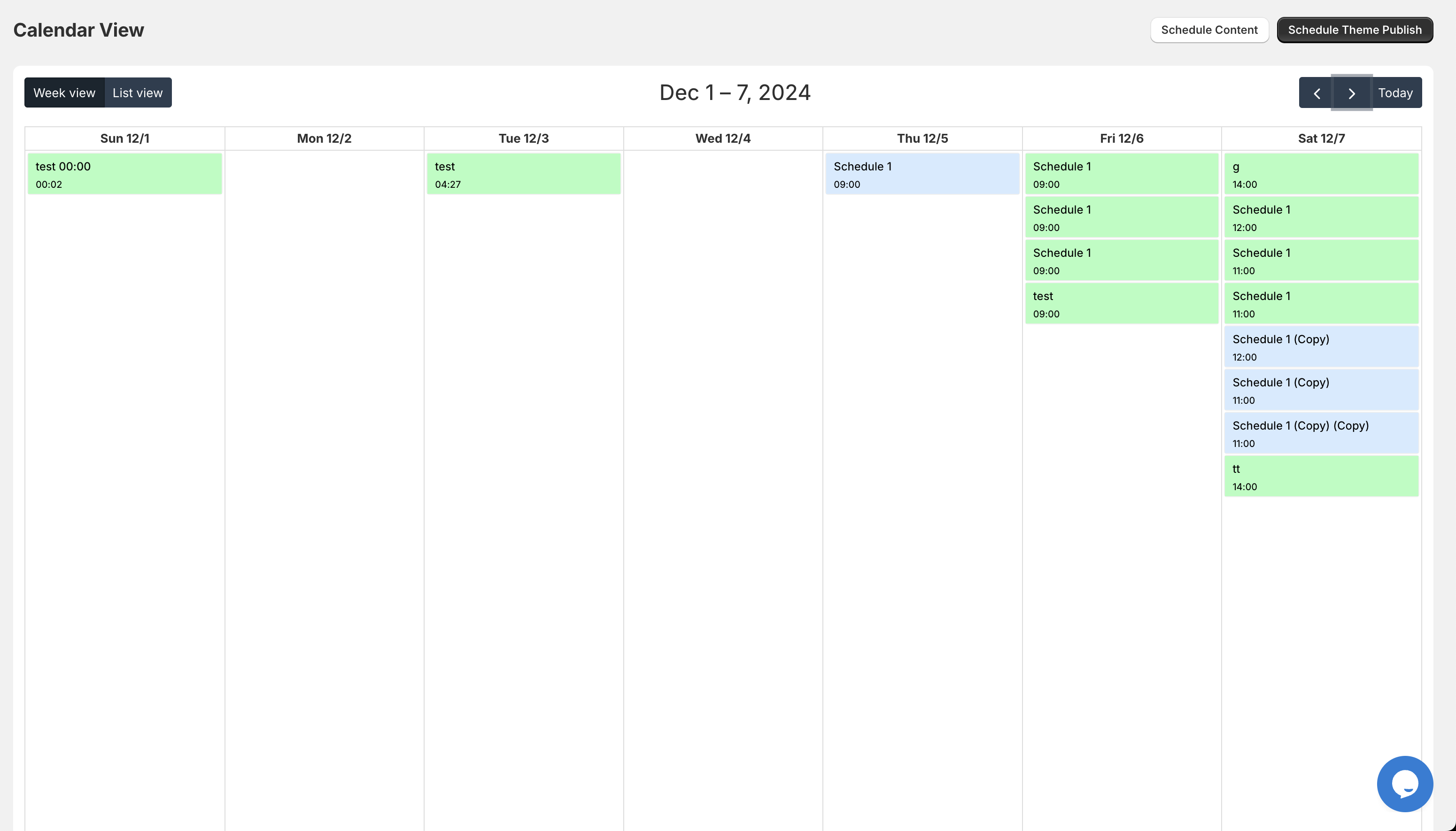
5. Managing Collection Visibility and Sorting
Your homepage and collection pages are your digital storefront windows. You wouldn't leave a Christmas display up in July, yet many Shopify stores have "Featured Collections" that are months out of date.
The Product Scheduler allows you to manage not just products, but how they appear in collections.
Advanced Collection Strategies:
- Timed Visibility: Show a "Holiday Gift Guide" collection starting November 1st and have it automatically hide on December 26th.
- Sorting Shifts: Schedule your "Best Sellers" to move to the top of the page during high-traffic weekends.
- Automated Archiving: Move old seasonal stock to a "Clearance" collection automatically based on the date.
By automating the visibility of these sections, you ensure your store always looks fresh and relevant to the shopper, which is vital for maintaining a high conversion rate.
Why XCO Agency Recommends a Hands-Off Approach
As a migration to Shopify expert, I have seen many businesses fail because they are overwhelmed by the "busy work" of ecommerce. The goal of using a tool like the Maestro Product Scheduler is to remove the friction between your ideas and your execution.
If you have a great idea for a flash sale, you should be able to set it up in ten minutes and then go back to focusing on your brand strategy. You should not be tethered to your laptop at 2 AM.
The ROI of Automation:
- Time Savings: Save an average of 5 to 10 hours per week on manual data entry.
- Error Reduction: Eliminate the "oops" moments that lead to customer complaints or lost margins.
- Agility: Launch campaigns faster than your competitors who are still doing everything by hand.

Integrating Scheduling into Your Workflow
If you are ready to change how you handle your Shopify store setup, the transition is simpler than you might think. It starts with an audit of your current manual tasks.
Ask yourself:
- What tasks do I perform every single week?
- Which of these tasks involve a "Start Date" and an "End Date"?
- How much time would I save if these happened automatically?
Once you identify these areas, you can begin implementing the Maestro app to handle the heavy lifting. Whether you are dealing with Shopify B2B wholesale channel updates or standard retail product drops, the logic remains the same: automate the predictable so you can focus on the exceptional.
Conclusion: Taking the Proactive Step
Running a successful Shopify store in 2026 requires more than just good products. It requires operational excellence. By utilizing the Product Scheduler by Maestro, you are taking a vital step toward a more professional, scalable, and stress-free business model.
Stop being a slave to your Shopify admin panel. Start using the tools that allow you to work on your business rather than in it. The reduction in human error and the increase in your own quality of life will be worth the investment ten times over.
If you want to learn more about how to optimize your store for maximum growth, or if you need help with Shopify integrations, we are here to help. Our team at XCO Agency specializes in turning complex Shopify setups into streamlined, profit-generating machines.
Ready to automate your store? Book a meeting with our experts today to discuss your store setup, or explore the Maestro Theme Scheduler to see these features in action. Let us help you build a store that works as hard as you do, even while you sleep.