
As a Shopify expert, I often work with high growth merchants who are seeking more efficient ways to manage their digital storefronts. One of the most common frustrations I hear involves the manual labor required to launch new sales, update homepage banners, or switch theme versions at specific times. Many merchants still rely on team members staying up until midnight to click the publish button, a process that is not only exhausting but also carries a significant risk of human error.
In the fast paced world of e-commerce, timing is everything. Whether you are launching a limited time flash sale or rolling out a complete overhaul of your custom shopify themes, precision is the key to maintaining a professional brand image. Automating these changes allows you to reclaim your time and ensure that your site always looks its best, even when you are not actively monitoring the admin dashboard.
The solution to this problem is simpler than most people realize. By using the right tools, you can move from a reactive management style to a proactive, automated workflow. This guide will show you exactly how to automate your storefront changes in five minutes or less, allowing you to focus on high level shopify plus development and growth strategies rather than routine site maintenance.
The Challenges of Manual Storefront Updates
Many merchants begin their journey by managing every site change manually. While this works for a small store with infrequent updates, it quickly becomes a bottleneck as the business scales. Here are the primary reasons why merchants are seeking automation:
- The Midnight Launch Syndrome: Staying up late to publish themes for sales events like Black Friday or Cyber Monday leads to fatigue and mistakes.
- Inconsistency Across Time Zones: For global brands, a manual update that happens at midnight in New York might be mistimed for customers in London or Tokyo.
- Resource Allocation: Your developers and marketing team should be focused on building new features, not performing basic ecommerce maintenance services.
- Human Error: Forgetting to revert a promotional banner after a sale ends can lead to customer confusion and lost revenue.
Transitioning to an automated system removes these hurdles, providing a set it and forget it environment that supports consistent growth.
Introducing Maestro Theme Scheduler
To achieve true automation, we recommend using the Maestro Theme Scheduler app. This tool is specifically designed to bridge the gap in Shopify’s native functionality by allowing merchants to schedule theme publishing and manage section visibility with ease. It is a vital component for any brand invested in shopify plus development that requires a sophisticated approach to site management.
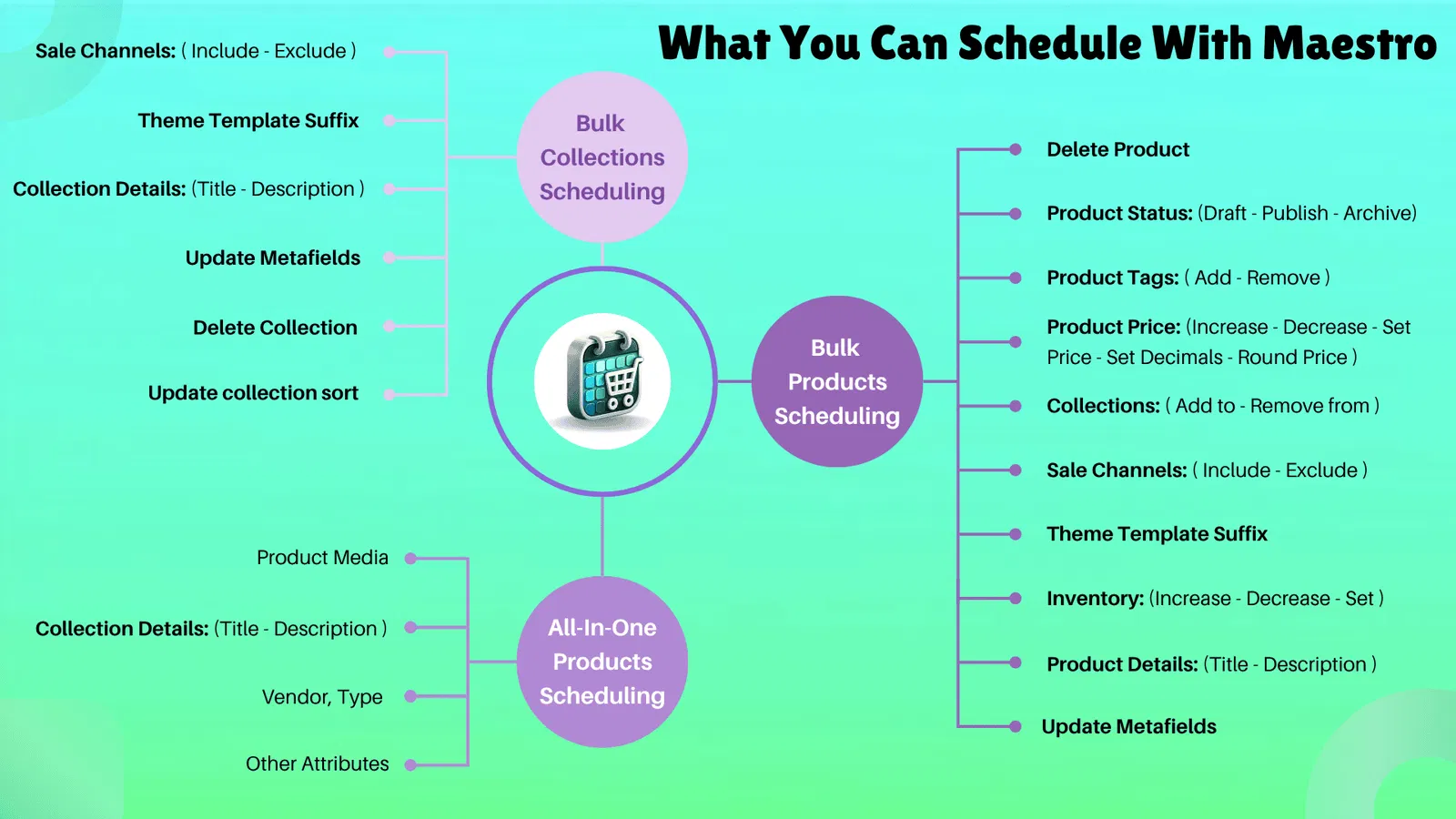
Maestro allows you to create a schedule for your themes, ensuring that the right version of your store goes live at exactly the right time. Beyond just publishing themes, it also offers granular control over individual sections and blocks, which is essential for maintaining dynamic storefronts without needing constant developer intervention.
How to Automate Your Storefront in 5 Steps
Setting up your first automation is a straightforward process. If you follow these simple steps, you can have your first scheduled update ready to go in less than five minutes.
Step 1: Install and Connect the App
Navigate to the Shopify App Store and install the Maestro Theme Scheduler. Once installed, the app will sync with your existing theme library, including all your custom shopify themes and draft versions.
Step 2: Create a New Schedule
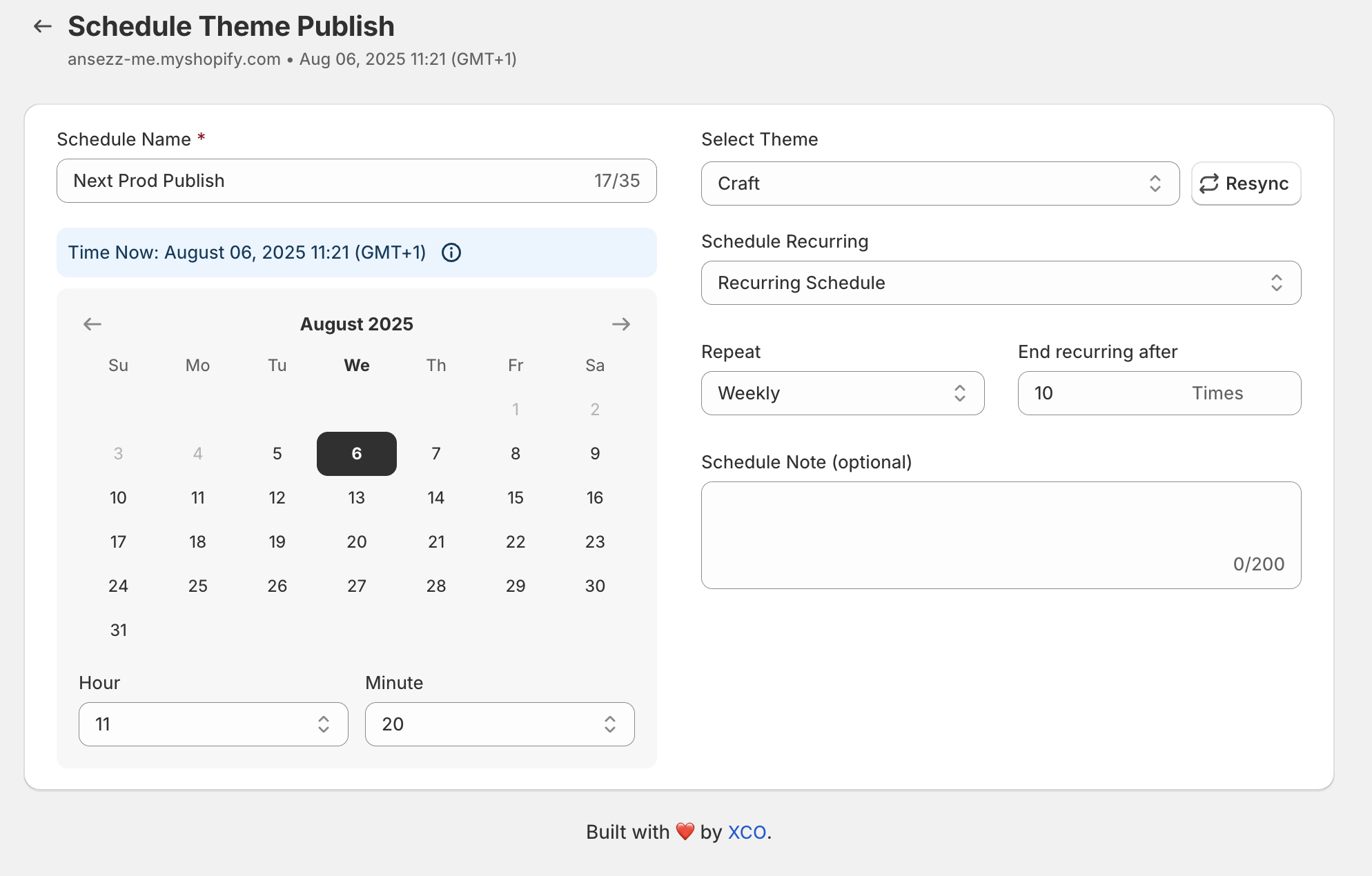
Within the Maestro dashboard, click on the button to create a new schedule. You will be prompted to give your schedule a name. We recommend being specific, such as Summer Collection Launch or Black Friday 2026.
Step 3: Select Your Theme
Choose the theme you want to publish from the dropdown menu. This could be a fresh design your team has been working on or a duplicate of your current theme with updated promotional banners.
Step 4: Define the Date and Time
Select the exact date and time you want the theme to go live. Maestro supports various time zones, ensuring your launch aligns perfectly with your marketing campaigns. You can also set a recurring schedule if you have updates that need to happen weekly or monthly.
Step 5: Save and Monitor
Once you have configured the settings, click save. You can now see your upcoming update in the publish timeline. The app will handle the rest, automatically switching your live theme at the designated moment.

Automating Section and Block Visibility
While switching an entire theme is powerful, sometimes you only need to change a specific part of a page. For example, you might want a countdown timer to appear 24 hours before a sale begins or a specific product collection to hide once it is sold out.
Maestro provides the ability to automate section and block visibility. This means you can prepare your homepage for a promotion days in advance. You simply set the start and end times for specific sections within your theme customizer. This level of control is a game changer for merchants who use ecommerce maintenance services to keep their sites fresh and engaging.
Here are some key benefits of automating section visibility:
- Automated Promotion Rollouts: Schedule hero banners and call to action buttons to change based on sale phases.
- Improved Customer Experience: Ensure that expired offers are removed instantly, preventing frustration.
- Reduced Development Overhead: Marketing teams can manage these changes without touching a single line of code.

Strategic Use Cases for Shopify Plus Merchants
For Shopify Plus merchants, the complexity of managing a high volume store requires advanced tools. Automation is not just a convenience: it is a necessity for maintaining a competitive edge.
Managing Global Campaigns
When running global promotions, you often need to coordinate changes across multiple expansion stores. Automation allows you to sync these launches so that your brand message remains consistent across all markets. This is a critical part of a successful growth strategy.
Flash Sales and Product Drops
Flash sales require precision. If a theme publishes even five minutes late, you could lose thousands in potential revenue. By scheduling your theme changes and product visibility, you ensure that the moment your marketing emails go out, the site is ready to convert those visitors.
Seasonal Transitions
Transitioning your store from a winter aesthetic to a spring collection usually involves many moving parts. With Maestro, you can schedule the entire transition. You can even set up a series of changes that happen over several days, gradually introducing new elements to keep your audience engaged.
The Role of Ecommerce Maintenance Services
While automation software like Maestro handles the execution of changes, many merchants still benefit from professional ecommerce maintenance services. A professional agency can help you design the themes that will be scheduled, ensure that all integrations are functioning correctly, and optimize your site speed.
Combining the power of automated tools with expert shopify design services creates a robust foundation for any online business. It allows you to be creative with your marketing while having the peace of mind that the technical execution is handled by reliable systems.
Why Time is Your Most Valuable Asset
Every minute you spend manually updating your Shopify store is a minute you are not spending on strategy, product development, or customer acquisition. Automation is about more than just saving time: it is about reducing the mental load associated with running a large scale e-commerce operation.
When you use the Maestro Theme Scheduler, you are investing in the long term health of your business. You are creating a scalable process that can grow with you, whether you are managing one store or ten. The "set it and forget it" nature of the app means you can finally reclaim your evenings and weekends, knowing that your storefront is in good hands.
Take Control of Your Storefront Today
Automating your Shopify storefront changes is a proactive step that significantly enhances your operational efficiency. By following the five minute setup outlined above, you can eliminate the stress of manual updates and ensure your store always performs at its peak.
As a Shopify expert, I highly recommend exploring how these automation tools can fit into your existing workflow. Whether you are focused on shopify plus development or looking to refine your daily operations, Maestro is the tool that makes it possible.
If you are ready to stop clicking publish manually and start growing your business with automation, you can learn more about our solutions on our Maestro Theme Scheduler page. For those who need more personalized assistance with their Shopify store, feel free to book a meeting with our team to discuss your specific needs and how we can help you optimize your e-commerce presence.
Maintaining a high performance store requires the right mix of strategy and technology. Don't let manual tasks hold you back from achieving your full potential in the digital marketplace. Take the first step toward a more automated, efficient future today.