
As a Shopify expert, I often see store owners chained to their admin dashboards at the most inconvenient hours. Whether it is a midnight product launch, a flash sale that starts at 4 AM, or the tedious task of reverting prices after a weekend promotion, manual labor is the silent killer of ecommerce scaling. If you are still manually toggling product statuses or updating tags one by one, you are not running a business; you are performing high-stakes data entry.
The reality of modern ecommerce maintenance services is that they should be invisible. You should be focusing on strategy, brand building, and conversion rate optimization, not clicking "Save" on a hundred different product pages. This is exactly where the Product Scheduler by Maestro app steps in. It transforms your Shopify store from a manual machine into an automated powerhouse.
The Problem with Manual Shopify Store Setup and Maintenance
Most merchants seeking to grow their business eventually hit a wall. That wall is built from the dozens of micro-tasks required to keep a store looking fresh. When you are handling a Shopify store setup, you realize quickly that the initial build is only 10 percent of the work. The remaining 90 percent is the ongoing maintenance.
Here are the common pain points merchants face:
- The Midnight Launch: Staying up late to ensure a collection goes live at the exact right second.
- The "Sale Hangover": Forgetting to remove sale tags or revert prices after a promotion ends, leading to customer confusion and lost margins.
- Inventory Chaos: Manually hiding out-of-stock products or showing restocked items.
- Messy Tagging: Inconsistent tags that break your storefront filters and ruin the user experience.
If these sound familiar, it is time to look at how automation can give you your life back.
Introducing the Draft Helper Your New Launch Partner
The "Draft Helper" feature within the Maestro Product Scheduler is perhaps the most immediate "quality of life" upgrade for any merchant.
As a Shopify expert, I often work with brands that have complex launch calendars. Traditionally, you have two choices: leave products in draft mode and publish them manually, or use Shopify’s basic scheduling which can sometimes be limiting when dealing with complex metafields or specific collection logic.
The Draft Helper allows you to:
- Prepare in Advance: Build your entire product page, including descriptions, images, and SEO settings, while keeping it in draft status.
- Set a Trigger: Define the exact date and time the product should transition from "Draft" to "Active."
- Coordinate with Themes: Ensure the product appears in the right featured collection on your home page at the exact moment it goes live.
This level of precision is vital for high-growth brands that rely on "drop" culture. You can set up an entire month of launches in a single Tuesday afternoon and spend the rest of the month focusing on your marketing strategy.
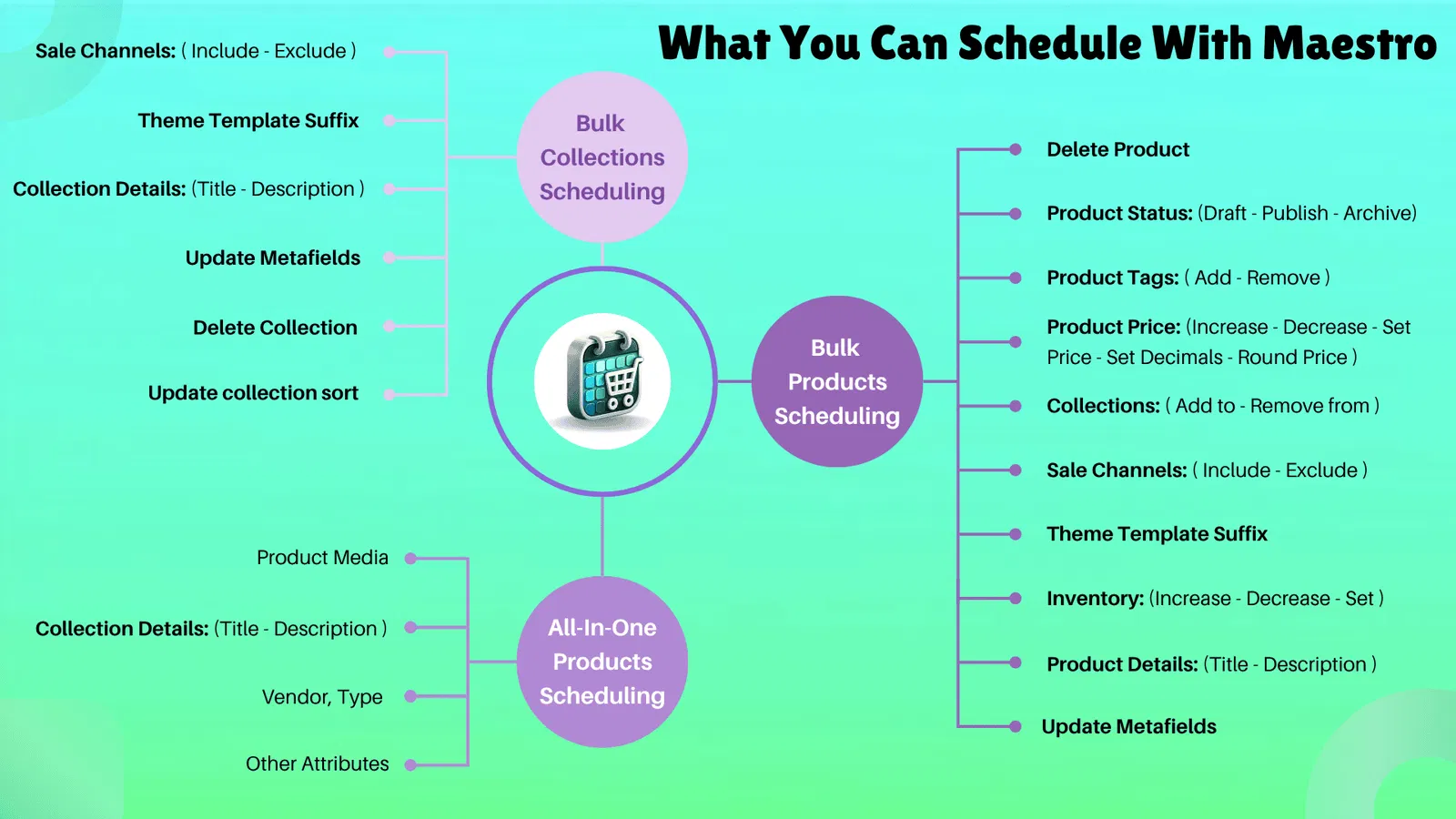
Automated Tag Management for Seasonal Sales
Tags are the invisible threads that hold your Shopify store together. They power your filters, your automated collections, and often your third-party marketing integrations. However, manual tagging is prone to human error. A typo in a "Summer-Sale" tag can mean a product never shows up in the discounted section, directly hurting your conversion rate optimization.
With the Product Scheduler by Maestro, tag management becomes a "set it and forget it" task. You can schedule tags to be added or removed based on specific dates.
Consider a Black Friday scenario:
- Step 1: Schedule the "BFCM" tag to be added to your selected products at 12:00 AM on Friday.
- Step 2: Your automated collections, which are set to look for the "BFCM" tag, instantly populate with the correct items.
- Step 3: Schedule the removal of that tag for Monday at 11:59 PM.
By automating this, you ensure that your store remains organized without you needing to lift a finger during the busiest shopping days of the year. This consistency is a hallmark of professional ecommerce maintenance services.

Scheduling Price Changes and Rounding Rules
Pricing is one of the most powerful levers for conversion rate optimization. But managing it at scale is a nightmare. If you want to run a 20 percent discount across 500 SKUs, doing it manually is out of the question. Even using Shopify's bulk editor can be risky if you don't have a clear plan to revert those prices.
The Maestro app allows you to schedule price changes with surgical precision. But the real "secret sauce" is the rounding rules.
Why do rounding rules matter?
- Psychological Pricing: A price of $19.99 often converts better than $20.00.
- Brand Consistency: If your brand always uses ".95" endings, an automated 20 percent discount might result in messy numbers like $17.43.
- Automation: Maestro can automatically round your calculated sale prices to the nearest .99, .95, or any rule you define.
When you combine scheduled price drops with automated rounding, you maintain a professional, polished storefront that builds trust and boosts sales. You can even show discount info more effectively when your pricing logic is consistent.
Inventory Automation and Restock Management
Nothing kills a conversion rate faster than a customer landing on a product page only to find it is out of stock. Conversely, having a "New Arrivals" section filled with sold-out items makes your store look neglected.
Product Scheduler handles the heavy lifting of inventory visibility. You can set rules to:
- Hide Out-of-Stock: Automatically move products to a hidden status or remove them from specific collections when inventory hits zero.
- Auto-Publish Restocks: As soon as your warehouse updates inventory levels, the app can flip the product back to "Active" and add a "Restocked" tag to grab attention.
This ensures that your Shopify store setup is always presenting the most purchase-ready items to your visitors. It is a proactive step toward a better user experience and higher revenue.

Managing Collection Visibility and Sorting
Your homepage and collection pages are your digital storefront windows. In a physical store, you wouldn't leave a heavy winter coat display up in the middle of July. In ecommerce, we often do exactly that because changing collection layouts is time-consuming.
Maestro allows you to schedule collection visibility. This means you can:
- Time-Box Collections: Create a "Weekend Flash Sale" collection that only exists on the site from Saturday morning to Sunday night.
- Automate Sorting: Change the "Sort Order" of a collection based on a schedule. Perhaps you want to show high-margin items during high-traffic periods and clear-out items during the end-of-month slow period.
- Control Layouts: Use Maestro Theme Scheduler features to show or hide specific sections of your site that correspond with your product launches.
This level of control allows you to run a highly dynamic store that feels fresh to returning customers, which is a key component of increasing brand loyalty and lifetime value.

Why Automation is the Vital Step for Your Growth
As a Shopify expert, I have seen the difference between merchants who work in their business and those who work on their business. Those who work in it are the ones manually updating prices at 2 AM. Those who work on it are using tools like Maestro to automate the mundane, allowing them to focus on high-level growth.
By implementing the Product Scheduler, you are essentially hiring a 24/7 digital assistant who never sleeps, never makes a typo, and always follows your instructions to the letter.
Here are the primary benefits of making this switch:
- Reduced Human Error: No more broken links, incorrect prices, or missing tags.
- Time Savings: Reclaim hours of your week that were previously spent on administrative tasks.
- Better Scaling: Manage thousands of products as easily as you manage ten.
- Improved UX: A store that is always up-to-date and accurately reflects current inventory and promotions.
Final Thoughts on Ecommerce Maintenance
Ecommerce maintenance should not be a chore that keeps you away from your family or your strategic planning. It should be a streamlined, automated process that happens in the background. Whether you are just starting your Shopify store setup or you are looking to optimize an existing high-volume store, automation is the key.
The Product Scheduler by Maestro app is not just a utility; it is a fundamental shift in how you manage your online presence. It allows you to be proactive rather than reactive. Instead of putting out fires, you are lighting sparks for new growth.
If you are ready to stop being a slave to your admin panel and start running a truly "hands-off" store, it is time to integrate these tools into your workflow. Your conversion rate, and your sanity, will thank you.
Ready to take your store to the next level? Explore how our ecommerce maintenance services can help you implement these automations, or boost your store's UX with a professional audit today. Let's make your Shopify store work for you, not the other way around.