
As a Shopify expert, I often work with high growth merchants who have mastered their domestic market but feel stuck when it comes to international expansion. They are seeking a way to reach customers in London, Tokyo, or Paris without the paralyzing fear of tax non compliance, customs delays, or fraudulent cross border transactions. The complexity of global commerce is the primary reason many brands hesitate to scale.
However, the introduction of Shopify Markets Pro has fundamentally changed the landscape for e-commerce businesses. It is not just a tool for currency conversion; it is a full stack solution that handles the heavy lifting of international logistics and legalities. In this guide, I will break down everything you need to know to leverage Markets Pro and turn your store into a global powerhouse.
Why International Expansion Stalls for High Growth Brands
Before we dive into the solution, it is vital to identify the problems most merchants face. Selling internationally is not as simple as enabling a new shipping zone. High growth brands often struggle with several key barriers:
- Regulatory Compliance: Navigating the specific import laws and tax requirements of over 150 countries is a full time job.
- Hidden Costs: Customers hate "surprise" fees. If a shopper in Germany has to pay unexpected duties at the door, your brand reputation will suffer.
- Fraud Risk: International orders often carry a higher risk of chargebacks and fraudulent activity, which can drain your margins.
- Currency Volatility: Fluctuating exchange rates can lead to inconsistent pricing and unexpected losses during the settlement period.
By identifying these hurdles early, you can see why a comprehensive tool like Markets Pro is a game changer. It moves beyond simple localization and enters the realm of complete operational management.

Understanding Shopify Markets Pro: The Merchant of Record Advantage
The defining feature of Shopify Markets Pro is its "Merchant of Record" (MoR) model. When you use Markets Pro, Shopify (in partnership with Global-e) becomes the legal entity responsible for selling your products to the end customer in international territories.
This distinction is crucial for several reasons:
- Tax Remittance: Shopify handles the filing and payment of VAT, GST, and other local taxes on your behalf.
- Legal Liability: Because Shopify is the MoR, they take on the legal responsibility for ensuring the sale complies with local regulations.
- Financial Protection: You are shielded from the complexities of foreign bank accounts and local tax registrations.
For many of our clients at XCO Agency, this feature alone justifies the switch. It allows you to focus on marketing and product development while the platform manages the bureaucratic nightmare of global trade.
Core Features That Power Your Global Strategy
Shopify Markets Pro offers a suite of features designed to provide a seamless experience for both the merchant and the customer. To truly optimize your store, you must understand how to use these tools effectively.
Automatic Duty and Tax Calculation
One of the most significant causes of cart abandonment in international shipping is the uncertainty of landed costs. Markets Pro automatically calculates duties and import taxes at checkout. This ensures that the price the customer sees is the final price they pay.
Guaranteed Fraud Protection
Cross border fraud can be sophisticated and difficult to track. Markets Pro includes enhanced security measures that protect you against fraudulent orders. If an order is approved by the system and later turns out to be fraudulent, Shopify covers the cost. This level of security is essential for maintaining a healthy bottom line while exploring new regions.
Localized Payment Methods
Different regions have different payment preferences. While credit cards are standard in the US, customers in the Netherlands may prefer iDEAL, while those in Brazil look for Pix. Markets Pro automatically integrates the most relevant local payment methods for each market, which can boost your store's UX and conversion rate significantly.
Expedited Global Shipping
Markets Pro provides access to exclusive, pre negotiated rates with carriers like DHL Express. This allows you to offer 1 to 5 day shipping worldwide. Fast shipping is no longer a luxury; it is a customer expectation that directly impacts your brand loyalty.

Markets vs. Markets Pro: Which One Is Right for You?
It is important to distinguish between the standard Shopify Markets and Markets Pro. While both help with international sales, they serve different needs.
- Shopify Markets: This is a self managed solution. It provides the tools for currency conversion and language translation, but you remain the Merchant of Record. You are responsible for tax registration, remittance, and compliance.
- Shopify Markets Pro: This is a managed solution. It includes everything in Markets plus the MoR service, guaranteed fraud protection, and pre paid duties.
If you are just starting to test a single foreign market, standard Markets might suffice. However, if you are looking to scale rapidly across dozens of countries without hiring a dedicated international tax team, Markets Pro is the superior choice.
How to Set Up Shopify Markets Pro: A Step-by-Step Process
Transitioning to Markets Pro is a straightforward process, but it requires careful attention to detail to ensure your catalog and shipping settings are optimized. Here are the steps to get started:
Step 1: Verify Your Eligibility
Before you can activate Markets Pro, ensure your store meets the basic requirements. Your business must be based in an approved region (currently primarily the US, with expansions ongoing) and you must be using Shopify Payments.
Step 2: Navigate to Market Settings
Go to your Shopify Admin, select "Settings," and then "Markets." From here, you will see an option to upgrade to Markets Pro. Click "Manage" to begin the application process.
Step 3: Review Your Product Catalog
Markets Pro will automatically scan your catalog to identify products that may be restricted in certain countries. For example, some supplements or materials may be prohibited in specific regions. Ensure your product descriptions are accurate so the automated system can categorize them correctly.
Step 4: Configure Shipping and Labels
Once activated, you will need to use the shipping labels provided by Markets Pro to ensure duties are handled correctly. You should also perfectly set up your domain for each market, using subfolders (e.g., yourstore.com/en-gb) to improve local SEO.
Step 5: Test the Checkout Experience
Always perform a test order for a specific international market. Verify that the currency displays correctly, duties are calculated at checkout, and local payment methods are visible.
Optimizing Your Global Store with XCO Agency Solutions
At XCO Agency, we believe that technology should work for you, not the other way around. While Markets Pro handles the logistics, you still need to manage the timing and presentation of your global store.
Synchronized Global Launches
If you are running a global sale or a new product drop, timing is everything. Using the Maestro Products Scheduler, you can ensure that new products go live at the exact right moment for each time zone. You do not want to launch a product at 3 AM in London just because it is 10 PM in New York.

Localized Theme Adjustments
Your website should feel local to every visitor. This means more than just translating text. You might want to show different promotional banners for Lunar New Year in Singapore versus a winter sale in Canada. With the Maestro Theme Scheduler, you can automate these theme changes so your store always reflects the local context of your shoppers.
Managing International Claims
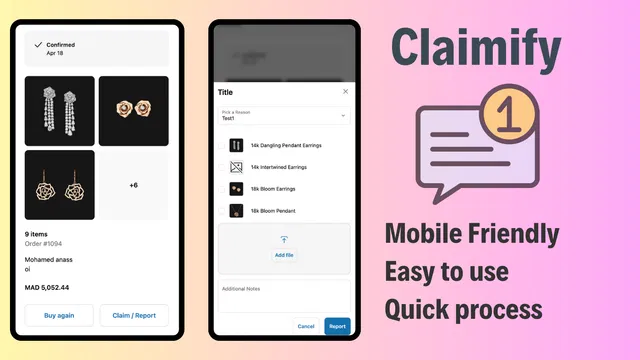
Returns and shipping issues are inevitable when selling globally. Handling these manually for international orders can be a nightmare. We recommend integrating Claimify to streamline the claims process. It provides a user friendly interface for customers to report issues, which is vital for maintaining trust in a foreign market.
Best Practices for International Conversion
To get the most out of Markets Pro, you should implement these strategic adjustments to your storefront:
- Language Localization: Use a high quality translation app or service to ensure your copy is culturally relevant.
- Trust Signals: Ensure your international shipping policy is clear and easy to find. Mentioning "No hidden fees" or "All duties included" can drastically reduce checkout friction.
- Local SEO: Ensure your Google Tag Manager setup is tracking events correctly across all subfolders so you can see which regions are performing best.
- Compliance Checkboxes: In some regions, you may need to show an 'I agree with terms & conditions' checkbox on the cart page to meet local legal standards.
The Future of Your Brand is Global
Scaling internationally used to be a privilege reserved for massive corporations with huge legal departments. Today, Shopify Markets Pro has leveled the playing field, allowing boutique brands and high growth startups to compete on a global stage.
By removing the barriers of tax compliance, fraud, and logistics, Markets Pro allows you to focus on what you do best: building a brand that customers love, no matter where they live. Taking this step is a vital move for any merchant looking to future proof their business.
As you begin this journey, remember that tools are only as effective as the strategy behind them. If you need assistance configuring your global store or want to automate your expansion with our suite of Maestro apps, reach out to us.

Are you ready to take your Shopify store to the global market? Contact XCO Agency today to learn how we can help you optimize your international strategy and implement the tools you need for worldwide success.