
As a Shopify expert, I often speak with merchants who are drowning in customer support tickets. One of the most persistent and draining issues for growing brands is the manual management of gift card inquiries. Customers lose their original email, forget their remaining balance, or simply want to know if their card is still active. Without a self-service option, every one of these questions ends up in your support inbox, taking away valuable time from your team.
If you are seeking a way to streamline your operations and improve the customer experience, the solution is simpler than you might think. By empowering your customers to check their own balances, you can significantly reduce your support overhead while building trust. In this guide, I will show you how to leverage the Gift Card Checker by Maestro to turn a common friction point into a seamless part of your shopping experience.
The Hidden Cost of Manual Gift Card Support
Managing gift cards manually is more than just a minor inconvenience. It represents a significant bottleneck in your ecommerce maintenance services. When a customer has to wait hours or even days for a support agent to respond with a simple balance number, their momentum to purchase is lost.
- Increased Support Costs: Every ticket has a price tag in terms of staff time and resources.
- Customer Friction: Forcing a customer to contact support for basic information creates a barrier to conversion.
- Resource Misallocation: Your skilled support team should be solving complex issues, not looking up gift card codes.
- Missed Revenue: A customer who cannot quickly check their balance may abandon their cart and head to a competitor.
Implementing a self-service tool is a vital step in optimizing your Shopify store setup. It moves the burden of information retrieval from your team to the customer, where it can be handled instantly.

Introducing Gift Card Checker by Maestro
The Gift Card Checker by Maestro is designed specifically to solve the balance inquiry dilemma. It provides a dedicated widget that can be placed anywhere on your store, allowing customers to enter the last four digits of their gift card and see their balance in real time.
Here are the key advantages of integrating this tool into your workflow:
- Self-Service Empowerment: Customers get instant answers without needing to reach out to your team.
- One-Click Integration: The setup process is designed to be fast and intuitive, requiring no complex coding.
- Branded Consistency: The widget can be customized to match your store’s unique aesthetic.
- Enhanced Reliability: Built for Shopify Plus and high-volume stores, ensuring it works perfectly even during peak sales seasons.
By providing this transparency, you are not just reducing tickets; you are fostering a sense of reliability and professionalism that keeps customers coming back.
How to Reduce Inquiries in 4 Simple Steps
Setting up a self-service gift card portal does not have to be a daunting task. The Gift Card Checker by Maestro is built for speed and ease of use. Once you have the app installed, follow these steps to go live.
Step 1: Install and Activate the App
Navigate to the Shopify App Store and search for Gift Card Checker by Maestro. Click the install button and approve the permissions. The app is designed to integrate deeply with your Shopify admin, ensuring that it has secure access to the necessary gift card data without compromising your customers' privacy.
Step 2: Configure Your Admin Settings
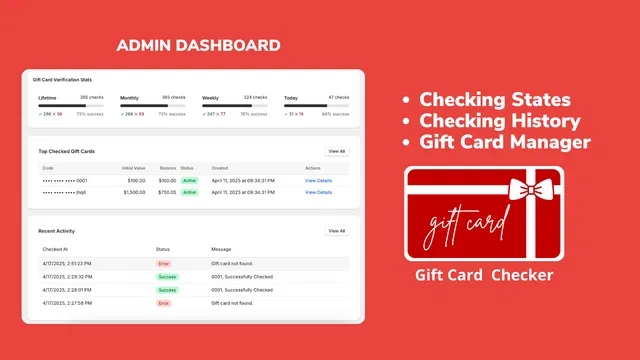
Open the app dashboard to view your verification stats and management tools. You will see a clean interface that highlights recent activity and top checked gift cards.
- Ensure that the "Check Status" feature is enabled.
- Review the "Checking History" to understand how your customers are interacting with the tool.
- Verify that your Shopify integrations are functioning correctly.
Step 3: Embed the Checker Widget
The true power of this tool lies in its placement. You want the checker to be easily accessible but not intrusive.
- Navigate to your theme editor.
- Select the page where you want the widget to appear (usually the FAQ page or a dedicated Gift Card page).
- Add the Gift Card Checker block to your desired section.
- Save your changes to push the widget live to your storefront.
Step 4: Customize the User Interface
A tool that looks out of place can erode trust. Use the customization settings to align the widget with your brand.
- Adjust the colors to match your primary and secondary brand palettes.
- Update the button text to match your brand's voice (e.g., "Check My Balance" vs "Verify Card").
- Ensure the layout is responsive, as many customers will be checking their balances via mobile devices while on the go.

Maintaining Brand Consistency with Custom Design
As a Shopify Plus Partner, we understand that every touchpoint in the customer journey is an opportunity to reinforce your brand. The Gift Card Checker widget is not a generic "one size fits all" box. It is a highly flexible component that can be tailored to look like a native part of your theme.
When your balance checker looks professional and matches your site’s design, it provides a sense of security to the customer. They feel confident entering their card details because the interface looks official and trustworthy. This attention to detail is what separates a standard online store from a premium brand experience.
If you need help with a more complex migration to Shopify or advanced theme customization, our team is always ready to assist. We focus on creating high-performing stores that prioritize both aesthetics and functionality.
Fostering Loyalty and Repeat Purchases
The benefits of a gift card checker go far beyond just saving time for your support team. When a customer checks their balance and realizes they have 25 dollars left on a card, they are much more likely to start browsing your catalog.
- Re-Engaging Dormant Customers: A balance check often serves as the first step in a new shopping session.
- Reduced Friction at Checkout: Knowing the balance beforehand prevents "insufficient funds" errors at the final stage of purchase.
- Increased Gift Card Sales: When buyers see that your store has a professional system for managing cards, they feel more comfortable purchasing them for friends and family.
By making it easy for customers to use their gift cards, you are effectively increasing your store's velocity. It is a simple form of app automation that pays dividends in customer satisfaction and retained revenue.

Conclusion: Take the Proactive Step Toward Better Support
Reducing your support ticket volume is a vital step in scaling your e-commerce business. By implementing a self-service gift card balance checker, you address a major pain point for both your team and your customers. This small change leads to a significant increase in efficiency and a much smoother shopping experience.
The Gift Card Checker by Maestro offers a combination of ease of use, professional design, and powerful automation. It is a proactive step that every serious merchant should consider as part of their ecommerce maintenance services strategy.
Stop letting manual inquiries slow down your growth. Empower your customers, free up your support team, and keep your brand momentum moving forward. If you are ready to optimize your Shopify store for better performance, I encourage you to explore our suite of Maestro tools or reach out to our team for a personalized consultation.
Ready to transform your customer experience? Book a meeting with our Shopify experts today to see how we can help you scale.