
As a Shopify expert, I often see merchants treat their customer support inbox like a digital junk drawer. It starts innocently enough with a few return requests, but before you know it, your team is drowning in a sea of unorganized emails, blurry photos of damaged goods, and frantic follow-ups from customers wondering where their refund is. If your current strategy for handling warranty claims or exchanges involves digging through a Gmail thread from three weeks ago, you are not just losing time; you are losing money and customer loyalty.
In the world of high-growth brands, managing these post-purchase hiccups is a critical part of ecommerce maintenance services. When you scale to a certain level, manual labor becomes a bottleneck. Merchants seeking enterprise ecommerce solutions need systems that work while they sleep. That is where a dedicated claims management system changes the game.
By moving your support requests from a chaotic inbox to a unified dashboard, you create a professional, reliable experience that keeps customers coming back. Here is why streamlining your claims process is the most productive thing you can do for your Shopify store today:
- Centralized Data: Stop hunting for order numbers across multiple platforms.
- Reduced Human Error: Automated validation ensures you never refund the wrong amount or accept an expired warranty.
- Faster Turnaround: Rapid processing means happier customers and better reviews.
- Scalability: A system that handles ten claims a day can just as easily handle a thousand.
The Inbox Monster: Why Manual Support is Killing Your Growth
I often work with brands that have beautiful storefronts and incredible marketing, but their "back of house" operations are held together by duct tape and hope. When a customer wants to file a claim, they usually have to find your contact page, write an email, attach photos, and then wait for a human to read it.
This manual process is a recipe for disaster. Emails get flagged as spam. Staff members accidentally delete threads. Most importantly, there is no "source of truth" for the status of a claim. If a customer calls in, your support agent has to spend five minutes just trying to figure out who they are talking to. For businesses investing in enterprise ecommerce solutions, this level of friction is unacceptable.
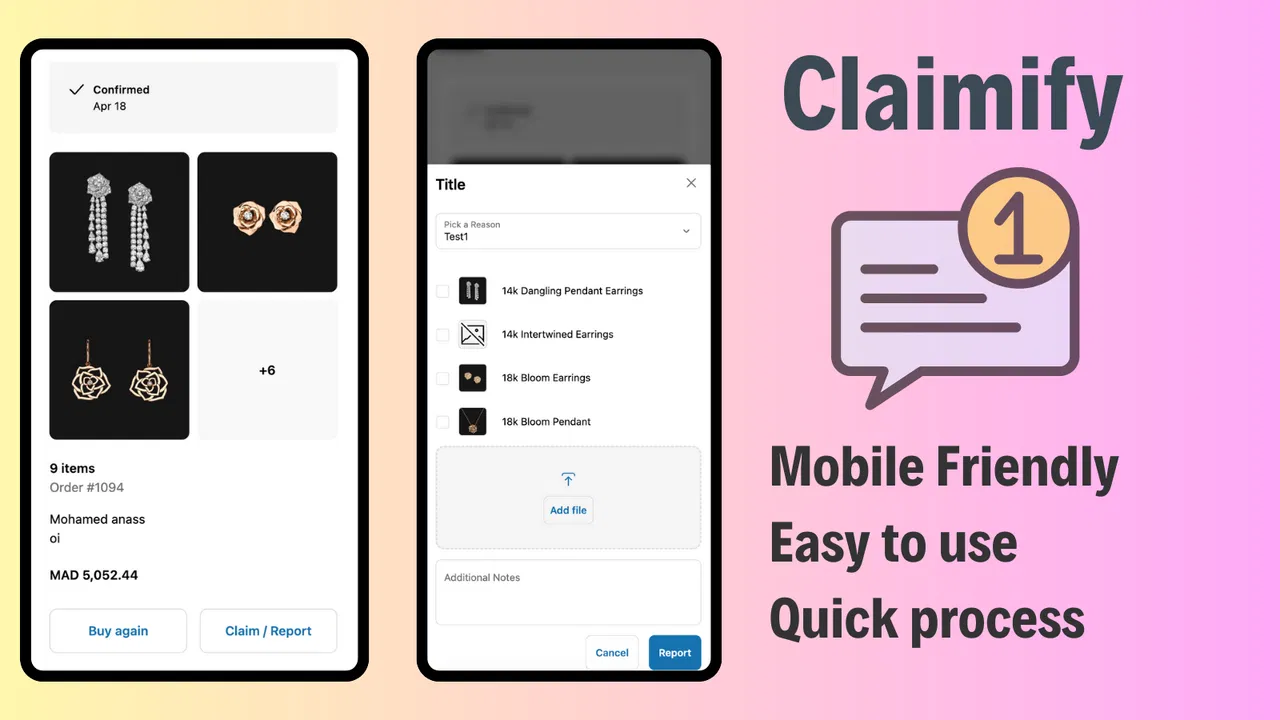
When you transition to a tool like Claimify, you essentially shut the door on the inbox monster. Instead of a messy email, the customer interacts with a structured portal. This not only looks more professional but also forces the collection of all necessary data upfront. No more back-and-forth asking for order numbers or clearer photos of a broken zipper.
Transforming the Post-Purchase Experience
The period after a customer clicks "buy" is the most sensitive part of the journey. If they receive a damaged item or the wrong size, they are already feeling a bit of "buyer's remorse." How you handle that moment determines whether they become a lifelong fan or a vocal critic.
A streamlined claims process is a form of proactive customer service. By offering a self-service portal directly on your storefront or thank-you page, you empower the customer. They do not have to "ask" for permission to start a return; they simply initiate the process.
Benefits of Self-Service Portals
- 24/7 Availability: Customers can file a claim at 2 AM without waiting for your office to open.
- Instant Confirmation: They receive an immediate notification that their claim has been received.
- Visual Transparency: Customers can see exactly what stage their claim is in, reducing "where is my refund" inquiries.
If you want to dive deeper into how this fits into your overall growth, checking out our growth strategies can provide a broader roadmap for your business.
The Power of Automated Validation Rules
One of the biggest time-wasters in support is checking eligibility. Is this product still under warranty? Did they buy it more than 30 days ago? Is this a final sale item?
When you use an intelligent claims app, you can bake these rules directly into the system. As a Shopify expert, I recommend setting up strict validation rules to act as your first line of defense. If a customer tries to return an item that was marked as "non-refundable," the system can politely inform them before they even submit the request.

This automation does not just save time; it protects your bottom line. It prevents "friendly fraud" and ensures that your return policy is applied consistently across every single transaction. This is a core component of professional ecommerce maintenance services, ensuring that your business logic is enforced without manual oversight.
Step-by-Step: Moving to a Unified Dashboard
Ready to ditch the messy inbox? Here is how to transition your Shopify store to a streamlined support system.
Step 1: Connect Your Data
Install your claims management app and sync it with your Shopify backend. This allows the system to pull order history, customer details, and product information automatically. You can explore various Shopify integrations to see how this fits with your existing tech stack.
Step 2: Define Your Claim Types
Not all claims are created equal. You need to categorize them so they can be routed correctly:
- Returns: Standard "changed my mind" scenarios.
- Exchanges: Swapping for a different size or color.
- Warranty Claims: Reporting a defect after the standard return window.
- Refunds: Direct money back for shipping errors or damaged goods.
Step 3: Configure the Portal Design
Ensure your claims portal matches your brand's aesthetic. A jarring, third-party looking page will make customers nervous. Use your brand colors, fonts, and tone of voice. If you need help with the visual aspect, our Shopify design services can help bridge that gap.
Step 4: Set Up Validation and Automation
Input your return windows and warranty periods. Decide which claims require manual approval and which can be auto-approved. For example, you might auto-approve all exchange requests for clothing items but require a manual review for high-value warranty claims.
Step 5: Redirect Your Support Traffic
Once the system is live, update your "Contact Us" and "Returns" pages. Instead of an email address, provide a clear button that says "Start a Claim." This funnels all traffic into your new, organized dashboard.

Integrating Claims into Your Broader Strategy
Managing claims is just one piece of the puzzle. To truly run a high-performance store, you need to look at all your operational workflows. For example, while you are automating your support, you should also look into how you schedule your store updates and seasonal changes.
Using tools for bulk scheduling can complement your claims automation by ensuring your site content remains updated without manual intervention. This holistic approach to ecommerce maintenance services is what separates the hobbyists from the enterprise-level players.

Why This Matters for Enterprise Ecommerce Solutions
At the enterprise level, efficiency is everything. Every minute a support agent spends looking for an order is a minute they aren't solving a complex customer problem or helping close a sale. By implementing a unified dashboard for claims, you are investing in the long-term health of your company.
A streamlined system provides you with something an inbox never can: data. You can start to see patterns. Are customers consistently claiming that a specific SKU is arriving damaged? Maybe it is time to look at your packaging. Are there a high number of exchanges for a particular dress? Perhaps the sizing chart is inaccurate. This insight is vital for making informed business decisions.
For more information on handling complex setups, you might find our page on Shopify B2B and wholesale channels useful, as these segments often have even more rigorous claim requirements.
Take Control of Your Support Today
Stop letting a messy inbox dictate the pace of your business. Transitioning to a unified claims dashboard is a vital step toward professionalizing your operations and scaling your store. It reduces the stress on your team, provides a superior experience for your customers, and gives you the data you need to grow.
As a Shopify expert, I can tell you that the most successful merchants are the ones who obsess over these "unsexy" backend processes. They know that a smooth return is just as important as a smooth checkout.
If you are ready to stop wasting time and start optimizing your support flow, it might be time to look at your overall store health. Whether you need help with technical setup or a complete migration to Shopify, we are here to guide you.
Ready to streamline your operations? Book a meeting with our team to discuss how we can implement professional ecommerce maintenance services and enterprise ecommerce solutions for your brand. Let's get your inbox under control and your customers back to shopping.