
As a Shopify expert, I often work with high-volume merchants who find themselves buried under a mountain of repetitive support tickets. One of the most common, yet avoidable, inquiries is the dreaded question: "What is my gift card balance?"
While gift cards are a fantastic tool for driving revenue and customer loyalty, the administrative overhead of managing balance inquiries can quickly drain your team's productivity. Merchants seeking a more streamlined approach often overlook how a simple self-service tool can revolutionize their workflow. By empowering customers to check their own balances, you reclaim hours of support time and provide a significantly better shopping experience.
In this post, I will show you how to eliminate manual gift card checks using a simple 1-click hack that integrates directly into your store. Whether you are in the middle of a new shopify store setup or looking to optimize your existing ecommerce maintenance services, this solution is a game-changer.
The Hidden Cost of Manual Gift Card Support
Every minute your support team spends looking up a gift card code in the Shopify admin is a minute they are not spending on closing high-value sales or resolving complex customer issues. When you multiply those minutes by dozens of inquiries per week, the cost becomes clear.
Why Manual Checks Slow Down Your Growth
The "What is my balance?" support loop is a silent killer of efficiency for several reasons:
- Delayed Gratification: Customers want to shop now. If they have to wait 24 hours for a support reply to know if they have $10 or $50 to spend, they might abandon their cart entirely.
- Operational Friction: Your team has to navigate to the "Products" section, then "Gift Cards," search for the customer, and relay the info. It is a tedious, multi-step process for a very simple request.
- Brand Perception: In the age of instant information, a brand that requires a manual email to check a balance feels outdated.
Providing a seamless self-service option is not just about saving time; it is about meeting modern consumer expectations. If you are investing in growth strategies, removing friction at the point of purchase should be a top priority.
Introducing the 1-Click Self-Service Solution
The most effective way to handle this issue is to move the balance check from your inbox to your storefront. This is where the Gift Card Checker By Maestro comes into play. It is designed specifically to handle the "activation" and "verification" burden that usually falls on the merchant.

Meet Gift Card Checker By Maestro
As part of our commitment to providing top-tier ecommerce maintenance services, we often recommend tools that automate repetitive tasks. This app provides a customizable widget that lives on your store, allowing customers to enter their code and instantly see their remaining balance.
Here is why it is the go-to choice for Shopify Plus merchants:
- Instant Verification: Customers get the information they need in seconds.
- Reduced Support Volume: It can eliminate up to 90% of gift card-related support inquiries.
- Seamless Integration: It works with your existing Shopify gift card system without requiring a complex migration.
How to Power-Up Your Shopify Store Setup
Integrating a self-service balance checker is one of the easiest wins you can implement during a shopify store setup. You do not need to be a developer to get this running.
Step 1: Quick Installation
The setup is designed to be a "1-click" experience. Once the app is added to your store, it automatically recognizes your theme structure.
- Select your placement: Decide whether you want the checker on a dedicated page, in the footer, or within the customer account section.
- Enable the widget: Toggle the visibility to "On" to make it live for your customers.
Step 2: Brand-Consistent Customization
One of the biggest concerns for merchants is maintaining a professional look. You do not want a third-party widget that looks like a sore thumb on your beautifully designed site.
- Adjust Colors and Fonts: Match the buttons and text to your brand's style guide.
- Custom Labels: Change the wording to match your brand's voice, whether you prefer "Check Balance," "View Funds," or "Gift Card Portal."
- Responsive Design: Ensure the checker looks perfect on mobile, where the majority of gift card users will likely be checking their codes while on the go.
Step 3: Deployment and Testing
After customizing the look, you can preview the widget before it goes live. This ensures that the user experience is fluid. Once you are satisfied, you can link to the balance checker page from your navigational menus or include a link in your gift card delivery emails.

Fostering Loyalty and Repeat Purchases
When customers can easily see how much credit they have, they are more likely to use it. A gift card with a $15 balance often leads to a $50 purchase. By making that $15 visible and "real" to the customer through a self-service portal, you are essentially nudging them toward their next checkout.
Enhancing the Shopping Experience
A better shopping experience leads to higher retention. When you work with us on shopify speed optimization or design, we always focus on the "path to purchase."
- Remove Barriers: Don't make customers work to spend money with you.
- Increase Trust: A transparent system where customers can verify their own data builds confidence in your brand.
- Encourage Usage: Remind customers about their balance in your newsletter and provide a direct link to the checker.
Maximizing Efficiency with Ecommerce Maintenance Services
For many store owners, managing an app is just one more thing on a long to-do list. This is where proactive ecommerce maintenance services become vital. At XCO Agency, we don't just set up the tool and leave; we ensure it is optimized for your specific traffic patterns.
Why Automation is the Future of Shopify Plus
As your store grows, the "human" element of support should be reserved for building relationships, not for looking up alphanumeric codes. Automation tools like the Maestro suite allow you to scale your operations without scaling your support headcount.
- Scheduled Updates: Use tools like Maestro Theme Scheduler to align your gift card promotions with site-wide sales.
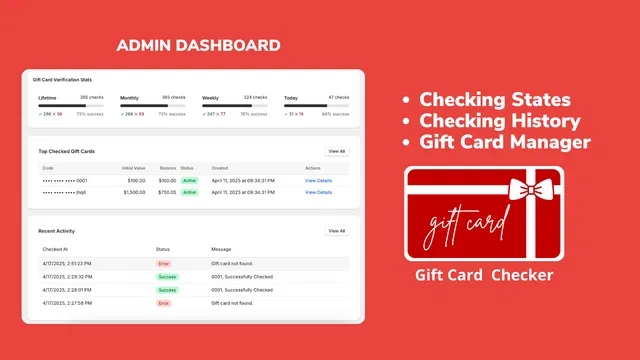
- Comprehensive Monitoring: Track how many people are using the checker to understand the ROI of the app.
- Data-Driven Decisions: See which gift cards are being checked most frequently to identify your most loyal customer segments.

A Proactive Step Toward Better Management
Stopping the waste of time on gift card support is a vital step for any growing Shopify store. By implementing a 1-click self-service hack, you solve a major pain point for both your team and your customers.
The transition from manual support to automated self-service is one of the simplest ways to optimize your store’s performance. It transforms a frustrating administrative task into a smooth, branded interaction that encourages more frequent shopping.
If you are ready to reclaim your time and enhance your store’s user experience, it is time to look at your gift card workflow. Whether you need help with a fresh shopify store setup or ongoing maintenance, our team is here to help you navigate the best tools for the job.
Ready to Optimize Your Store?
Don't let manual tasks hold your business back. If you want to explore more ways to automate your Shopify store or need a professional team to handle your shopify integrations, we are ready to chat.
Book a meeting with us today to discuss how we can streamline your operations and help you scale faster. You can also explore our full range of services to see how we support Shopify Plus merchants in achieving their growth goals.