
As a Shopify expert, I often encounter store owners who are looking for ways to streamline their operations. One of the most frequent complaints I hear involves the repetitive nature of customer support. Merchants spend hours every week answering the same question: "How much money is left on my gift card?"
If you are running a growing brand, you already know that time is your most valuable asset. Every minute your team spends looking up a balance in the Shopify admin is a minute they are not spent closing sales or improving your shopify store setup. While gift cards are a fantastic tool for driving revenue and customer acquisition, the native Shopify experience leaves a significant gap when it comes to customer self-service.
In this post, I will show you how to eliminate these inquiries forever using a simple, professional self-service hack. By implementing the Gift Card Checker By Maestro, you can provide a seamless experience that keeps customers happy and your support inbox empty.
The Hidden Cost of Manual Gift Card Support
When you first start your e-commerce journey, handling a few emails a day seems manageable. However, as you scale, these small tasks accumulate into a massive administrative burden. Manual balance inquiries are more than just a nuisance. They represent a friction point in the customer journey that can actually prevent sales.
Consider the typical workflow for a customer who wants to use a gift card they received months ago. They visit your store, find something they love, and then realize they do not know their balance. Since there is no "check balance" button on your site, they have to navigate to your contact page, send an email, and wait for a response. By the time your team gets back to them, the impulse to buy has often faded.
Here are a few reasons why manual checks are detrimental to your business:
- Increased Support Overhead: Paying staff to perform tasks that could be automated is a drain on your margins.
- Reduced Conversion Rates: Any delay in the checkout process gives the customer a reason to second guess their purchase.
- Poor Customer UX: In a world of instant gratification, customers expect to find information themselves without waiting for a human agent.
- Scalability Issues: What works for 10 gift cards a month will not work for 1,000.
Why Shopify Store Owners Are Seeking Better Solutions
Standard retail practice across the globe includes self-service balance checks. Think of any major retailer like Starbucks or Amazon. They do not ask you to email support to see your credit. They provide a clear portal.
Currently, Shopify lacks a built-in, customer-facing balance check widget. This has led many merchants to try creative but clunky workarounds. Some suggest a dummy product method where customers add a 10,000 dollar item to their cart and apply the gift card to see the remaining balance. As a Shopify expert, I strongly advise against this. It is confusing, looks unprofessional, and can mess up your analytics.
Other merchants rely on checking balances manually within the Shopify Admin under Products and then Gift Cards. While this works for the merchant, it does nothing to empower the customer. This is why ecommerce maintenance services often recommend third-party apps to bridge the gap.

Introducing Gift Card Checker By Maestro: The Self-Service Revolution
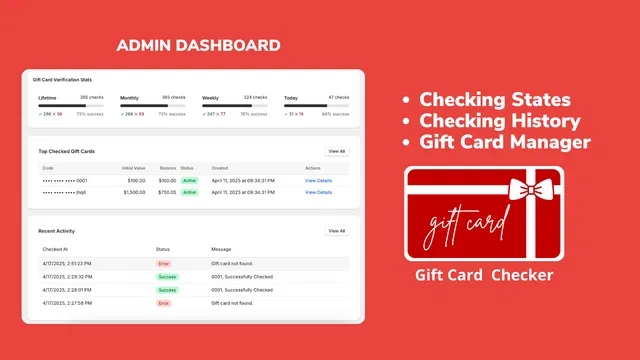
The most effective way to solve this problem is to install a dedicated widget that allows customers to check their own balance. The Gift Card Checker By Maestro is designed specifically for this purpose. It provides a simple, clean, and reliable interface that integrates directly with your Shopify store.
The primary benefit of this tool is that it shifts the responsibility of information retrieval from your staff to the customer. It creates a win-win scenario: the customer gets an instant answer, and your team is freed up to focus on high-value tasks.
Key Features of the Maestro Solution
- One-Click Setup: You do not need to be a developer to get this running. It integrates into your theme with minimal effort.
- Real-Time Data: The app pulls directly from your Shopify backend, ensuring the balance shown is always 100 percent accurate.
- Customizable Design: You can adjust the look and feel of the widget to match your brand colors and typography, maintaining a professional appearance.
- Mobile Optimization: Since most shoppers are on their phones, the checker is fully responsive and easy to use on any device.
How This Hack Optimizes Your Shopify Store Setup
When we talk about shopify store setup, we often focus on the visual layout or the product descriptions. However, the technical infrastructure that supports the customer experience is just as important. Adding a self-service gift card portal is a vital step in maturing your store.
By adding this functionality, you are signaling to your customers that you value their time. It also helps with ecommerce maintenance services by reducing the volume of "low-value" tickets that your support team has to manage.

Step-by-Step: Setting Up Your Balance Checker
Setting up a self-service portal should not be a daunting task. Here are the simple steps to get the Gift Card Checker By Maestro working on your site:
- Install the App: Navigate to the Shopify App Store and search for Gift Card Checker By Maestro.
- Enable the Widget: Once installed, go to the app dashboard and toggle the "Enable" button.
- Customize the Appearance: Select colors, fonts, and button styles that align with your existing theme. Consistency is key for brand authenticity. You can even learn more about brand consistency in our guide on how to add a custom font to your store.
- Choose the Placement: You can embed the checker on a dedicated "Gift Card" page or include it in your footer menu. I recommend putting a link in the footer so it is accessible from every page.
- Test the Functionality: Use a test gift card to ensure the balance displays correctly and the user interface is intuitive.
Once your setup is complete, you will notice an immediate drop in support tickets related to gift card balances.
Strengthening Brand Loyalty Through Better UX
A better shopping experience naturally leads to increased loyalty. When a customer knows exactly how much they have to spend, they are more likely to return to your store to use that balance.
Gift cards are often the "entry point" for new customers who received them as a gift. If their first interaction with your brand involves a frustrating search for their balance, they may not return. However, if they can easily find their balance and complete a purchase, you have successfully converted a gift recipient into a repeat customer.
You can further enhance this experience by ensuring other parts of your store are optimized for usability. For instance, you might want to enhance your website's usability by adding a favicon or ensure you open social links in a new tab to keep customers on your site longer.
Boosting Conversions with Transparency
Transparency is a powerful psychological trigger in e-commerce. When customers have all the information they need at their fingertips, they feel more confident in their purchasing decisions.
A self-service gift card checker removes the "mystery" of the checkout process. It allows customers to plan their purchase. They can see they have 25 dollars left, which might encourage them to add a 30 dollar item to their cart, knowing they only need to pay 5 dollars out of pocket. This transparency can significantly boost your average order value.
Why Branding Matters in Self-Service
Many apps offer functionality but fail on aesthetics. As a professional agency, we believe that every element of your store should feel like it belongs to your brand. The Gift Card Checker By Maestro allows for deep customization, ensuring that the widget doesn't look like a tacked-on piece of software.
You should aim for a seamless transition between your product pages and your gift card portal. Use the same brand voice in your instructions and the same color palette for your buttons. If you need help with the overall design and feel of your site, consider a conversion rate optimization audit report to identify other areas for improvement.
Conclusion: A Small Change with Big Impact
Stop wasting your time and your customers' time on manual balance inquiries. Implementing a self-service hack like the Gift Card Checker By Maestro is a proactive step that pays dividends in both time saved and customer satisfaction.
As we have discussed, a professional shopify store setup is about more than just looking good. It is about creating an efficient, automated environment where customers can help themselves. Whether you are looking to improve your ecommerce maintenance services or simply want to offer a better user experience, this tool is an essential addition to your Shopify toolkit.
By empowering your customers to check their own balances, you foster loyalty, encourage repeat purchases, and significantly reduce the strain on your support team. It is a small change that makes a world of difference for your brand's growth and reputation.
If you are ready to take your store to the next level, start by auditing your current support requests. If "gift card balance" is at the top of the list, it is time to make the switch to a self-service solution today. For more tips on optimizing your Shopify store, feel free to explore our other resources at XCO Agency.