
As a Shopify expert, I often work with merchants who struggle to keep their digital storefronts synchronized with fast-moving marketing campaigns. When you manage hundreds or thousands of SKUs, executing manual updates for seasonal drops, flash sales, and product visibility feels like running on a treadmill. Store owners are constantly seeking robust tools to streamline operations without sacrificing precision or user experience.
By leveraging intelligent product scheduler tools and advanced shopify automation, you can transform simple product labels into dynamic operational triggers. Whether you are building bespoke experiences through custom shopify themes or scaling enterprise operations with shopify plus development, mastering tag-based workflows allows your store to run smoothly around the clock.
Here are the key advantages of automating your product tag lifecycle:
- Instant Campaign Synchronization: Trigger automated collections and promotional banners the exact moment your marketing campaign goes live.
- Error-Free Execution: Eliminate human oversights like forgotten discount tags or stale seasonal labels lingering past their deadline.
- Maximized Operational Efficiency: Free your merchandising team from tedious manual data entry so they can focus on revenue-generating strategy.
- Enhanced Customer Experience: Ensure shoppers always encounter accurate product availability, pricing, and curation.
The Hidden Power of Product Tags in E-Commerce
Product tags are often treated as simple organizational housekeeping items. Many merchants use them solely to filter search results or group items in the backend admin. However, when paired with the right automation architecture, tags act as the central nervous system of your catalog.
In a modern Shopify ecosystem, tags communicate directly with automated collections, search filters, and discount scripts. When you apply a tag dynamically, you instantly update how products are displayed across your entire storefront. This capability becomes even more vital for high-volume enterprises utilizing shopify plus development frameworks, where micro-efficiencies compound into massive revenue gains.
Why Manual Tagging Holds Your Store Back
Relying on manual labor to update product tags creates severe operational bottlenecks. Consider a midnight product launch or a weekend flash sale. Coordinating your team to manually add and remove promotional tags at off-hours is inefficient and prone to delays.
Furthermore, missed updates lead to customer friction. If a sale ends at midnight but the promotional tag remains active, shoppers may encounter pricing discrepancies or confusing collection groupings. Implementing automated rules ensures your store maintains absolute precision, reinforcing brand trust and professional credibility.
Setting Up Time-Based Tag Automation with Product Scheduler by Maestro
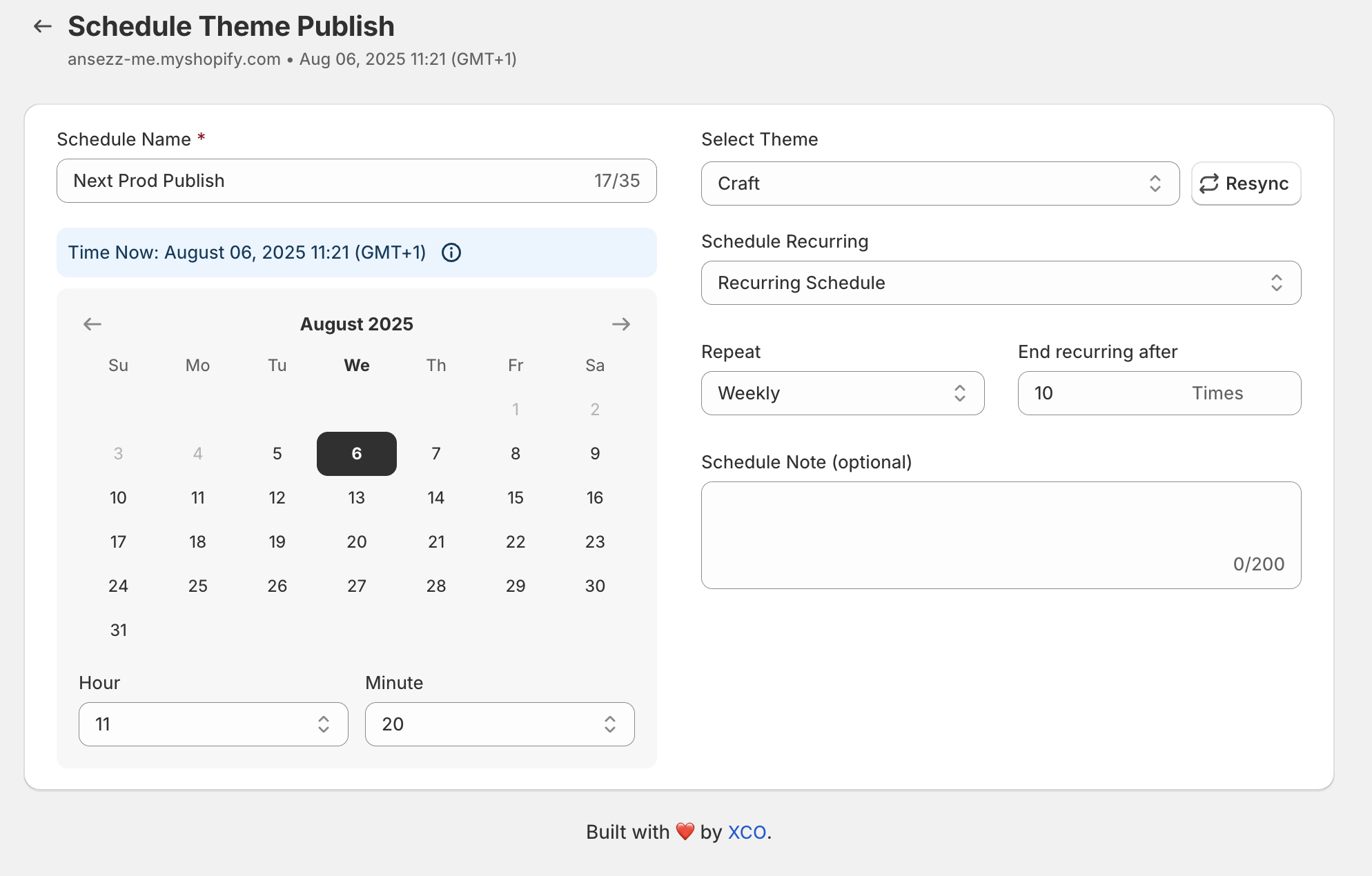
To harness the full potential of your catalog, you need a dedicated scheduling solution. The Product Scheduler by Maestro app empowers merchants to automate adding and removing product tags on a precise schedule. Here is how you can set up your first tag automation workflow in a few simple steps.
Step 1: Install and Access the App in Your Shopify Admin
- Navigate to your Shopify admin dashboard and ensure your store permissions are fully updated.
- Open the Product Scheduler by Maestro application from your installed apps list.
- Click on the primary button to create a new schedule.
- Select Product Tags as your targeted action type to begin configuring your time-based rule.
Step 2: Choose Your Target Action and Select Products
- Decide whether you want to Add Tags or Remove Tags for your specific campaign.
- Use the flexible product and collection selector to isolate the exact items you want affected by the automation.
- Search existing tags or type a brand-new tag into the input field, then click to confirm your selection.
- Ensure your selection accurately reflects the scope of your merchandising campaign before proceeding.
Step 3: Configure Date, Time, and Rollback Actions
- Select the precise calendar date and start time for your tag automation event to execute.
- Utilize the recurring schedule options if your campaign follows a weekly or monthly rotation.
- Click the built-in revert button to automatically configure the opposing action, such as removing the promotional tag once the sale concludes.
- Review your configured summary and click save to activate your workflow. Once your schedule is saved, Shopify will handle the execution automatically in the background.
Real-World Workflow Examples for High-Performing Stores
To see how tag alchemy translates into tangible results, let us examine how top brands deploy these workflows in practice.

Flash Sales and Promotional Drops
During high-traffic events like Black Friday or weekend flash sales, timing is everything. By scheduling an automated tag addition for a specific group of products, you can instantly flag items for promotional banners or special badges. When the sale window closes, the Maestro scheduler automatically strips the tags, returning your catalog to its standard state without manual intervention.
Seasonal Collection Rotations
Seasonal transitions often require massive catalog reorganizations. Instead of manually editing thousands of items, you can schedule recurring tag additions for items matching upcoming seasons. These tags feed directly into your automated collections, allowing your storefront to refresh its merchandise lineup seamlessly as the calendar turns.
Inventory and Visibility Harmonization
Pairing tag changes with inventory updates ensures your customers never see outdated merchandising. When popular items run low or restock, scheduled workflows can apply urgency tags or back-in-stock labels, driving higher conversion rates and improving overall user engagement.
Elevating Your Store with Custom Shopify Themes and Shopify Plus Development
While app automation provides incredible tactical power, true e-commerce excellence requires a cohesive foundation. Integrating automated workflows into custom shopify themes ensures that your visual design elements respond dynamically to your catalog tags. For instance, your theme can be coded to display custom callout badges or special layout treatments whenever a specific tag is active on a product.

For high-growth brands scaling on Enterprise infrastructure, professional shopify plus development guarantees that complex automation scripts, B2B wholesale channels, and high-volume traffic spikes run without latency. Partnering with experienced agencies like XCO Agency allows you to build robust, scalable architectures that align perfectly with advanced tools like Maestro. You can explore our specialized shopify design services and shopify speed optimization to ensure your store remains lightning-fast and visually stunning.
Conclusion: Embrace Proactive Automation
Transforming simple product labels into intelligent, time-based workflows represents a vital step for any merchant looking to scale efficiently. By eliminating manual bottlenecks and harnessing advanced scheduling tools, you can run flawless marketing campaigns, dynamic seasonal rotations, and automated collection updates with absolute confidence.
Taking a proactive step toward catalog automation not only saves countless hours of administrative labor but also delivers a polished, responsive shopping experience that drives long-term customer loyalty and revenue growth.