
As a Shopify expert, I often work with high-growth brands that dread the approach of Black Friday Cyber Monday (BFCM). The anxiety usually stems from a single, high-stakes moment: the clock striking midnight. Traditionally, merchants have had to stay up late, manually clicking publish on their custom shopify themes, and hoping the site doesn't break under the sudden surge of traffic. This manual approach is not only exhausting for your team but also prone to human error that can cost thousands in lost revenue.
At XCO Agency, we believe that ecommerce maintenance services should focus on growth, not just staying awake for manual deployments. Merchants are seeking a way to automate these transitions so they can focus on customer support and live marketing during their biggest sales of the year. The solution lies in a set-it-and-forget-it workflow that ensures your store transforms exactly when it needs to, without any manual intervention.
Why Manual Theme Publishing is a Risk to Your Revenue
In the fast-paced world of shopify plus development, every second counts. When you rely on manual publishing for your major sales events, you introduce several points of failure that can impact your bottom line.
- Timing Inaccuracies: If your marketing emails go out at 12:00 AM but your team doesn't hit publish until 12:03 AM, those early visitors see a site that doesn't match the offer.
- Resource Drain: Your best developers and store managers should be monitoring performance and conversion rates, not performing basic administrative tasks at midnight.
- Version Control Issues: In the rush to go live, it is easy to publish the wrong version of a theme or forget to toggle a specific promotional banner.
- Stress and Fatigue: High-pressure manual tasks performed late at night lead to mistakes that are difficult to fix once the traffic peak arrives.
By moving toward an automated scheduling system, you treat your theme rollout like any other part of your marketing stack. Just as you schedule your emails and social media posts, your store's visual identity should also be queued for success.
Introducing Maestro Theme Scheduler: Your Automation Engine
The Maestro Theme Scheduler app was built specifically to solve the headaches associated with seasonal promotions. It allows merchants to create a comprehensive timeline of theme changes well in advance. Whether you are running a 24-hour flash sale or a month-long holiday campaign, the app handles the heavy lifting.
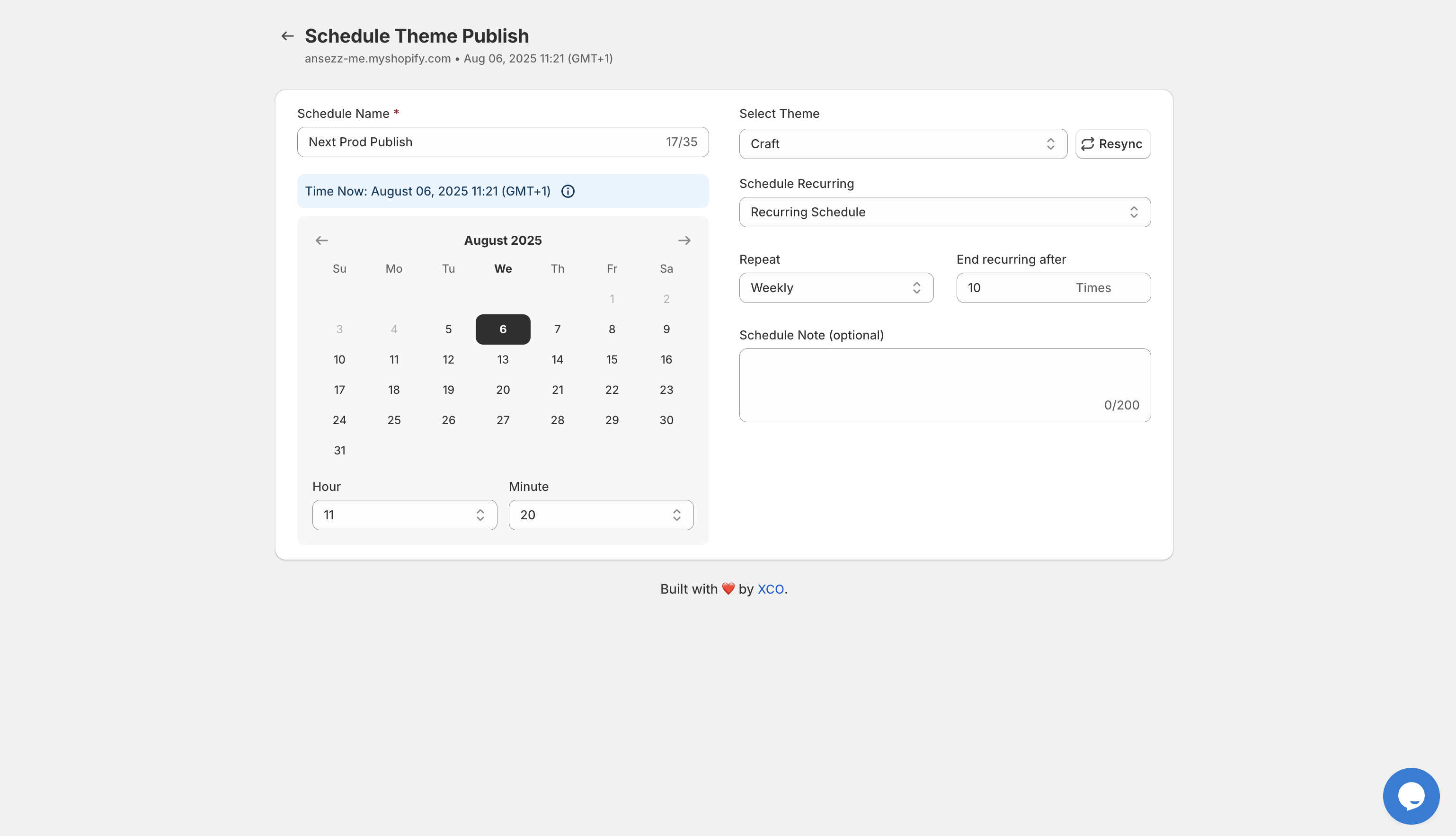
This tool is a cornerstone of our ecommerce maintenance services, providing a level of precision that manual operations simply cannot match. It allows for complex scheduling, including recurring updates and multi-theme rollouts, which is essential for brands managing multiple international storefronts.
The 5-Minute Rollout: A Step-by-Step Guide
Scheduling your entire Black Friday theme rollout does not have to be a multi-hour project. If you have your custom shopify themes ready to go, the actual scheduling process takes less than five minutes. Here is how you can execute a flawless transition using the Maestro Theme Scheduler.
Step 1: Prepare Your Promotional Themes
Before opening the scheduler, ensure your Black Friday and Cyber Monday themes are fully designed and tested in your library. Use a naming convention that makes them easy to identify, such as BFCM 2026 Main Sale and BFCM 2026 Last Chance.
Step 2: Navigate to the Maestro Interface
Open the Maestro app within your Shopify admin. You will see a clean dashboard designed for speed. Click on the option to create a new schedule. This is where you will define the parameters of your rollout.
Step 3: Name Your Event and Select Your Theme
Give your schedule a clear name, like Black Friday Launch. From the dropdown menu, select the specific theme you want to go live. This ensures there is no confusion about which version of your site is being deployed.
Step 4: Set the Precise Date and Time
Select the exact date and time for the theme to go live. Maestro uses your store's timezone settings to ensure perfect synchronization with your marketing campaigns. If your sale starts at exactly 12:00 AM on Friday, set the scheduler for that exact moment.
Step 5: Configure the Reversion (Optional)
One of the most powerful features of the app is the ability to schedule the end of the sale. You can set a second event to publish your standard theme once the sale concludes on Tuesday morning. This completes the cycle without you ever having to log in during the holiday weekend.

Beyond the Basics: Automating Sections and Blocks
While switching an entire theme is the most common use case, advanced merchants often need more granular control. Part of high-level shopify plus development involves creating dynamic experiences that change throughout the day.
Maestro allows you to automate the visibility of specific sections and blocks. This is vital for:
- Flash Sale Countdowns: Show a countdown timer block only during the final four hours of a sale.
- Limited Time Offers: Automate the appearance of a free gift with purchase banner that only displays during specific hours.
- Tiered Promotions: Change the hero banner every six hours to highlight different product categories without changing the entire theme.
This level of automation ensures that your site remains fresh and urgent throughout the Black Friday weekend, driving higher engagement and conversion rates.
Real-World Benefits for Shopify Plus Merchants
For large-scale retailers, the benefits of using a dedicated scheduler like Maestro go beyond just saving time. It becomes a critical part of their infrastructure.
- Global Coordination: Coordinate launches across different time zones by setting multiple schedules for different regional stores.
- Team Collaboration: Allow your design team to set up the schedules days in advance, which can then be reviewed by the marketing manager for final approval.
- Audit Trails: Maintain a clear history of what was published and when. The timeline feature provides a detailed log of every theme change, which is essential for troubleshooting and post-campaign analysis.

When we handle migration to Shopify for our clients, we always emphasize the importance of these automation tools. They represent a shift from reactive store management to a proactive, strategic approach.
Optimizing for Performance and Stability
A common concern with automated theme changes is the impact on site speed and stability. However, the Maestro Theme Scheduler is designed to work seamlessly within the Shopify ecosystem. Because it leverages Shopify's native theme publishing API, the transition is instantaneous and does not require additional scripts to load on the storefront.
To ensure your rollout is as smooth as possible, we recommend the following best practices:
- Run a Test Schedule: A week before Black Friday, schedule a minor theme change at a low-traffic time to verify that everything is working as expected.
- Check Your Integrations: Ensure that any third-party apps, such as loyalty programs or inventory managers, are compatible with your new theme version.
- Monitor Speed: Use our shopify speed optimization services to ensure your promotional themes are as lightweight as possible before they go live.
Advanced Scheduling Tools and Flow Integration
For merchants who want to push the boundaries of automation, integrating theme scheduling with other workflows is the next step. Shopify's advanced scheduling tools now allow for even more complex triggers.

By combining the Maestro Theme Scheduler with Shopify Flow, you can create ecosystem-wide responses to your theme changes. For example, when the Black Friday theme goes live, Flow can automatically tag all new orders or send a notification to your Slack channel. This creates a unified front between your store's appearance and your backend operations.
Conclusion: A Proactive Step for Your Biggest Sale
Transitioning to an automated theme rollout is a vital step for any merchant looking to scale. By removing the manual burden of theme publishing, you protect your revenue, reduce team stress, and ensure a professional, perfectly timed experience for your customers.
The ability to schedule your entire Black Friday strategy in just five minutes is not a luxury; it is a competitive necessity in the modern ecommerce landscape. Whether you are using custom shopify themes or a standard template, the peace of mind that comes from automation allows you to focus on what really matters: growing your business and serving your customers.
If you are ready to take the stress out of your next major launch, explore the Maestro Theme Scheduler today. For more complex needs or bespoke automation strategies, book a meeting with our team of experts at XCO Agency to discuss how we can optimize your Shopify Plus store for maximum performance. Don't leave your biggest sale of the year to a midnight manual click. Set it, forget it, and watch your conversions soar.