
As a Shopify expert, I often work with high-growth merchants who feel restricted by the legacy checkout.liquid system. If you are seeking a more flexible, secure, and high-converting checkout experience, understanding Shopify Checkout Extensibility is no longer optional. With the final sunset of legacy checkout files having passed in 2024 and 2025, the platform has fully transitioned to an app-based, upgrade-safe architecture.
Choosing the right strategy for your checkout customization can significantly impact your conversion rates and operational efficiency. Whether you are managing a complex B2B portal or a high-volume B2C fashion brand, your approach to extensibility must align with your technical resources and business goals.
Why Merchants are Moving to Checkout Extensibility
Before we compare specific strategies, it is vital to understand why this shift occurred. Legacy customizations were often brittle, breaking whenever Shopify updated its core code. Checkout Extensibility solves this by using a suite of powerful components and APIs that live outside the core checkout logic but interact with it seamlessly.
Here are the primary benefits of adopting a modern checkout strategy:
- Enhanced Performance: Checkout Extensibility is up to 4x faster than the standard liquid-based checkout, reducing friction at the most critical stage of the buyer journey.
- Shop Pay Integration: You can now offer customizations within Shop Pay, which has been shown to boost conversion rates by up to 50 percent.
- Upgrade-Safe Architecture: Unlike the old system, Shopify updates its platform without breaking your custom apps or UI extensions.
- Mobile-First Design: All components are natively responsive, ensuring a smooth experience for the increasing number of mobile shoppers.
Strategy 1: The No-Code App Strategy
For many Shopify Plus merchants, the best strategy is leveraging pre-built apps from the Shopify App Store. This approach is ideal for brands that want to move fast without maintaining a custom codebase.
In this strategy, you use specialized apps to add features like upsells, custom fields, and loyalty widgets directly through the Shopify Checkout Editor. This is a "what you see is what you get" (WYSIWYG) experience that allows marketing teams to make changes without developer intervention.
- Best for: Merchants with standard customization needs who prioritize speed to market.
- Pros: Easy to set up, no maintenance costs, and instantly compatible with Shopify updates.
- Cons: Monthly app fees can accumulate, and you are limited to the features provided by the app developers.
When optimizing your store, don't forget that the checkout experience is just one part of the journey. For instance, using Maestro Theme Scheduler allows you to align your store's visual theme with specific sales events that lead into your customized checkout.
Strategy 2: The Low-Code Branding API Strategy
If your primary goal is to ensure the checkout feels like a seamless extension of your brand, the Branding API strategy is your best bet. This allows you to go beyond the basic editor settings to customize fonts, colors, border radii, and button styles across the entire checkout journey, including the Thank You and Order Status pages.
As a Shopify expert, I suggest this strategy for luxury brands and high-end boutiques where visual consistency is a non-negotiable part of the customer experience. You can create a checkout that looks completely bespoke while still using Shopify's secure payment processing.
- Best for: Brands with strict visual identity guidelines.
- Pros: Provides a high-end, custom look without the complexity of building custom logic.
- Cons: Requires a developer to initially configure the API settings, although the Shopify Checkout Editor has made some of these settings more accessible recently.

Strategy 3: The Pro-Code Custom Logic Strategy (Shopify Functions)
For enterprise-level merchants with complex requirements, the Pro-Code strategy using Shopify Functions and custom UI extensions is the most powerful option. This is where you build your own private apps to handle specific business logic that standard apps cannot cover.
Common use cases for this strategy include:
- Custom Shipping Logic: Hiding or renaming shipping methods based on the customer’s tag or the contents of the cart.
- Payment Customizations: Restricting certain payment methods (like Cash on Delivery) for specific geographic regions or customer segments.
- B2B Validations: Requiring specific tax IDs or purchase order numbers only for wholesale customers.
If you are operating in the Shopify B2B wholesale channel, this strategy is almost always necessary to handle the nuances of business-to-business transactions.
- Best for: Complex business models, B2B merchants, and international sellers.
- Pros: Total control over the checkout logic and user interface.
- Cons: Higher initial development costs and the need for ongoing technical oversight.
Strategy 4: The Post-Purchase and Order Status Strategy
The checkout journey does not end when the customer clicks "Pay Now." An effective extensibility strategy includes the Thank You page and the Order Status page. This is a prime location for building trust and reducing customer support inquiries.
For example, integrating a tool like Claimify into your Order Status page allows customers to manage their own claims and reports. This reduces the burden on your support team while providing a professional, easy-to-use interface for the shopper.
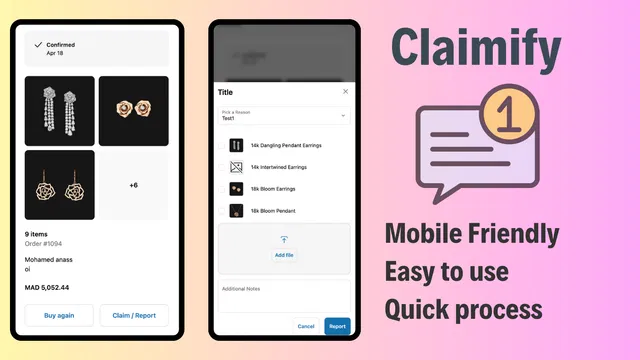
By placing a "Report an Issue" button directly on the Order Status page via a custom UI extension, you empower the customer. This proactive step significantly enhances customer satisfaction and loyalty.
Comparing the Strategies: A Decision Matrix
| Feature | No-Code (Apps) | Low-Code (Branding API) | Pro-Code (Functions) |
|---|---|---|---|
| Setup Time | Minutes to Hours | Days | Weeks |
| Technical Skill | None | Basic Developer | Senior Developer |
| Flexibility | Moderate | High (Visuals) | Infinite (Logic) |
| Ongoing Cost | App Subscriptions | Low | Maintenance |
| Maintenance | Handled by App Devs | Minimal | Required |
How to Implement Your Chosen Strategy
Once you have identified which strategy fits your business, follow these simple steps to begin your migration or upgrade.
- Audit Your Current Setup: List all customizations currently running on your checkout. Note which ones are essential and which can be improved.
- Select Your Components: If you choose the No-Code strategy, research apps that specialize in checkout extensions. If choosing Pro-Code, consult with an agency to map out your Shopify integrations.
- Draft Your Design: Use the Shopify Checkout Editor to visualize your changes. This tool provides a real-time preview of how your extensions will look on both desktop and mobile.
- Develop and Test: For custom logic, build your Shopify Functions in a development store first. Ensure they do not conflict with other apps or discount codes.
- Schedule the Launch: Use tools like Product Maestro Scheduler to ensure your product availability and pricing are synced with any new checkout logic you are deploying.
The Role of Automation in Checkout Success
A successful checkout strategy is only as good as the data flowing into it. If your inventory is inaccurate or your sales are not scheduled correctly, even the most beautiful checkout will fail to convert.
I often recommend that merchants use the Maestro suite of apps to automate their store updates. By scheduling theme changes and product availability in advance, you ensure that the frontend of your store is always in sync with the rules you have set up in your Checkout Extensibility apps.

Making the Final Move
Choosing the best Shopify Checkout Extensibility strategy is a vital step in future-proofing your e-commerce business. For most, a hybrid approach works best: using high-quality apps for standard features like upsells, while employing custom Shopify Functions for unique business logic.
If you are feeling overwhelmed by the technical requirements of migrating to Checkout Extensibility or choosing between these strategies, XCO Agency is here to help. We specialize in migration to Shopify and optimizing high-volume stores for maximum performance.
Enhance your customer journey today by moving away from legacy limitations. Whether it is through Shopify speed optimization or a complete checkout overhaul, taking a proactive step now will pay dividends in conversion rates and customer loyalty for years to come.
Ready to optimize your checkout experience? Book a meeting with our experts to discuss which strategy is right for your brand.