
As a Shopify expert, I often work with high-growth merchants who have conquered their home market and are now staring at the vast potential of international trade. The challenge is rarely about whether to go global, but rather how to structure that expansion without creating an operational nightmare. Merchants are seeking a balance between a localized customer experience and a manageable backend.
In the current e-commerce climate, specifically as we move through 2026, the tools available have become more sophisticated. You are no longer forced to choose between a basic setup and a hyper-complex multi-store architecture. However, the decision between Shopify Markets and dedicated Expansion Stores remains one of the most critical strategic choices you will make. This choice dictates your SEO performance, your inventory management efficiency, and your team's daily workload.
The Evolution of Global Selling on Shopify
Global e-commerce has shifted from a "nice-to-have" to a necessity for brands looking to sustain 20 percent plus year over year growth. In the past, going global meant manually duplicating stores, translating content line by line, and managing separate inventory pools. Today, Shopify provides a more streamlined path through Shopify Markets, yet the traditional Expansion Store model still holds significant value for certain enterprise-level needs.
Before diving into the technical details, it is important to identify what you are trying to achieve:
- Boost conversion rates by offering local currency and payment methods.
- Enhance brand trust through localized language and cultural nuances.
- Optimize logistics by shipping from regional warehouses.
- Significantly improve search engine visibility in specific countries.

Shopify Markets: The Case for Speed and Unity
Shopify Markets is a cross-border management tool that allows you to identify, set up, launch, and manage your international markets from a single store. It is designed to centralize international selling, making it the preferred choice for brands that want to move fast without doubling their administrative overhead.
Why Shopify Markets Works for Most Merchants
If your brand maintains a unified identity across the globe and your product catalog remains 90 percent consistent, Shopify Markets is likely your best starting point.
- Centralized Management: You manage one set of products, one inventory pool, and one theme. This drastically reduces the risk of data silos or inconsistent branding.
- Rapid Deployment: You can activate a new country in minutes. By configuring settings for currency, duties, and local payment methods, you can test a new market with minimal financial risk.
- Localized Experience without the Bloat: Shopify Markets handles currency conversion at checkout and offers the Translate & Adapt app to manage multilingual content within the same administrative interface.
- Cost Efficiency: You avoid the cost of multiple app subscriptions. Most Shopify apps charge per store, so a single-store setup with Markets can save thousands of dollars in monthly recurring revenue (MRR) costs.
For many merchants, the primary goal is a perfectly set up domain for maximum impact. Shopify Markets allows you to use subfolders (e.g., yourstore.com/en-ca) which consolidates your domain authority, making it easier to rank globally compared to starting from scratch with a new top-level domain.
Expansion Stores: The Case for Total Control
Expansion Stores are separate Shopify accounts, usually managed under a Shopify Plus contract. For Plus merchants, you are typically granted up to nine expansion stores. This model is the gold standard for brands that require deep localization or have entirely different business units in different regions.
When Expansion Stores are Essential
As a Shopify expert, I recommend Expansion Stores when regional complexity outgrows the capabilities of a single-store architecture.
- Deep Catalog Customization: If your product offering in Japan is 50 percent different from your offering in the United Kingdom, managing this via Shopify Markets becomes cumbersome. Expansion stores allow for unique catalogs.
- Independent Marketing and SEO: When you need a dedicated SEO strategy for each region, including separate top-level domains (e.g., .de, .fr, .jp), expansion stores provide the most granular control.
- Separate Legal Entities and Payments: If your US and EU operations are handled by different legal entities with separate bank accounts and tax obligations, expansion stores keep these financial streams completely isolated.
- Regional Team Autonomy: If you have a dedicated team in Paris managing the French market, they can have full administrative access to the French store without interference from the global headquarters.

Operational Challenges: Scheduling and Automation
Whether you choose Markets or Expansion Stores, the complexity of managing sales, launches, and theme updates across time zones is a significant hurdle. This is where XCO Agency’s specialized tools become vital for high-growth merchants.
Managing Global Product Launches
When you have a product launch happening at midnight in five different time zones, doing it manually is not an option. Using Product Maestro Scheduler allows you to automate product status changes, price adjustments, and collection updates.
Here are simple steps to handle a global launch:
- Select the products for the upcoming collection.
- Navigate to the Product Maestro Scheduler interface.
- Schedule the "Active" status and "Price" changes to align with local market time zones.
- Ensure that collection visibility is toggled on exactly when the marketing emails hit the inbox.
Theme Synchronization
Maintaining a consistent brand look while running regional promotions requires precision. Maestro Theme Scheduler enables you to schedule theme changes in advance. This is particularly useful for Expansion Store users who need to update multiple stores simultaneously or for Markets users who want to swap banner sections for specific regional holidays like Lunar New Year or Boxing Day.

Comparative Decision Matrix
To help you decide, consider this comparison of the two strategies:
| Factor | Shopify Markets | Expansion Stores |
|---|---|---|
| Setup Speed | Fast (days) | Slower (weeks/months) |
| Inventory | Centralized by default | Separate by default |
| SEO Structure | Subfolders or Subdomains | Top-Level Domains (ccTLDs) |
| App Costs | Single subscription | Multiple subscriptions |
| Localization | Moderate (Currency/Language) | Extreme (Custom Themes/Content) |
| Team Structure | Small, centralized team | Large, regional teams |
Post-Purchase: The Global Customer Experience
A global strategy is only successful if the post-purchase experience is as seamless as the checkout. International returns and claims can quickly destroy your profit margins if not managed correctly.
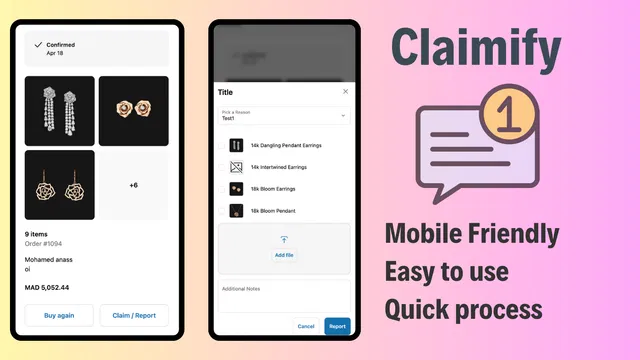
I often advise clients to integrate Claimify to handle the inevitable "where is my order" or "this arrived damaged" inquiries from around the world. By providing a self-service claims portal, you reduce the burden on your support team and increase brand authenticity. This is a vital step in maintaining high customer satisfaction scores (CSAT) across different geographies.
Strategic Implementation: A Step-by-Step Guide
If you are ready to transition from a domestic store to a global powerhouse, follow these steps to choose and implement your strategy.
Step 1: Audit Your Regional Requirements
Analyze your sales data to see where your international traffic is coming from. If 80 percent of your international sales come from three countries, you might start with Shopify Markets for those regions.
Step 2: Evaluate Your Logistics
Determine where your inventory is held. If you use a single 3PL that ships globally, Shopify Markets is ideal. If you have warehouses in the US, EU, and Australia, Expansion Stores might better serve your need for local inventory control.
Step 3: Choose Your Domain Strategy
Decide between subfolders (com/uk) or country-coded top-level domains (.co.uk). Your decision here will heavily influence whether you use Markets or Expansion Stores. You can optimize your store's UX by ensuring the domain strategy does not confuse the user.
Step 4: Automate the Workflow
Once your structure is chosen, implement automation. Use scheduling tools to ensure your global presence doesn't require 24/7 manual oversight. Automating theme updates and product availability ensures that your store is always fresh, regardless of the time zone.
Final Verdict
Choosing between Shopify Markets and Expansion Stores is not a permanent decision, but it is one that carries significant weight. Shopify Markets is the superior choice for brands looking for efficiency, centralized data, and lower technical debt. It is the "lean" way to go global.
Conversely, Expansion Stores are the necessary choice for the enterprise merchant who requires absolute autonomy for regional branches and the highest level of SEO localization.
As a Shopify expert, I recommend starting with Shopify Markets to validate your international demand. Once a specific region accounts for more than 20 percent of your total revenue, or when local compliance and logistics become too complex for a shared setup, you can then consider migrating that specific market to a dedicated Expansion Store.
Global expansion is a journey, not a single event. By leveraging the right structure and the right automation tools like Product Maestro and Claimify, you can scale your brand to every corner of the world without losing your mind in the process. If you need help auditing your current setup or implementing a global migration, the team at XCO Agency is here to guide you through the technical complexities of Shopify Plus.