
As a Shopify expert, I often see merchants struggling with the same hidden bottleneck: the manual management of gift card balance inquiries. While gift cards are a phenomenal way to boost upfront revenue and secure future sales, they often come with a lingering administrative burden. Customers frequently lose track of their remaining balances and end up flooding your support inbox with questions that could easily be automated.
When you are refining your shopify store setup, every minute saved on manual tasks is a minute you can spend on growth strategies. Many store owners seek a way to empower their customers without adding complexity to their backend operations. This is where a self-service solution becomes a vital part of your ecommerce maintenance services.
The solution is simpler than you might think. By implementing the Gift Card Checker by Maestro, you can provide a seamless experience for your shoppers while significantly reducing your support overhead. In this guide, I will walk you through exactly how to get this running on your store in less than five minutes.
Why Your Shopify Store Setup Needs a Gift Card Checker
Before we dive into the how, let's talk about the why. Providing a self-service balance check is not just a convenience; it is a strategic move that affects your bottom line and customer retention.
Boost Customer Confidence and Trust
When a customer can quickly verify their balance on your site, it removes the friction between them and their next purchase. If they have to wait 24 hours for a support representative to reply with a balance, they might lose interest or head to a competitor.
Drastically Reduce Support Tickets
A significant portion of customer service inquiries for mid-sized stores revolves around "How much do I have left on my gift card?" Automating this response allows your team to focus on high-value tasks like closing sales or resolving complex shipping issues.
Enhance Brand Consistency
Unlike generic third-party widgets that look out of place, the Gift Card Checker by Maestro is designed to blend perfectly with your existing theme. Maintaining a professional look is essential for building long-term loyalty.

Step 1: Install the Gift Card Checker by Maestro
As a Shopify expert, I recommend tools that offer a one-click setup. You do not want to spend hours fiddling with code or hiring developers for a simple feature.
- Navigate to the Shopify App Store. Search for the Gift Card Checker by Maestro.
- Click the Add App button. Shopify will guide you through the standard permissions screen.
- Approve the installation. Once you click install, the app will be integrated into your Shopify admin panel immediately.
The beauty of this specific app is that it is built specifically for the Shopify ecosystem. It does not require you to edit your theme files manually or understand Liquid code. It is designed for merchants who want professional results without the technical headache.
Step 2: Access the Dashboard and Enable the Widget
Once the installation is complete, you will find the app under your "Apps" section in the Shopify admin sidebar.
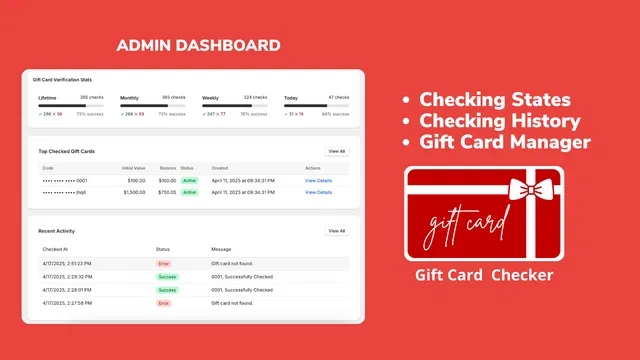
- Select the Gift Card Checker app. This will open the main dashboard where you can see verification stats and recent activity.
- Locate the toggle to enable the widget. With a single click, you can make the checker live on your storefront.
- Confirm the placement. The widget usually appears as a sleek, non-intrusive element on your store, often on the gift card product page or a dedicated page you create.
The dashboard provides a clear overview of how your customers are using the tool. You can see the top checked gift cards and the overall checking history, which gives you valuable insights into customer behavior.
Step 3: Customize the Design to Match Your Brand
Maintenance of a professional brand image is a core part of our ecommerce maintenance services. You never want a feature to look like a "plug-in" that was tacked on at the last minute.
- Go to the Design or Settings tab. Here you will find options to change colors, fonts, and button styles.
- Match your brand colors. Enter your specific hex codes to ensure the widget looks like a native part of your Shopify theme.
- Adjust the wording. You can customize the call-to-action text. Instead of a generic "Check Balance," you might want "View Your Credit" or "See My Gift Balance."
- Preview the changes. Always use the preview function to see how the widget looks on both desktop and mobile devices.
Mobile responsiveness is critical. Most shoppers will check their balance on their phones while they are browsing your products. The Maestro app ensures that the experience is smooth regardless of the device.

Step 4: Link the Checker to Your Navigation
A self-service tool is only useful if your customers can find it. After the setup is complete, you should ensure it is easily accessible.
- Go to Online Store then Navigation. Most merchants find that adding a link in the footer is the best practice.
- Add a new menu item. Title it "Gift Card Balance" or "Check Gift Card."
- Link to the page. Select the page created by the app or the specific URL where the checker is hosted.
- Update your automated emails. This is a pro-tip from our growth strategies. Include a link to the gift card checker in your "Gift Card Issued" and "Order Confirmation" emails.
By proactively providing the link, you prevent the customer from ever needing to contact support in the first place. This is the definition of a proactive shopify store setup.
Enhancing Your Strategy with Ecommerce Maintenance Services
Adding a gift card checker is a great first step, but it is part of a larger ecosystem of store optimization. At XCO Agency, we believe that your store should work for you, not the other way around. This involves regular audits and the implementation of smart automation tools.
For instance, if you are running a high-volume store, you might also look into bulk scheduling for your themes and products. Just as the gift card checker automates balance inquiries, scheduling tools automate your marketing transitions.

When we provide shopify design services, we look for these specific friction points. A store that looks beautiful but is hard to navigate or lacks basic self-service features will always underperform compared to a store that prioritizes the user experience.
The Long-Term Benefits of Self-Service
After completing the five-minute setup, you will start to see the benefits almost immediately.
- Increased Repeat Purchases: Customers who know exactly how much they have left are more likely to come back and spend it.
- Better Data: The app's dashboard gives you a view of which gift cards are being checked most often, which can inform your marketing campaigns.
- Scalability: As your store grows, the number of gift cards issued will increase. Automated systems ensure that your support team does not have to scale at the same rate as your sales.
If you are looking to further optimize your store's backend, you might consider how migration to Shopify or advanced shopify integrations can streamline other areas of your business.
Final Thoughts on Gift Card Management
Implementing a self-service gift card checker is a vital step for any merchant looking to professionalize their operations. It is a low-effort, high-impact change that improves the lives of both your customers and your staff. By choosing a specialized tool like the Gift Card Checker by Maestro, you ensure that the setup is quick and the results are on-brand.
The process is straightforward: install the app, enable the widget, customize the look, and make it easy to find. This small investment in your shopify store setup pays dividends in saved time and increased customer satisfaction.
If you are ready to take your store to the next level or need help with broader ecommerce maintenance services, the team at XCO Agency is here to help. We specialize in everything from shopify speed optimization to full-scale digital marketing.
Start by making your gift card process seamless today. You can book a meeting with us to discuss how to further automate your Shopify store or head over to our FAQs to learn more about our specialized apps and services. Your customers will thank you for the transparency, and your support team will thank you for the lighter workload.