
As a Shopify expert, I often witness high-growth brands pouring thousands of dollars into customer acquisition while simultaneously leaking revenue through a broken support system. It is a classic case of filling a bucket that has seven distinct holes. Merchants seeking to scale to enterprise levels frequently treat support as a secondary cost center rather than a primary driver of retention and trust.
When your post-purchase experience is friction-filled, you are not just losing a single sale. You are losing the lifetime value of that customer and risking your brand reputation. Transitioning from ad-hoc email replies to sophisticated enterprise ecommerce solutions is what separates the hobbyists from the market leaders.
By optimizing your support and claims process, you can achieve several key advantages:
- Boost customer lifetime value by turning negative return experiences into positive brand interactions
- Significantly reduce overhead costs through the use of intelligent automation and self-service portals
- Enhance brand credibility by providing transparent, real-time tracking for every claim
- Optimize staff productivity by moving requests from messy inboxes to a structured, unified dashboard
1. Hiding Your Support and Return Policies
One of the most common errors I see is the "treasure hunt" approach to support. Merchants often bury their return policies in tiny footer links or hide them deep within a FAQ page. If a customer has to work hard to find out how to return a product, they will likely choose not to buy from you in the first place.
As a proactive step, you should integrate your support portal directly into the customer journey. Using an app like Claimify ‑ Support & Claims, you can place a branded "File a Claim" button directly on the order confirmation page or within the customer account section.
Here are simple steps to fix this:
- Move your policy up - Place a summarized version of your return and warranty rules on every product page
- Leverage the Thank-You page - Use Claimify to embed a claim widget right where the customer is already looking after their purchase
- Use clear language - Avoid legal jargon and explain exactly how many days a customer has to initiate a return or exchange
2. Managing Returns and Claims via a Messy Email Inbox
If your support team is still digging through a "support@yourstore.com" inbox to find lost attachments and order numbers, you are inviting human error and burnout. Email is where high-volume claims go to die. It is impossible to track trends, manage statuses, or ensure consistent follow-ups when everything is stuck in a linear thread.

Professional ecommerce maintenance services prioritize a "single source of truth." Claimify moves every request for a refund, exchange, or warranty claim into a centralized dashboard. This allows your team to see the status of every ticket at a glance, ensuring no customer is left waiting for a reply.
3. Ignoring the Power of Automated Validation Rules
Many store owners manually review every single return request, checking order dates and item eligibility. This is a massive waste of time for any brand striving for enterprise ecommerce solutions. Manual reviews often lead to inconsistent decisions, where one agent might approve an out-of-policy return while another denies it.
To fix this, implement automated logic:
- Select your parameters - Define specific rules based on the purchase date, product type, or claim reason
- Navigate to validation settings - Use Claimify’s no-code logic to automatically reject claims that fall outside your 30-day window
- Ensure photo requirements - Require customers to upload photos of damaged items before they can even submit the claim, reducing back-and-forth communication
4. Failing to Offer a Branded Self-Service Portal
In the modern digital landscape, customers do not want to wait 24 hours for an email response. They want to solve their own problems immediately. If you do not provide a self-service portal, you are essentially telling your customers that their time is not valuable.

A branded portal allows customers to select the items they want to return, choose a reason, and even print a shipping label without ever speaking to a human. This level of professional service is a vital step in building a premium brand image. Claimify ensures this portal looks and feels exactly like your Shopify store, maintaining a seamless visual experience.
5. Overlooking "Smart" Auto-Approvals for Low-Risk Claims
Not every claim requires a human eyes-on review. If a VIP customer reports a missing item in a $15 order, the cost of having a support agent spend 10 minutes investigating it often exceeds the cost of the item itself.

Implement a tiered approval system:
- Identify low-risk scenarios - Determine which claim types or price points can be handled instantly
- Toggle on auto-approval - Use the "Smart Auto-Approval" features in Claimify to instantly trigger a refund or replacement for specific conditions
- Click on fraud protection - Ensure your automation is backed by bracket-shopper detection to prevent abuse from customers who habitually return items
6. Separating Theme Management from Support Highs
A mistake many merchants make is failing to coordinate their store's front-end changes with their support capacity. For example, if you are launching a major sale that will inevitably increase support volume, your theme and promotions must be perfectly timed.
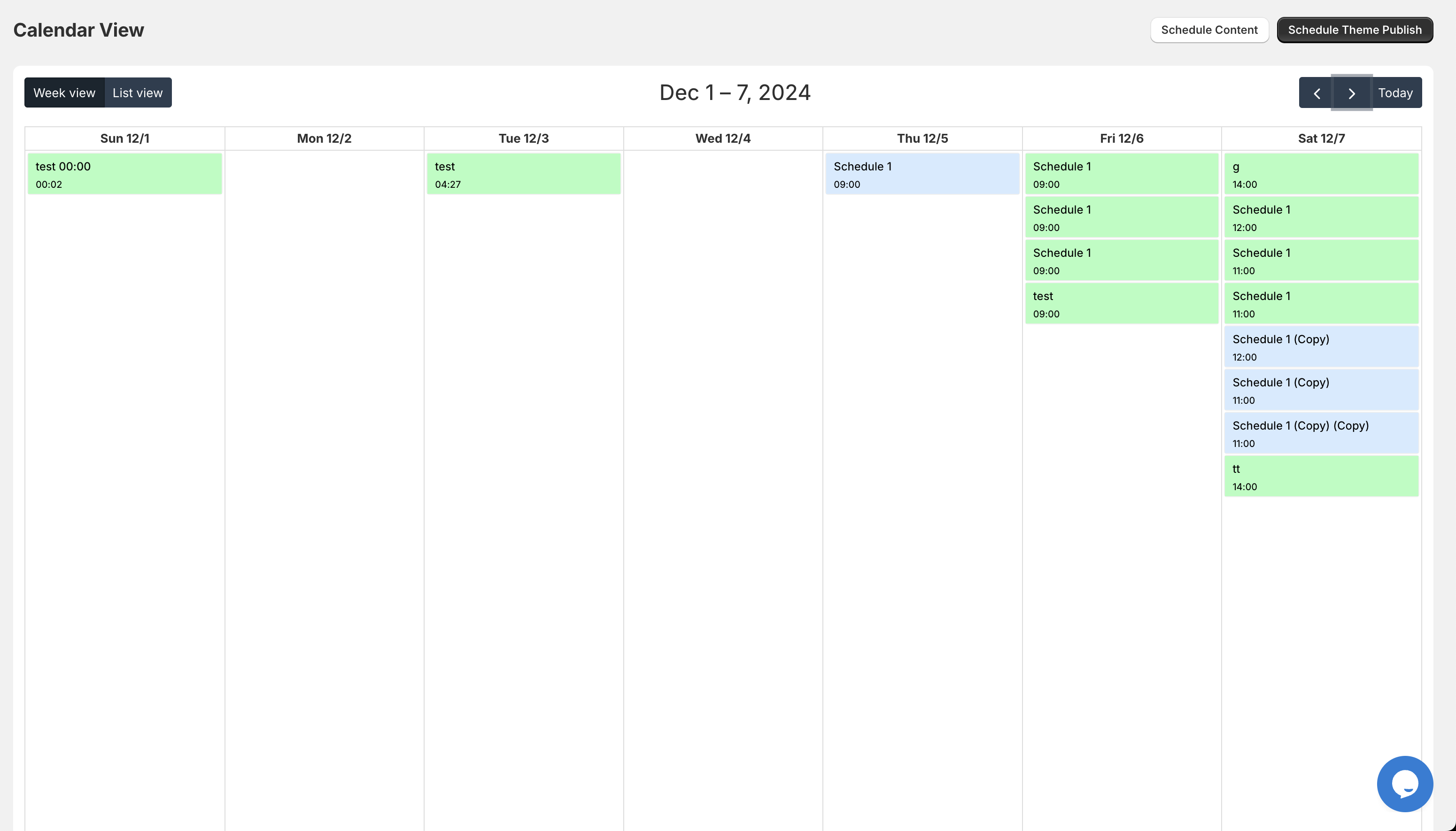
We often recommend tools like Maestro - Theme Scheduler to our clients. This allows you to automate your store's appearance, ensuring that when a promotional banner goes live, your support portal is also updated with any specific "Sale Final" return rules. Coordination between these apps is essential for maintaining smooth ecommerce maintenance services.
7. Treating Support Data as "Trash" Instead of "Gold"
The final mistake is treating support tickets as problems to be solved and forgotten. In reality, every claim is a data point. If 20% of your returns for a specific dress are due to "too small," your sizing chart is the problem, not your support team.
How to extract value from your claims:
- Analyze claim reasons - Use the analytics dashboard to identify which products have the highest defect or return rates
- Optimize product descriptions - Use insights from Claimify to update your copy, highlighting features that customers frequently ask about
- Monitor agent performance - Track how long it takes for claims to move from "Pending" to "Resolved" to identify bottlenecks in your workflow
Conclusion
Fixing your Shopify support mistakes is not just about being "nice" to your customers. It is a strategic move to protect your margins and scale your operations. By moving away from manual email threads and embracing automated enterprise ecommerce solutions like Claimify, you free your team to focus on growth rather than damage control.
Remember that a return is often the last interaction a customer has with your brand. Whether they return to shop again or leave a negative review depends entirely on how you handle that moment. Taking a proactive step today to structure your claims process will pay dividends in customer loyalty for years to come.
If you are ready to stop the support madness and professionalize your post-purchase experience, our team at XCO Agency is here to help. Whether you need custom app integrations or a full audit of your ecommerce maintenance services, we can ensure your Shopify store is built for long-term success.
Contact XCO Agency Today | Explore Our Services | Learn more about Maestro