
As a Shopify expert, I often encounter ambitious merchants who view Shopify Markets as a simple "on" switch for global growth. While the platform has revolutionized how we handle cross-border commerce, the "set it and forget it" mentality frequently leads to broken user experiences, tanking conversion rates, and SEO nightmares. Global expansion is more than just currency conversion; it is about creating a localized journey that feels native to every shopper, regardless of their coordinates.
High-growth brands seeking to scale internationally often find themselves trapped by technical oversights that disrupt the shopping flow. Whether you are using Shopify Plus with Hydrogen for a headless build or sticking to a Liquid-based theme, these errors can be costly.
In this guide, I will break down the seven most common mistakes merchants make with Shopify Markets and provide the actionable steps needed to optimize your global strategy for long-term success.
1. Hardcoding Routes and Ignoring the Liquid Routes Object
One of the most frequent technical errors I see in custom theme development is the use of hardcoded links. When you move to a multi-market setup, Shopify often uses subfolders (like /en-ca or /fr-fr) to distinguish between localized versions of your store.
If your navigation or buttons are hardcoded to link directly to "/cart" or "/account," you are forcing your international users out of their localized context. A customer browsing the Canadian French version of your site who clicks a hardcoded "Login" button will likely be redirected back to the default primary market store. This results in the loss of correct localized pricing, language settings, and currency.
How to fix it:
-
Utilize Liquid objects: Always use the
routesobject in your Liquid files. Instead of<a href="/cart">, use<a href="{{ routes.cart_url }}">. -
Update JavaScript references: If your theme uses AJAX for cart drawers or "Add to Cart" functionality, ensure your scripts reference
window.Shopify.routes.root. - Audit your theme regularly: Run a search through your codebase for any static paths that should be dynamic to ensure a seamless transition between market subfolders.
2. Using Full Domain URLs in Internal Navigation
Similarly to hardcoding paths, using full URLs (e.g., https://yourstore.com/pages/about) in your navigation menus is a major pitfall. Shopify Markets relies on recognizing internal paths to dynamically append the correct market prefix.
When you paste a full URL into the Shopify Navigation admin, the system treats it as an external link. Consequently, it will not automatically adapt the URL for a shopper in a different market. A customer in the UK might be browsing yourstore.com/en-gb/, but clicking that navigation link will send them back to the US root domain, breaking the localized experience.
How to fix it:
- Select internal pages: When building menus in the Shopify admin, use the search tool to select pages, collections, or products rather than pasting the full URL string.
-
Implement relative paths: Ensure any custom links in footers or headers use relative paths (e.g.,
/pages/contact-us) so Shopify can automatically route them based on the user's active market.
3. Mismanaging Product Availability Across Regions
As a Shopify expert, I often see merchants frustrated because products "disappear" from their storefront. Usually, this is not a bug but a configuration error within Shopify Markets. Shopify allows you to control exactly which products are available in which market. While this is a powerful feature for managing regional restrictions or licensing, it is easy to overlook during a bulk upload.
If you add new inventory but forget to publish it to your specific international markets, your global customers will see "Product Not Found" or empty collection pages.
How to fix it:
- Audit market publishing: Regularly check the "Product Status" section in the Shopify admin to ensure your catalog is active for all relevant markets.
- Use automation tools: For high-growth merchants managing thousands of SKUs, manual updates are a recipe for error. I recommend using the Product Maestro Scheduler to automate product availability and updates across different regions.
- Schedule regional launches: If you have a product dropping at midnight in different time zones, use scheduling tools to ensure the inventory goes live exactly when your marketing campaign starts in that specific market.

4. Relying Heavily on Automatic Redirections
Shopify offers an automatic redirection feature that detects a user's location via IP address and pushes them to the correct market. On the surface, this sounds efficient, but it often creates a jarring user experience and can interfere with search engine crawling.
Forced redirects can frustrate users who may be traveling or using a VPN. Furthermore, if Google's crawlers are redirected before they can see the localized content, your international SEO rankings will suffer.
How to fix it:
- Use the Geolocation App: Instead of forced redirects, implement a polite country selector or a "recommendation" banner. This allows the user to choose their preferred market while staying in control.
- Enable selectors in the footer: Ensure your theme has a clear currency and language selector in the footer, allowing users to switch manually if the automated detection is incorrect.
- Optimize for SEO: Ensure your Hreflang tags are correctly implemented (Shopify handles much of this automatically, provided you don't break the URL structure with forced scripts).
5. Confusing Backend Market Groups with Front-end UI
A common misunderstanding among merchants is how Shopify Markets groups countries. You might group 27 countries into an "EU Market" for administrative ease, managing duties and pricing in one place. However, this does not automatically create a "European Union" option in your storefront's country selector.
The storefront UI still needs to provide a way for users to identify their specific country for shipping and tax calculations. Merchants often overlook the need for a granular UI that matches their backend logistical grouping.
How to fix it:
- Map your UI to your strategy: Ensure your theme's country selector reflects the actual shipping destinations you support within those market groups.
- Customize the experience: If you are a Shopify Plus merchant, consider using Shopify design services to build a custom market selector that aligns with your brand's global aesthetic and logistical reality.
6. Neglecting Market-Specific Content and Promotions
One of the biggest mistakes in a global strategy is assuming that a single promotional calendar works for everyone. Black Friday might be huge in the US, but Single's Day is vital in other regions. If your storefront displays a "Free Shipping in the USA" banner to a customer in Australia, you have immediately lost their trust.
Maintaining a fresh, localized storefront requires scheduling different theme sections and banners for different markets. Doing this manually for ten different markets is nearly impossible for a small team.
How to fix it:
- Leverage scheduling apps: I suggest using the Maestro Theme Scheduler to automate theme changes. You can schedule specific banners or promotional sections to appear and disappear based on the local time zones of your various markets.
- Localize your messaging: Go beyond translation. Use specific cultural references and local idioms to make the brand feel homegrown in every territory.
- Coordinate launches: Ensure your growth strategies account for regional holidays and shopping peaks.

7. Ignoring Post-Purchase Localization and Claims
The global customer journey does not end at the "Buy" button. If an international customer receives a damaged item or wants to return a product, they need a localized way to handle those claims. If your support process is only optimized for your home market, international customers will feel abandoned.
Managing international returns and claims can be a logistical nightmare, involving different languages and shipping regulations.
How to fix it:
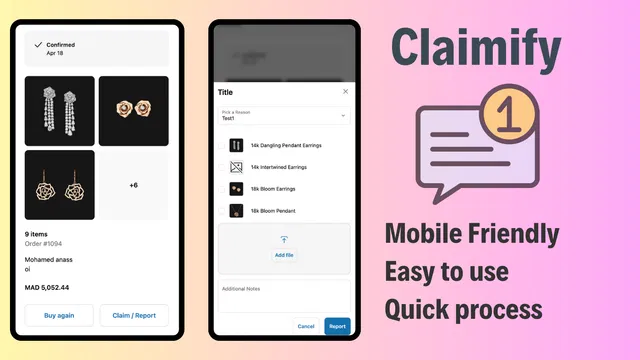
- Implement a robust claims portal: Use a tool like Claimify to provide a self-service claims portal. This allows international customers to report issues, upload photos, and track their claims without needing to navigate complex time-zone-delayed email chains.
- Provide clear international policies: Make sure your FAQs clearly outline the return and refund process for every market you serve.
- Ensure mobile accessibility: Most international shoppers browse on mobile devices. Ensure your claims and support interfaces are fully responsive and easy to use on the go.
Building a Resilient Global Strategy
Mastering Shopify Markets is a vital step for any merchant looking to dominate the international stage. By avoiding these seven common mistakes, you can significantly enhance your store's performance and build a loyal global customer base.
Successful international expansion requires a blend of technical precision and strategic foresight. From ensuring your URLs are properly routed to automating your promotional schedule with the Maestro suite, every detail counts toward building a frictionless experience.
If you are finding the complexities of Shopify Markets overwhelming, or if you need a hand with migration to Shopify to start your global journey, XCO Agency is here to help. We specialize in helping high-growth brands navigate the intricacies of the Shopify ecosystem.
Are you ready to take your global strategy to the next level? Book a meeting with our team today to discuss how we can optimize your store for international success. Between our expert development services and our suite of specialized apps, we have the tools to ensure your brand thrives in every corner of the world.