
As a Shopify expert, I often work with brand owners who treat gift cards as a secondary thought. They view them as a digital version of a plastic card that sits in a drawer, only to be remembered during the holiday season. However, this "set it and forget it" mentality is a significant oversight. In the world of high-growth e-commerce, gift cards are powerful tools for customer acquisition, retention, and cash flow.
When your shopify store setup treats gift cards as a basic utility rather than a strategic asset, you are likely leaving money on the table. Even worse, you might be creating unnecessary friction for your customers. I frequently see merchants struggling with high volumes of support tickets specifically related to gift card balances. These manual inquiries drain your team's time and frustrate customers who just want to spend their money.
Here is a look at the most common mistakes merchants make with Shopify gift cards and how implementing a self-service solution like Gift Card Checker By Maestro can transform your operations.
The Hidden Cost of Manual Management
Many merchants believe that a few emails a day asking for a balance check is not a big deal. But when you scale, those "few emails" turn into dozens of hours spent on ecommerce maintenance services that could have been automated.
Mistake 1: Forcing Customers to Contact Support
This is the most common error I see. By default, Shopify does not provide a native way for a customer to check their own gift card balance without being at the checkout stage. If a customer wants to know how much they have left before they start shopping, they have to email your support team.
- The Problem: This creates a barrier to purchase. If a customer has to wait 24 hours for a response from your team, they might lose interest in the product.
- The Impact: Your support costs rise, and your conversion rate drops.
- The Solution: A self-service widget allows customers to check their balance in seconds, keeping them in the "buying" mindset.
Mistake 2: Making Codes Impossible to Find
Shopify sends the gift card code in the initial confirmation email. If the customer loses that email or deletes it, they are often stuck. Research shows that Shopify's admin does not allow merchants to easily retrieve the full code for security reasons.
- The Problem: Customers feel like they have "lost" their money if they cannot find the code.
- The Impact: High frustration levels and negative brand sentiment.
- The Solution: While a checker tool requires the code, providing a clear, branded area on your site for gift card management reminds customers that their balance is accessible.

Branding and Experience Gaps
As a CEO who focuses on growth strategies, I believe every touchpoint is a branding opportunity. If your gift card experience looks like a generic system notification, you are missing a chance to build loyalty.
Mistake 3: Zero Brand Consistency
Most default Shopify gift card notifications are plain. When customers visit your site to use those cards, the experience should be seamless. If you use a third-party app that doesn't match your theme, it looks unprofessional and untrustworthy.
- The Problem: A disjointed visual experience makes your store look unpolished.
- The Impact: Reduced trust, especially for new customers who received the gift card from a friend.
- The Solution: Use tools like Gift Card Checker By Maestro that offer customizable designs. You can adjust colors and layouts to ensure the balance checker looks like a native part of your Shopify design services.
Mistake 4: Ignoring the Recipient Experience
We often focus on the person buying the gift card, but the recipient is the one you need to convert into a long-term fan. If the recipient finds it difficult to check their balance or understand how to use the card, they won't return after their first purchase.
- The Problem: The recipient has no prior relationship with your brand and zero patience for a clunky UI.
- The Impact: You lose a "free" acquisition opportunity.
- The Solution: A simple "Check Your Balance" link in your footer or navigation menu makes the experience effortless for new users.

Strategic Failures in Gift Card Usage
Beyond the technical setup, there are strategic mistakes that prevent gift cards from being a growth lever for your business.
Mistake 5: Failing to Use Gift Cards for Loyalty
Gift cards are not just for sales. They are excellent tools for customer recovery and loyalty programs. If a shipment is late or a product is damaged, a small gift card is often more effective than a refund because it guarantees a return visit.
- The Problem: Merchants often default to cash refunds which "leak" money out of the business.
- The Impact: Lower lifetime value (LTV) and higher churn.
- The Solution: Use gift cards as "store credit." When customers have a self-service way to manage that credit, they are more likely to use it quickly.
Mistake 6: Complex Redemption Processes
If your gift card code field is hidden or if customers are confused about whether a gift card can be combined with a discount code, they will abandon their cart.
- The Problem: Confusion at the final stage of the funnel is the number one cause of cart abandonment.
- The Impact: Lost revenue and wasted marketing spend.
- The Solution: Clear communication. A balance checker page can also include a "How to Use" section to guide the customer.
Mistake 7: Lack of Insight into Unused Balances
Many merchants do not track how much "liability" they have in unredeemed gift cards. This makes financial planning difficult.
- The Problem: You have no idea how much potential revenue is sitting in customers' inboxes.
- The Impact: Poor inventory planning and accounting headaches.
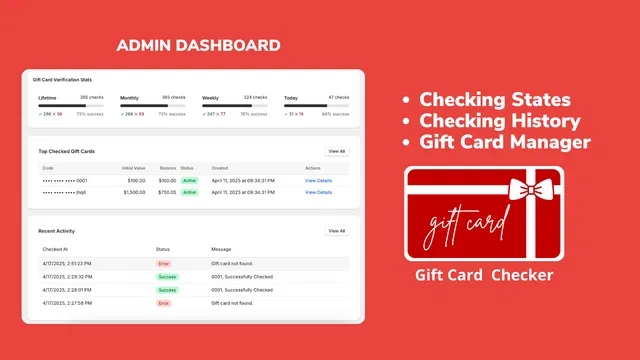
- The Solution: An admin dashboard that shows checking history and top-checked cards gives you a window into customer intent.
How a Self-Service Checker Fixes Everything
I often recommend Gift Card Checker By Maestro to our clients because it addresses these seven mistakes in one go. It is a proactive step toward better ecommerce maintenance services and a smoother shopify store setup.
Step-by-Step: Setting Up Your Self-Service Portal
Once you decide to stop manually answering balance inquiries, the setup is incredibly simple. Here are the steps to get your self-service checker running:
- Install the App: Navigate to the Shopify App Store and add Gift Card Checker By Maestro.
- One-Click Integration: The app is designed for ease of use. You do not need to be a developer to get it live.
- Customize the Design: Navigate to the app settings to match the widget colors and fonts to your brand. Ensure the "Check Balance" button is prominent.
- Add to Navigation: Place the link to your balance checker page in your footer or under a "Customer Service" menu.
- Monitor Results: Check the admin dashboard to see how many customers are using the tool. You will likely see a significant drop in support tickets almost immediately.
The Benefits of Automation
By empowering your customers to help themselves, you are not just saving time. You are building a more professional brand.
- Reduced Support Load: Free up your team to handle complex issues instead of repetitive balance checks.
- Enhanced Trust: A professional-looking checker gives customers confidence that their money is safe and accessible.
- Increased Sales: When customers see they have a $25 balance, they are much more likely to start a $50 shopping session to use it up.

Final Thoughts on Gift Card Strategy
As we look toward the future of e-commerce, the brands that win will be those that remove every possible point of friction. Forcing a customer to wait for a manual email response in 2026 is simply not acceptable.
Implementing a self-service balance checker is a vital step in modernizing your shopify store setup. It turns a manual chore into an automated asset. Whether you are looking for advanced shopify-integrations or just simple ways to improve your shopify-speed-optimization by reducing heavy support scripts, automation is the answer.
If you are ready to stop wasting time on manual balance checks and start focusing on growth, I highly recommend looking at our Maestro apps. At XCO Agency, we specialize in helping brands scale through smart automation and professional e-commerce development.
Don't let gift cards be a burden on your support team. Turn them into a seamless part of your customer journey today. If you need help auditing your current store setup or want to explore more growth strategies, feel free to book a meeting with our team. We are here to help you optimize every inch of your Shopify experience.