
As a Shopify expert, I often speak with ambitious merchants who feel held back by the invisible borders of e-commerce. You have a product that people love, your domestic sales are climbing, and you know there is a massive audience waiting in Europe, Asia, or North America. However, the technical hurdles of multi-currency pricing, localized shipping, and translation have historically required multiple store instances or expensive third-party workarounds.
Shopify Markets has fundamentally changed this landscape. It is no longer necessary to manage five different stores for five different countries. Instead, you can now orchestrate a complex global empire from a single Shopify admin. High-growth merchants are seeking ways to simplify their operations without sacrificing the hyper-local experience that customers demand.
In this guide, I will break down everything you need to know about Shopify Markets, from the basic configuration to advanced strategies that leverage the latest platform updates like Hydrogen and Checkout Extensibility.
Why Global Expansion is Vital for Your Growth
Expanding into international markets is one of the most effective ways to increase your brand's footprint and diversify your revenue streams. By utilizing Shopify Markets, you can unlock several key advantages:
- Boost Conversion Rates: localized shopping experiences significantly reduce friction, leading to higher trust and more completed checkouts.
- Simplify Operations: manage all localized content, pricing, and inventory from one central location rather than jumping between separate store logins.
- Optimize Search Visibility: improve your global SEO by using localized domains or subdirectories that tell search engines exactly who each version of your site is for.
- Enhance Customer Trust: displaying local currencies and transparent duty calculations at checkout eliminates the "sticker shock" that often leads to abandoned carts.
What Exactly is Shopify Markets?
Shopify Markets is an all-in-one toolkit designed to help you identify, set up, and manage international markets from a single store. Since its major updates in 2024, the tool has evolved into a unified dashboard that consolidates B2B, cross-border, and even point-of-sale settings.
Previously, if you wanted to sell in France and Germany with different prices, you might have needed two separate stores. With Shopify Markets, these are simply two "Markets" within your primary store. Each market can have its own specific settings for language, currency, and product availability. This centralization is a game-changer for lean teams who need to move fast.

Core Features That Power Global Sales
To succeed globally, your store needs to feel local. Shopify Markets provides the infrastructure to make this happen through several core pillars.
Multi-Currency and Local Payment Methods
Research shows that 92% of customers prefer to see prices in their local currency. Shopify Markets allows you to sell in over 130 local currencies through Shopify Payments. Prices are automatically converted based on current exchange rates, or you can set manual price adjustments to maintain your margins in specific regions. Furthermore, offering local payment methods can reduce cart abandonment by up to 33%.
Localized Storefronts and Content
A customer in Japan expects different imagery and messaging than a customer in the United States. You can now customize your store content by market, showing different homepage banners, product descriptions, and even entirely different themes for specific regions. This level of localization ensures that your brand voice resonates regardless of where the shopper is located.
Automatic Tax and Duty Calculation
Nothing kills a customer relationship faster than an unexpected bill from a courier for import duties. Shopify Markets calculates these duties at checkout so the customer knows the total cost of ownership upfront. This transparency is a vital step in building long-term international brand loyalty.
Shopify Markets vs. Managed Markets: Which is Right for You?
When you decide to go global, you have two primary paths within the Shopify ecosystem.
- Shopify Markets: This is the standard version where you maintain control over your own legal entities, tax registrations, and shipping contracts. It is ideal for merchants who already have a logistics infrastructure or want full control over their international operations.
- Shopify Managed Markets: This is a "Merchant of Record" service. Shopify takes on the legal and financial complexity of international selling, including tax remittance and compliance. This is a proactive step for brands that want to scale rapidly without hiring a dedicated international tax team.
How to Configure Your First International Market
Setting up a new market is a straightforward process when you follow a structured approach. Here are the simple steps to get started:
- Navigate to Settings: In your Shopify Admin, click on the "Settings" gear icon in the bottom left corner.
- Select Markets: Click on the "Markets" tab to see your current primary market and any active international markets.
- Add a New Market: Click the "Add market" button and select the specific country or region you wish to target.
- Configure Localization: Once the market is created, go into its specific settings to choose the primary language and currency.
- Adjust Pricing and Products: Use the "Product and pricing" section to decide if you want to hide certain items from this specific market or apply a price adjustment.
- Set Up Shipping: Ensure you have defined shipping zones and rates for this new market in your Shipping and Delivery settings.

Advanced Strategies with XCO Agency Expertise
At XCO Agency, we work with high-growth merchants to optimize their Shopify setup for maximum efficiency. Standard settings are great, but the real power comes from automating your global operations.
Scheduling Regional Content Updates
Global brands often have different promotional calendars. For example, your UK market might have a "Bank Holiday" sale while your US market is focused on "Labor Day." Managing these manual updates across multiple markets can be a nightmare.
We recommend using Maestro Theme Scheduler to automate these changes. You can schedule specific theme sections to show or hide based on the date and time, ensuring your French market gets its "Bastille Day" banner right on time without you having to stay up until midnight to toggle a switch.
Managing Global Product Catalogs
Not every product is suitable for every market due to shipping restrictions or local demand. If you are managing thousands of SKUs, manually adjusting product availability is tedious. Our team often implements Product Maestro Scheduler to handle bulk updates to product attributes and availability across different sales channels. This allows you to launch new collections in specific regions at the exact moment they become relevant.

Optimizing the Post-Purchase Experience Internationally
Global success is not just about the first sale. It is about the entire customer lifecycle. One of the biggest challenges for international merchants is handling claims and returns. A customer in Australia who receives a damaged item should not have to wait days for an email response from your US-based support team.
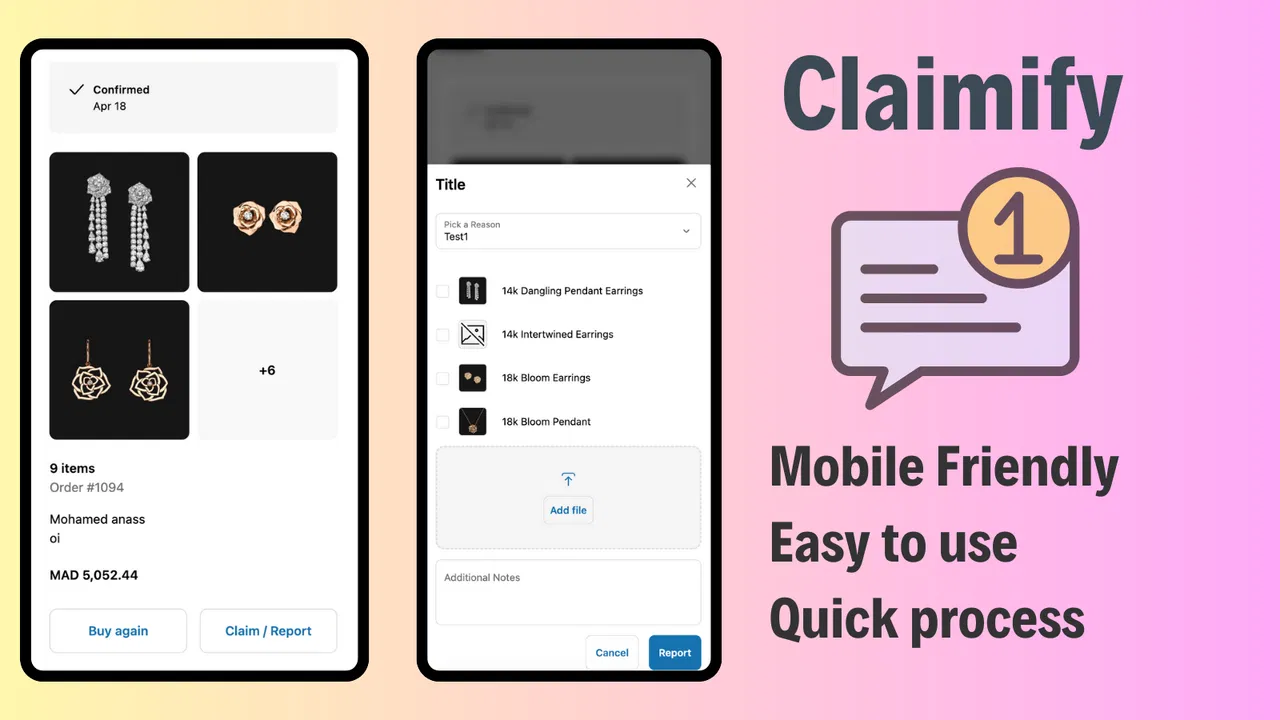
Integrating an automated tool like Claimify into your Shopify store allows customers to report issues and file claims through a mobile-friendly interface. This self-service approach significantly improves the customer experience and reduces the burden on your support team, which is especially important when dealing with different time zones.
SEO and Domain Strategy for Global Markets
How you structure your URLs is a vital step for international SEO. Shopify Markets gives you three main options:
- Subfolders: (e.g., example.com/en-ca) This is the easiest to set up and allows you to consolidate all your domain authority into one primary domain.
- Subdomains: (e.g., ca.example.com) These are useful if you want a clear separation between markets while still keeping them under your main brand umbrella.
- Top-Level Domains: (e.g., example.ca) This is the most "local" feel but requires managing multiple domains and SEO profiles.
For most growing brands, I recommend starting with subfolders. They offer a great balance of technical simplicity and SEO effectiveness. Once your domain is configured, ensure that your sitemaps are correctly updated. You can view our sitemap example to see how clean URL structures should look.
Taking Your Next Step Toward Global Dominance
Shopify Markets has removed the technical barriers that once made international expansion the exclusive domain of enterprise-level companies. Today, any merchant with a great product and a strategic vision can compete on a global scale.
By centralizing your operations, localizing your content, and automating your workflows with tools like the Maestro suite, you can build a truly global brand without the operational overhead of the past. If you find the process of internationalization intimidating, remember that Shopify will guide you through the technical steps, and agencies like ours are here to handle the strategy.
Expanding globally is a proactive step toward securing your brand's future. It requires careful planning, the right tech stack, and a commitment to providing a seamless local experience for every customer, regardless of their zip code or country code.
Are you ready to optimize your Shopify store for international growth? Whether you need help with migration to Shopify, speed optimization, or setting up a complex B2B wholesale channel, our team is here to help.
Book a meeting with us today to discuss your global growth strategy and how we can help you scale with confidence.