
As a Shopify expert, I often see high-growth brands hit a specific wall when they attempt to scale across borders. For years, the traditional way to go global was to create multiple "expansion stores." While this allowed for localization, it created a massive operational burden. Merchants had to manage separate inventories, separate apps, and disconnected data. This fragmentation is exactly what Shopify Markets was built to solve.
In today's e-commerce landscape, international buyers expect a local experience. They want to see prices in their own currency, browse in their native language, and pay using methods they trust. If your store feels like a foreign entity, your conversion rates will suffer. Shopify Markets provides a centralized hub to manage all these variables from a single Shopify admin.
Why Global Expansion Often Stalls for High-Growth Merchants
Most store owners are seeking a way to reach new audiences without tripling their workload. Before the launch of Shopify Markets, the friction of international selling was a significant barrier. Here are the primary reasons why global growth often becomes a headache:
- Operational Complexity: Managing 10 different stores for 10 different countries requires 10 times the effort for theme updates and app configurations.
- Inventory Fragmentation: Splitting stock across multiple store instances makes it difficult to maintain an accurate "single source of truth."
- Inconsistent Branding: Ensuring that a promotion starts at the same time across different time zones and store instances is nearly impossible without advanced automation.
- Compliance Hurdles: Calculating duties and import taxes at checkout is a technical nightmare that often leads to unexpected costs for the customer.
By consolidating these functions, Shopify Markets allows you to focus on strategy rather than technical firefighting.
Understanding the Core Architecture of Shopify Markets
At its heart, Shopify Markets is a cross-border management tool that identifies, sets up, and manages international markets. A "market" can be a single country, such as Canada, or a group of countries, such as the Eurozone.
Centralized Control vs. Localized Execution
The beauty of this system is that it maintains a single backend while allowing for highly specific frontend experiences. You can control exactly which products are available in which region. For example, if you have a product that cannot be shipped to Australia due to regulatory reasons, you can hide it specifically for that market without affecting your primary store in the US.

The Primary Market and Beyond
Your primary market is typically the country where your business is based. For most of our clients at XCO Agency, this is the foundation of their brand. From there, you can add up to 50 additional markets. Each of these sub-markets can be configured with its own unique settings for domains, languages, and pricing.
Key Features That Drive International Conversion
To succeed globally, you must remove every possible reason for a customer to abandon their cart. Shopify Markets provides the tools to build that trust instantly.
Multi-Currency and Local Payment Methods
High-growth merchants should never force a customer to do currency math in their head. Shopify Markets, powered by Shopify Payments, automatically converts your prices into over 130 international currencies.
- Rounding Rules: You can set consistent rounding rules so that your prices always look professional (e.g., always ending in .99).
- Local Trust: Offering local payment methods like iDEAL in the Netherlands or Bancontact in Belgium can significantly boost conversion rates.
Language Translation and Content Localization
Speaking your customer's language is the most effective way to build rapport. Through the Translate & Adapt app and Shopify Markets integration, you can offer localized versions of your store.
- SEO Benefits: Localized content helps you rank in international search engines.
- Subfolders and Domains: You can choose to use subfolders (brand.com/en-ca) or international top-level domains (brand.ca) to give each market a local feel.
Market-Specific Product Catalogs and Pricing
One of the most powerful features for high-growth brands is the ability to adjust pricing by market. You might want to charge more in the UK to cover higher shipping costs or offer a specific collection only to your European customers.
If you are managing a large catalog with frequent updates, this is where tools like Product Maestro Scheduler become essential. When launching a global sale, you need to ensure that product tags, prices, and visibility are updated simultaneously across all relevant markets.
Scheduling Global Campaigns with Precision
Managing a global brand means dealing with multiple time zones. As a Shopify expert, I often advise clients that a "Midnight Launch" in New York is a 5:00 AM launch in London. If your team is based in one location, managing these updates manually is a recipe for error.

Using the Maestro Theme Scheduler, you can automate your theme changes and section visibility. This ensures that your "International Women's Day" banner goes live in the UK market at the start of their day, rather than waiting for your US team to wake up. This level of precision is what separates hobbyist stores from high-growth enterprises.
Steps to Launch Your First International Market
If you are ready to expand, follow these steps to ensure a smooth rollout:
- Analyze Your Data: Look at your current traffic in Shopify Analytics. Identify which countries are already visiting your store but not converting.
- Navigate to Markets: In your Shopify Admin, go to Settings and then Markets.
- Add a New Market: Click "Add Market" and select the country or region you want to target.
- Configure Domains: Decide if you will use subfolders or separate domains. For most brands, subfolders are the easiest for SEO management.
- Set Up Pricing: Decide if you will use automatic exchange rate conversions or manual price adjustments.
- Translate Your Content: Use a translation app to ensure your checkout and core pages are accessible in the local language.
- Review Duties and Taxes: Ensure you have configured your shipping settings to collect duties at checkout to avoid "delivery duty unpaid" (DDU) surprises for your customers.
When to Move to Shopify Markets Pro
For merchants doing significant international volume, Shopify Markets Pro (powered by Global-e) offers an even more robust solution. While standard Markets is a set of tools, Markets Pro acts as a "merchant of record."
- Compliance Management: Markets Pro handles all international tax filing and remittances for you.
- Fraud Protection: It includes enhanced fraud protection for every international order.
- Guaranteed Duties: It provides 100% certainty on duties and taxes, ensuring no customer is ever asked to pay more upon delivery.
- Shipping Optimization: Access to deeply discounted international shipping rates and simplified label printing.
If your migration to Shopify was motivated by a desire to scale globally, Markets Pro is often the final piece of the puzzle.
Enhancing the Post-Purchase Experience Internationally
Global expansion does not end at the "Buy" button. The post-purchase experience is where brand loyalty is won or lost. Handling international returns and claims can be a logistical nightmare if not handled correctly.
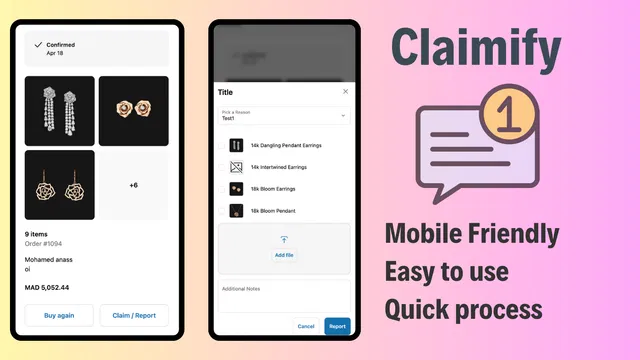
We recommend using Claimify to streamline the claims process. When an international customer receives a damaged item or has an issue with their order, they need a simple, mobile-friendly way to report it. Providing a professional claims portal reduces the friction of international support and helps maintain your brand reputation across borders.
Strategic Optimization for Long-Term Growth
Once your markets are active, the work shifts to optimization. You should treat each market as a unique business entity.
- Monitor Speed: International users may experience different load times. Consider Shopify speed optimization to ensure your global subfolders are as fast as your primary site.
- A/B Test Local Content: What works in the US might not work in Japan. Test different hero images and messaging for each market.
- Refine Your Shipping: As you grow, you may want to move from international shipping to local fulfillment centers. Shopify Markets allows you to change your shipping origins easily.
Conclusion: Taking Your Brand Global with Confidence
Expanding into international markets is a vital step for any merchant looking to achieve true high-growth status. Shopify Markets has democratized cross-border commerce, allowing smaller teams to operate with the sophistication of global conglomerates. By centralizing your operations, localizing the customer experience, and using automation tools like the Maestro suite, you can scale without the traditional overhead.
At XCO Agency, we specialize in helping brands navigate these complex transitions. Whether you are looking for growth strategies or need help with Shopify design services to localize your theme, our team is ready to assist.
Global e-commerce is no longer a luxury; it is a necessity for brands that want to remain competitive. By taking a proactive step today to configure your Shopify Markets settings, you are opening your doors to the world.
If you are ready to scale your international operations or need help optimizing your current setup, book a meeting with us today. Let's turn your store into a global powerhouse.