
As a Shopify expert, I often work with merchants who have experienced the same frustrating scenario. It is 11:47 PM, you are hunched over your laptop with a cold cup of coffee, refreshing your admin panel and waiting for the clock to strike midnight so you can manually publish your highly anticipated product drop. Your eyes are heavy, your patience is thin, and you are already dreading the alarm set for 3 AM to swap your theme back to normal.
Sound familiar? You are not alone.
Flash sales and limited product drops have become essential strategies for building hype, driving urgency, and boosting revenue. But the operational reality of executing them manually is exhausting, error-prone, and frankly unnecessary in 2026.
The good news? There is a better way. Let me walk you through how to automate your Shopify flash sales so you can sleep soundly while your store does the heavy lifting.
The Real Cost of Manual Product Drops
Before diving into solutions, let us acknowledge what manual flash sales actually cost you:
- Lost sleep and burnout from staying up late or waking at odd hours
- Human error risks like publishing the wrong products, forgetting to update prices, or missing the exact launch time
- Inconsistent customer experiences when you scramble to update banners, themes, and product visibility on the fly
- Missed revenue opportunities when you cannot scale your drop strategy because each one requires your physical presence
I have seen merchants limit their flash sales to once a month simply because they cannot sustain the manual workload. That is leaving serious money on the table.
The solution is automation, and specifically, two powerful tools that work seamlessly together: Product Maestro and Maestro Theme Scheduler.
Introducing Product Maestro: Schedule Product Availability Like a Pro
Product Maestro is designed to solve one of the most common pain points in e-commerce: controlling when products become visible and purchasable in your store.
Instead of manually toggling product status at midnight, you can schedule:
- Product visibility windows so items appear and disappear at exact times
- Inventory availability for limited drops without manually adjusting stock
- Collection assignments to automatically add or remove products from flash sale collections
- Recurring schedules for weekly drops, monthly exclusives, or seasonal releases

The beauty of Product Maestro is its simplicity. You set your schedule once, and the app handles the rest. No more setting alarms, no more late nights, and no more hoping you remembered to click publish at the right moment.
Why Scheduled Product Drops Matter
Think about what happens when you automate product availability:
- Consistency builds trust as customers know exactly when to expect your drops
- Hype management improves because you can announce drop times confidently
- Operational freedom increases so you can focus on marketing instead of admin tasks
- Scalability becomes possible allowing you to run multiple drops without additional effort
Maestro Theme Scheduler: Automate Your Store's Look and Feel
Product availability is only half the equation. A truly seamless flash sale experience requires your entire store to transform at the right moment. That means updated banners, flash sale themes, countdown elements, and promotional messaging.
This is where Maestro Theme Scheduler becomes invaluable.
With Maestro Theme Scheduler, you can:
- Schedule theme swaps to automatically publish your flash sale theme at midnight and revert to your standard theme when the sale ends
- Set recurring theme changes for weekly or monthly promotional periods
- Coordinate content updates across multiple templates and pages from a single panel
- Create publish timelines to visualize and manage all your scheduled changes

Imagine this workflow: At 11:59 PM, your store looks completely normal. At 12:00 AM sharp, your flash sale theme goes live with bold banners, countdown timers, and featured drop products. At 2:00 AM when the sale ends, your theme automatically reverts. You did not touch a single button.
That is the power of automation.
The Recurring Schedule Feature
One feature I particularly love is the recurring schedule option. If you run a weekly flash sale every Friday at midnight, you can set it once and let it run for weeks or months without intervention.
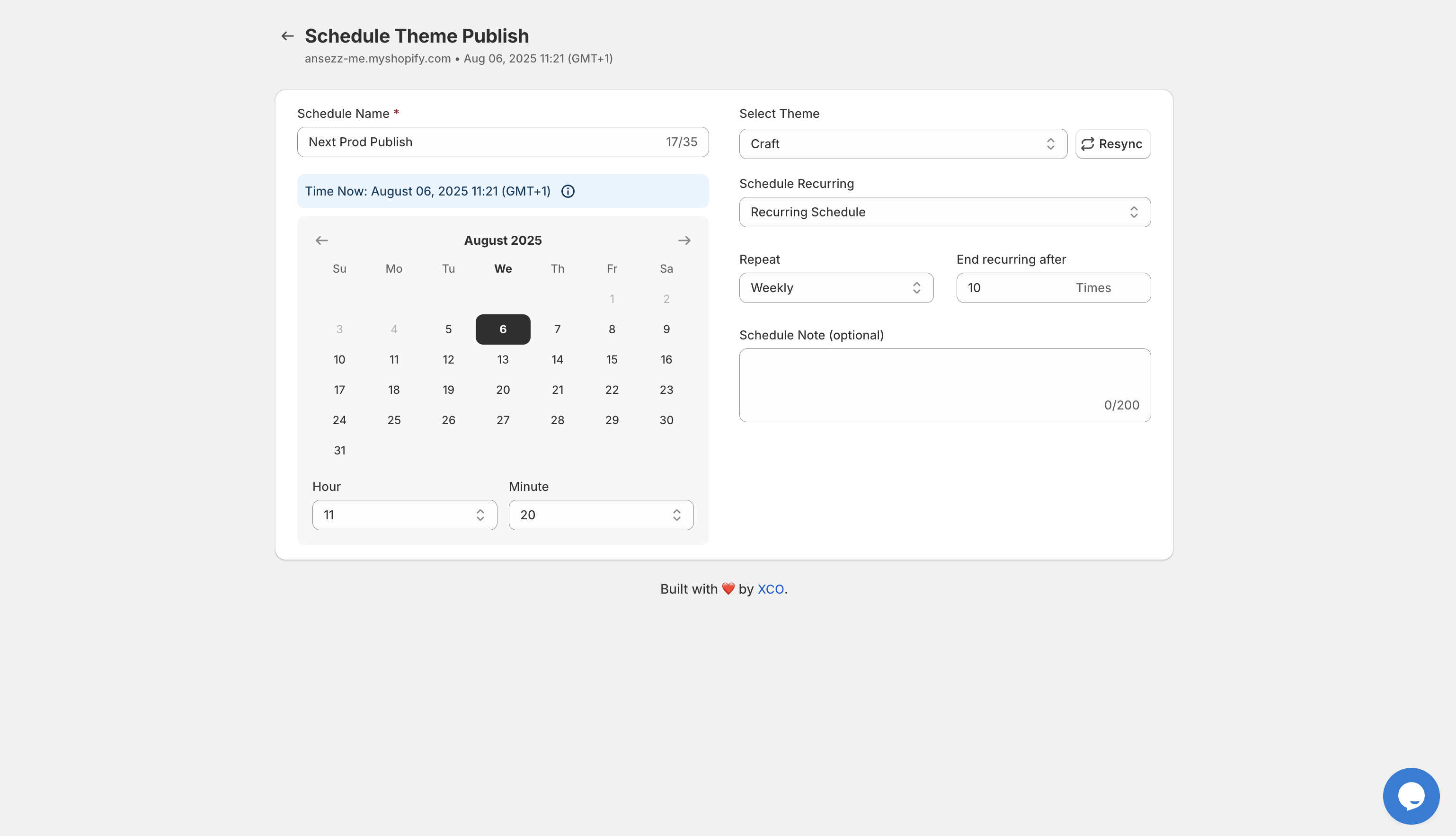
The interface allows you to:
- Name your schedule for easy reference
- Select which theme to publish
- Set the exact date and time
- Choose recurring frequency like daily, weekly, or monthly
- Define when the recurrence should end
- Add notes for your team
This level of control means you can plan an entire quarter of flash sales in one sitting.
Your Stress-Free Midnight Drop Checklist
Ready to automate your next flash sale? Here is a step-by-step checklist to ensure everything runs smoothly:
One Week Before the Drop
- Create your flash sale theme with updated banners, promotional sections, and any special navigation
- Prepare your drop products by ensuring all images, descriptions, and pricing are finalized
- Set up Product Maestro schedules for each product that will be part of the drop
- Schedule your theme swap using Maestro Theme Scheduler with exact start and end times
Three Days Before the Drop
- Test your schedules by reviewing the calendar view to confirm all times are correct
- Create a dedicated flash sale collection if using automatic discounts
- Set up your discount codes or automatic discounts with matching start and end times in Shopify
- Prepare your marketing assets including emails, SMS, and social posts
One Day Before the Drop
- Schedule your announcement emails to go out a few hours before the drop
- Queue social media posts with exact launch time details
- Double-check timezone settings to ensure all schedules align
- Consider adding a countdown timer to your current theme to build anticipation
Drop Day
- Relax because your automation is handling everything
- Monitor from a distance by checking in briefly to ensure systems triggered correctly
- Engage with customers on social if you choose to stay up, but know you do not have to
After the Drop
- Review your analytics to measure performance
- Gather customer feedback on the experience
- Document what worked for future drops
- Plan your next automated sale while the insights are fresh
Bonus: Enhance Your Flash Sales with Gift-with-Purchase
Want to take your flash sales to the next level without relying solely on discounts? Consider pairing your drops with automated free gifts using Claimify.
Instead of slashing prices, you can:
- Offer an exclusive gift only available during the flash sale window
- Create tiered rewards based on cart value
- Build perceived value without sacrificing margins
This strategy works exceptionally well for midnight drops where customers already feel a sense of exclusivity and urgency.
Why Automation is the Future of E-Commerce Operations
The merchants I work with at XCO Agency who embrace automation consistently outperform those who rely on manual processes. It is not just about convenience, though that matters. It is about:
- Reducing operational risk when critical launches do not depend on human availability
- Scaling promotional strategies without scaling your team
- Improving customer experience through consistent, well-executed campaigns
- Freeing up mental bandwidth to focus on growth instead of admin tasks
Flash sales should be exciting for your customers and profitable for your business. They should not be a source of stress, sleep deprivation, or operational chaos.
Ready to Automate Your Next Drop?
If you have been manually managing your flash sales and product drops, I encourage you to explore what automation can do for your store. Start with Product Maestro to schedule your product availability, then layer in Maestro Theme Scheduler to automate your entire store experience.
The next time midnight rolls around for a major drop, you will be sleeping peacefully while your Shopify store delivers a flawless customer experience.
That is what smart e-commerce looks like.