
As a Shopify expert, I often work with merchants who are losing sleep over product drops. Whether it is a limited edition sneaker release, a seasonal collection launch, or a flash sale that needs to go live at exactly midnight, the pressure of getting it right is immense. One missed click, one timezone miscalculation, and your entire campaign can fall flat.
The good news? It does not have to be this way. With the right Shopify product scheduler, you can automate your entire inventory lifecycle and finally embrace the "set it and forget it" approach that busy merchants dream about.
The Real Cost of Manual Product Drops
Let me paint a picture you might recognize. It is 11:58 PM. You are sitting at your laptop, finger hovering over the publish button, waiting for the clock to strike midnight so your new collection goes live. Your team has been coordinating all day. Social media posts are scheduled. Email campaigns are queued. Everything hinges on you hitting that button at the exact right moment.
Now multiply that stress by every product launch, flash sale, and seasonal update you run throughout the year. The manual approach to product drops creates several problems:
- Human error is inevitable when you are tired, distracted, or juggling multiple tasks
- Timezone confusion leads to products going live at the wrong time for your target audience
- Team coordination becomes a bottleneck when someone always needs to be online
- Scaling becomes impossible as your store grows and launches become more frequent
- Work-life balance suffers when product drops dictate your schedule
This is exactly why e-commerce automation has become essential for serious Shopify merchants.
Introducing Maestro Product Scheduler
Maestro Product Scheduler is built specifically to solve these headaches. Developed by XCO Agency, it gives you complete control over your product lifecycle without requiring you to be glued to your screen.
Think of it as your personal inventory management assistant that never sleeps, never forgets, and executes with precision every single time.

The core concept is simple but powerful. You define when products should publish, when they should unpublish, and what tags should be applied at each stage. Maestro handles the rest, executing your schedule exactly as planned regardless of whether you are awake, asleep, or on vacation.
Key Features That Transform Your Product Launches
Scheduled Publishing and Unpublishing
The foundation of any good Shopify product scheduler is reliable timing. With Maestro, you can:
- Set exact dates and times for products to become visible on your storefront
- Schedule automatic unpublishing when sales end or inventory runs out
- Create publishing windows that match your marketing campaigns perfectly
- Handle timezone differences so your global audience sees products at the right local time
Automated Tagging Throughout the Product Lifecycle
Tags drive so much of what happens in a Shopify store. From collection filtering to marketing automation triggers, getting tags right matters. Maestro lets you automate tag changes based on your schedule:
- Add "new arrival" tags when products launch
- Apply "on sale" tags during promotional periods
- Remove promotional tags automatically when sales end
- Trigger collection membership changes through strategic tagging
Recurring Schedules for Repeat Events
Some merchants run weekly flash sales, monthly restocks, or seasonal promotions that follow predictable patterns. Rather than setting up each event manually, you can create recurring schedules that repeat automatically.

How to Set Up Your First Automated Product Drop
Getting started with flash sale automation is straightforward. Here is the process I walk through with merchants:
Step 1: Plan Your Product Launch Timeline
Before touching any settings, map out your ideal launch sequence. Consider:
- When should the product become visible for browsing?
- When should purchasing become available?
- How long should the sale or availability window last?
- What happens after the window closes?
Step 2: Configure Your Schedule in Maestro
Navigate to the Maestro Product Scheduler app in your Shopify admin. Create a new schedule and define:
- The specific products or collections involved
- Your target publish date and time
- Any tags that should be applied at launch
- The unpublish date if applicable
Step 3: Set Up Supporting Tags
Think about what automated processes depend on product tags. If you use Klaviyo for email marketing, certain tags might trigger flows. If you have dynamic collections, tags determine which products appear where. Configure these tag changes to align with your schedule.
Step 4: Test Before Your Big Launch
For important drops, I always recommend doing a test run with a draft product. Verify that the timing works as expected and that tags apply correctly. A few minutes of testing can prevent hours of troubleshooting later.
Step 5: Coordinate Your Marketing
With your product schedule locked in, you can confidently schedule your email campaigns, social media posts, and ads to align perfectly. No more last-minute coordination calls.
Flash Sale Automation: The Set It and Forget It Advantage
Flash sales are where Maestro really shines. These time-limited promotions create urgency, but they also create operational chaos when managed manually. Here is how automation transforms the flash sale experience:
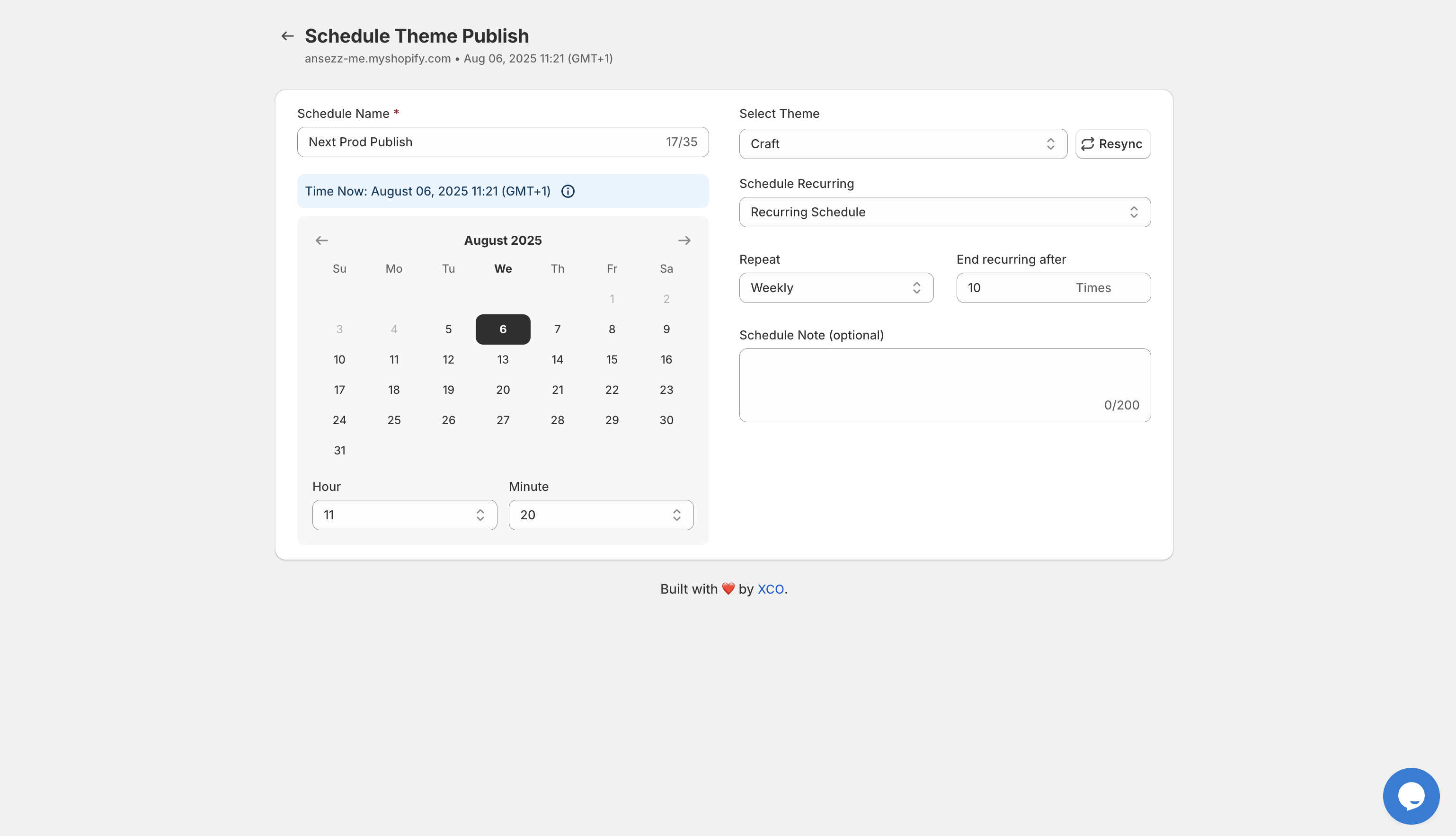
Before the Sale
Schedule your sale products to publish at the exact moment your campaign emails hit inboxes. Apply "flash sale" tags that automatically add products to your promotional collection.
During the Sale
Focus on customer service and monitoring performance rather than babysitting product settings. Your automation handles the technical execution while you handle the human elements.
After the Sale
Products automatically unpublish or have their promotional tags removed. Your store returns to its normal state without anyone needing to remember to "turn off" the sale.
Best Practices for Product Drop Success
After helping dozens of merchants optimize their inventory management with Maestro, I have noticed patterns in what separates smooth launches from chaotic ones:
Build in Buffer Time
Schedule products to publish a few minutes before your marketing goes out. This ensures everything is live and working when customers start clicking through.
Use Descriptive Schedule Names
When you have multiple schedules running, clear naming conventions prevent confusion. "Summer Flash Sale July 15" is more useful than "Sale 1."
Document Your Automation
Keep a simple record of what automations are running and when. This helps when team members need to understand what is scheduled or troubleshoot unexpected behavior.
Monitor Your First Few Automated Launches
Even though the goal is "set it and forget it," watch your first few automated drops to confirm everything works as expected. Once you trust the system, you can truly step back.
Align Tags with Your Marketing Stack
Think holistically about how product tags interact with email marketing, SMS campaigns, and advertising platforms. Strategic tagging amplifies the impact of your automation.
Taking the Next Step
If you are still manually managing product drops, you are spending time and energy on tasks that could be fully automated. The stress of midnight launches, the risk of human error, and the coordination overhead are all problems with proven solutions.
Maestro Product Scheduler gives you the tools to automate your product lifecycle and reclaim your time. Whether you are running weekly flash sales or planning your biggest launch of the year, having reliable automation in place is a vital step toward scaling your e-commerce operation.
Ready to make your next product drop your smoothest one yet? Install Maestro and set up your first automated schedule today. And if you need help optimizing your Shopify store beyond product scheduling, the team at XCO Agency is always here to help you grow.
For more tips on enhancing your store operations, check out our other guides in the Maestro Products Scheduler blog.