
As a Shopify expert, I often consult with brands that have hit what I call the success ceiling. They have the traffic, the sales are pouring in, and the brand is growing, yet the backend is screaming for help. Usually, the loudest screams come from the customer support team. While marketing is out there winning new customers, the support team is buried under a mountain of manual return requests, blurry photos of damaged goods sent via email, and the endless back and forth of "What is your order number again?"
Manual returns are the stepping on a Lego of the ecommerce world: unexpected, painful, and they make you want to yell at the ceiling. For brands looking for robust enterprise ecommerce solutions, staying stuck in a manual inbox workflow is not just inefficient; it is a profit killer. This is where Claimify enters the chat. As a specialized tool for support and claims, it turns the post-purchase headache into a streamlined, automated process that saves time and keeps customers happy.
In this post, we will explore five ways Claimify simplifies your operations and why it is a vital component of modern ecommerce maintenance services.
The Problem with Manual Post-Purchase Support
Before we dive into the solutions, we need to acknowledge what most store owners are seeking when they look for automation. They want to escape the Inbox Abyss. When a customer has an issue, their first instinct is to reply to a confirmation email or find a contact form. This leads to several issues:
• Data Fragmentation: Vital information like order numbers, photos, and tracking IDs are scattered across different email threads.
• Slow Response Times: Support agents spend more time gathering information than actually solving the problem.
• High Human Error: Copying and pasting data between Shopify and an email client is a recipe for manual entry mistakes.
• Poor Customer Experience: Customers hate waiting 48 hours just to be told they forgot to include a photo of the shipping label.
By shifting to an automated system, you move away from reactive firefighting and toward proactive management.
1. Moving from Inbox Chaos to a Unified Dashboard
The primary benefit of Claimify is the transition from a messy email inbox to a structured, unified dashboard. As a Shopify expert, I often see teams lose hours every week just trying to organize their tickets. Claimify acts as a central hub where every return, refund, and warranty claim is stored in a clean, searchable format.
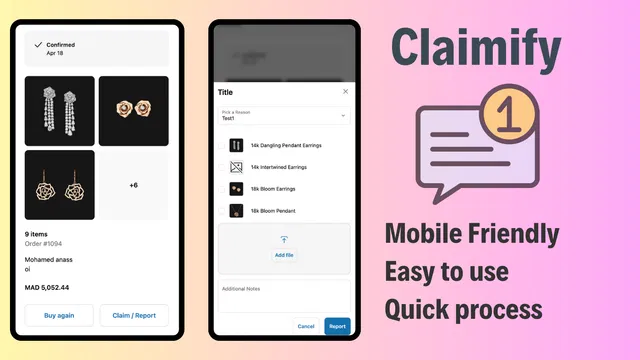
When a request comes in through the Claimify portal, it is automatically categorized. You do not have to guess if it is a "wrong item sent" or a "damaged during transit" issue. The system captures all the necessary data upfront.
• Centralized Communication: Keep all claim-related messages in one place rather than hunting through your personal or general support inbox.
• Visual Proof: The dashboard displays uploaded photos directly alongside the order details, allowing for instant verification.
• Status Tracking: Easily see which claims are pending, approved, or resolved at a glance.
This organization is essential for enterprise ecommerce solutions because it allows for scalability. You can add more support agents without them tripping over each other in a shared Gmail account.
2. Improving the Post-Purchase Experience via Self-Service
In the modern era of shopping, customers do not want to talk to you. That sounds harsh, but it is true. They want to fix their problems quickly and get on with their day. If they have to wait for a human to give them permission to return an item, their loyalty to your brand drops.
Claimify provides a self-service portal that can be embedded directly on your storefront or linked from the thank-you page. This allows customers to initiate their own claims without ever picking up the phone or sending an email.
• Ease of Access: Link the claims portal in your footer or order confirmation emails so customers know exactly where to go.
• Guided Submission: The app walks the customer through the process, asking for the order number, item selection, and reason for the claim.
• Instant Gratification: Giving the customer a "Your claim has been submitted" confirmation page provides immediate peace of mind.
By empowering the customer, you are not just saving your team time; you are building trust. A smooth return process is often what brings a customer back for a second purchase.

3. Implementing Automated Validation Rules
One of the biggest time-wasters in ecommerce maintenance services is the manual verification of return policies. Your staff should not have to manually check if a purchase was made within the 30-day window or if the item was a "final sale" product.
Claimify allows you to set up automated validation rules that do the thinking for you. This is the "brain" of your claims process.
• Policy Enforcement: Automatically reject claims that fall outside your return window or apply only to specific product categories.
• Required Documentation: Set rules that prevent a customer from submitting a "Damaged" claim unless they have uploaded at least two photos.
• Conditional Logic: If a customer selects "Wrong Item," the system can automatically ask them to upload a photo of the barcode they received.

By the time a claim reaches your dashboard, you already know it meets your basic criteria for approval. This significantly reduces the back-and-forth communication required to get a claim "ready" for review.
4. Seamless Integration with Enterprise Ecommerce Solutions
For large-scale merchants, a standalone app that does not talk to the rest of the tech stack is a liability. Claimify is designed to work within the Shopify ecosystem, ensuring that your data flows where it needs to go. Whether you are using Shopify integrations for your ERP or your shipping carrier, having a dedicated claims tool ensures that your inventory and financial records stay accurate.
• Syncing with Shopify Orders: The app pulls real-time data from your Shopify store, ensuring that customers can only file claims against valid, fulfilled orders.
• Workflow Triggers: You can use the data from Claimify to trigger other actions, such as sending a personalized discount code via Klaviyo once a claim is resolved.
• Scalable Infrastructure: As your order volume grows, Claimify handles the load without requiring you to hire a proportional number of new support staff.
Enterprise-level brands need systems that can be optimized. By using a tool that automates the "boring" parts of support, your high-level staff can focus on growth strategies rather than checking return labels.
5. Leveraging Data for Better Product Maintenance
Finally, Claimify provides a wealth of data that can help you improve your business. If you notice a high volume of "Damaged" claims for a specific SKU, that is a red flag. Perhaps the packaging is insufficient, or there is a recurring manufacturing defect.
• Identify Trends: See which products have the highest return rates and why.
• Supplier Accountability: Use claim data to hold your suppliers accountable for quality issues or shipping errors.
• Optimization: Adjust your product descriptions if you see a high number of "Item not as described" claims for a particular product.
This level of insight is what separates a basic online store from a data-driven enterprise. It allows you to move from simply "handling returns" to "reducing returns" through better product maintenance and quality control.

Step-by-Step: Setting Up Your Claimify Workflow
If you are ready to stop wasting time on manual returns, here are the simple steps to get your automated claims process running.
- Install and Connect: Add the Claimify app to your Shopify store and sync your historical order data.
- Define Your Policies: Navigate to the settings and input your return windows, non-refundable items, and required documentation for different claim types.
- Customize the Portal: Style the claims portal to match your brand colors and fonts. Ensure it looks like a native part of your website.
- Set Up Notification Triggers: Decide who gets notified when a new claim is submitted and set up automated emails to keep the customer informed of their claim status.
- Embed the Portal: Place the link to your new portal in your navigation menu, footer, and post-purchase email flows.
After completing these steps, your support team will likely notice an immediate drop in "status update" emails from customers, as the system handles the heavy lifting of communication.
Conclusion: A Vital Step for Scalable Growth
As a Shopify expert, I cannot emphasize enough how important it is to automate your post-purchase workflows. Manual returns are a bottleneck that prevents you from scaling. By implementing a tool like Claimify, you centralize your support, empower your customers with self-service options, and use automated rules to protect your bottom line.
Moving your support requests from messy email inboxes to a unified dashboard is not just about convenience; it is a proactive step toward building a more professional and efficient brand. Whether you are looking to improve your customer experience or looking for more comprehensive ecommerce maintenance services, automating your claims is a win-win for everyone involved.
Stop playing email tag with your customers. It is time to let Claimify handle the details so you can focus on the big picture. If you need help integrating these types of automated solutions into your Shopify Plus store, feel free to reach out to us at XCO Agency for a consultation.