
As a Shopify expert, I often hear the same story from store owners: "I had to stay up until midnight to manually switch our theme for Black Friday." Or "I set an alarm for 3 AM to launch our Valentine's Day collection." Sound familiar?
If you've ever found yourself frantically clicking "Publish" at an ungodly hour just to launch a sale or swap out seasonal content, you're not alone. Manual theme management is one of those silent productivity killers that keeps e-commerce teams glued to their screens at the worst possible times.
The good news? There's a better way. Maestro Theme Scheduler handles all of this automatically, so you can finally get a full night's sleep before your biggest launches.
The Real Cost of Manual Theme Launches
Let's talk about what manual theme scheduling actually looks like. You've planned your BFCM campaign for months. Your seasonal banners are ready. Your promo codes are set. Everything is perfect, except for one small detail: someone needs to be awake at midnight to click "Publish" on your holiday theme.
Here's what usually happens:
- Timezone chaos - Your team is spread across different locations, and coordinating who stays up late becomes a logistical nightmare
- Launch anxiety - You're refreshing your store every five minutes to make sure everything went live correctly
- Human error - It's 2 AM, you're tired, and you accidentally publish the wrong theme version or forget to update a banner
- Lost sleep - You sacrifice rest during your busiest sales periods when you actually need to be sharp and strategic
This isn't just about convenience. It's about protecting your team's wellbeing and your store's performance during critical revenue moments.

What Maestro Theme Scheduler Actually Does
Maestro Theme Scheduler is built to eliminate the need for manual intervention when launching theme changes. It's the "set it and forget it" solution for Shopify stores that run time-sensitive campaigns.
Here's the simple promise: schedule your theme changes in advance, and they'll go live automatically at the exact time you specify, without anyone needing to be online.
But it goes deeper than just basic scheduling. You get granular control over:
- Full theme publishes - Switch your entire theme at a specific date and time
- Individual sections and blocks - Update specific parts of your store without publishing a whole new theme
- Recurring schedules - Set up weekly promos, seasonal content, or daily updates that repeat automatically
- Multi-timezone coordination - Plan everything once and let the app handle timing across global markets
The app works across all Shopify themes and requires zero technical setup. You install it, create your schedule, and move on with your day.
The Features That Change Everything
1. Scheduling Theme Changes Down to the Minute
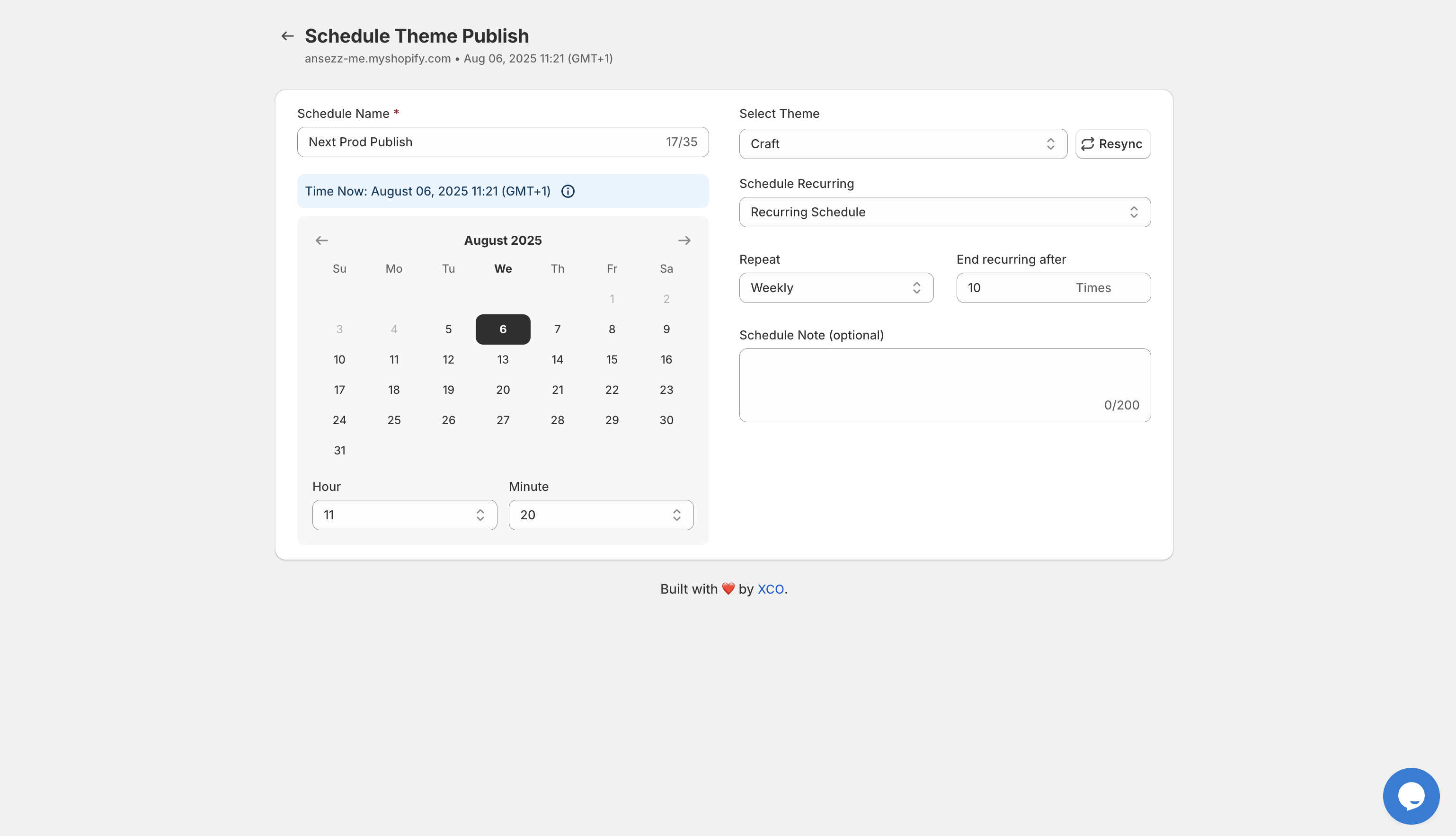
You're not limited to vague "sometime today" launches. Maestro lets you schedule theme publishes down to the exact minute. Planning a flash sale at 9 AM EST? Set it and forget it. Need your Valentine's theme to go live at midnight? Done.
2. Recurring Automation for Seasonal Content
Here's where Maestro becomes truly powerful: recurring schedules. Instead of manually swapping banners every week for your Sunday sale, you set up one recurring schedule, and it handles the rest indefinitely.
This is perfect for:
- Weekly flash sales that run every Friday
- Monthly collection drops on the 1st of each month
- Holiday themes that switch automatically throughout the year
- Seasonal banners that appear and disappear based on your calendar
3. Section-Level Control Without Full Theme Publishing
Not every update needs a complete theme overhaul. Maestro lets you schedule changes to individual sections and blocks, so you can update a promotional banner, swap out a hero image, or modify a slideshow without touching the rest of your theme.
This granular control means faster updates, less risk, and more flexibility in how you manage your store's appearance.
4. Visual Timeline of All Your Scheduled Changes
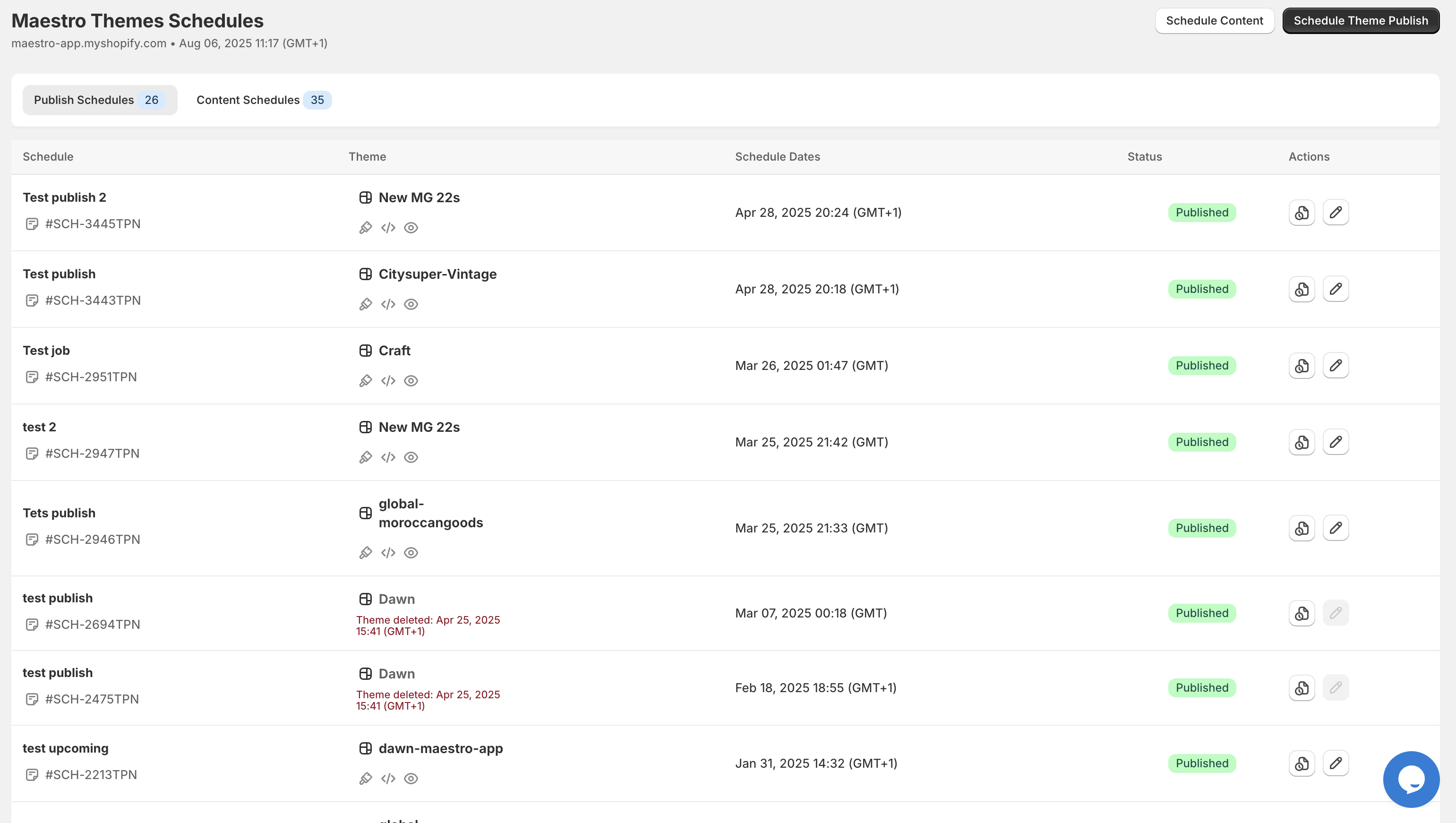
One of my favorite features is the publish timeline view. You get a visual calendar that shows exactly what's scheduled to go live and when. No more spreadsheets or sticky notes trying to track what launches when.

This visibility is critical when you're managing multiple campaigns, coordinating with marketing teams, or just trying to stay organized during peak seasons.
Real-World Use Cases
Let me walk you through how stores actually use Maestro Theme Scheduler in the wild:
Black Friday / Cyber Monday Preparation
You've built your BFCM theme in October. It's tested, optimized, and ready to go. Instead of staying up on Thanksgiving night, you schedule it to publish automatically at midnight. While you're enjoying time with family, your store transforms itself and starts capturing early-bird shoppers.
When Cyber Monday ends, another scheduled change swaps everything back to your standard theme. No manual intervention required.
Flash Sales and Limited-Time Offers
Run a 24-hour flash sale every Tuesday? Set up a recurring schedule that publishes your sale banner at 9 AM and removes it at 9 AM the next day. It runs automatically every single week without you lifting a finger.
Seasonal Theme Rotations
Holiday stores are a perfect example. Your Halloween theme goes live on October 1st, switches to Thanksgiving on November 1st, then Christmas on December 1st. All scheduled months in advance. You set it up once in September and let Maestro handle the transitions.
Product Launch Coordination
Dropping a new collection at a specific time? Schedule your theme to showcase the new products exactly when they become available. Coordinate your theme changes with your product publish times for a seamless launch experience.
The Sleep Comparison: Manual vs. Automated
Let's put this in perspective with a simple visual:
Launch Night Sleep:
- Manual theme management: 2-3 hours (you're up late, anxious, and double-checking everything)
- Maestro Theme Scheduler: 8 hours (you schedule it days in advance and sleep peacefully)
That's not just about feeling rested. That's about showing up sharp for the actual work that matters: analyzing sales data, responding to customer questions, and optimizing your campaigns in real-time.
How to Get Started with Maestro Theme Scheduler
The setup process is refreshingly simple:
Step 1: Install Maestro Theme Scheduler from the Shopify App Store
Step 2: Create your first schedule by selecting the theme you want to publish and setting the date and time
Step 3: Add any section or block-level changes you want to include
Step 4: Review your schedule in the timeline view and confirm
Step 5: Move on with your life while Maestro handles the execution
There's no configuration required, no complicated settings to navigate, and no learning curve. The interface is intuitive enough that you can create your first schedule in under five minutes.
If you do need help optimizing your automation strategy, Maestro offers live chat support directly within the app.
Why This Matters for E-Commerce Productivity
Here's the thing about productivity in e-commerce: it's not just about doing more tasks faster. It's about eliminating unnecessary tasks entirely so you can focus on strategy, creativity, and growth.
Manual theme scheduling is busy work. It's necessary, sure, but it doesn't require your strategic brain. It's the kind of task that drains energy without adding value.
When you automate theme scheduling with Maestro, you're not just saving time. You're:
- Reducing stress during your most critical sales periods
- Eliminating human error at launch moments
- Freeing up mental bandwidth for high-impact work
- Creating consistency in how your store presents itself across campaigns
And perhaps most importantly, you're giving yourself and your team permission to rest. The most successful e-commerce operators aren't the ones who work around the clock. They're the ones who build systems that work for them.
Ready to Stop Losing Sleep Over Store Launches?
If you're tired of setting alarms for midnight theme swaps, or if you've ever scrambled to fix a launch that went wrong because someone was too tired to catch an error, it's time to try a different approach.
Maestro Theme Scheduler gives you the peace of mind that comes with knowing your store launches will happen exactly as planned, without manual intervention, and without sacrificing your sleep.
Built by the team at XCO Agency, Maestro is designed specifically for Shopify merchants who want to scale their operations without scaling their stress levels. Install it today and experience what it's like to launch campaigns on your schedule, not your store's.
Your 3 AM alarm clock will thank you.