
As a Shopify expert, I often see merchants invest thousands of dollars into their initial shopify store setup, focusing heavily on high-resolution imagery and complex checkout flows, yet they overlook the post-purchase experience. One of the most common friction points in a growing e-commerce business is the management of gift cards. When a customer receives a gift card, they want to know exactly how much credit they have left before they start filling their cart.
In the standard Shopify environment, checking a gift card balance usually requires the customer to dig through old emails or, even worse, reach out to your support team. This creates unnecessary work for your staff and frustration for your buyers. Implementing a self-service balance checker is not just a "nice-to-have" feature; it is a fundamental component of modern shopify design services that prioritizes user experience and operational efficiency.
The Problem with Manual Gift Card Inquiries
I often work with brands that are scaling quickly, and they all hit the same wall: support ticket overload. A significant portion of these tickets involves simple questions like, "How much is left on my gift card?" or "Can you check if my code still works?"
When your team spends hours every week answering these basic questions, they are not focusing on high-value tasks like closing sales or managing growth strategies. Furthermore, manual inquiries create a delay. If a customer has to wait six hours for a support representative to reply with a balance, they might lose interest in the purchase entirely.
Why Customers Demand Self-Service
Modern shoppers are accustomed to instant gratification. They want to manage their accounts and store credits on their own terms. By providing a dedicated widget for gift card checks, you are offering:
- Immediate Transparency: Customers see their balance in real-time.
- Reduced Friction: No need to leave the site or open an email client.
- Enhanced Trust: A professional tool reflects a well-organized business.
- Faster Path to Purchase: Once a balance is confirmed, the customer is one step closer to checking out.
Introducing Gift Card Checker By Maestro
To solve this specific pain point, my team at XCO Agency recommends the Gift Card Checker By Maestro. This app was designed specifically to bridge the gap between Shopify's robust backend and the customer's need for front-end access. It allows you to add a simple, beautiful widget to your store where customers can enter their code and see their remaining balance instantly.
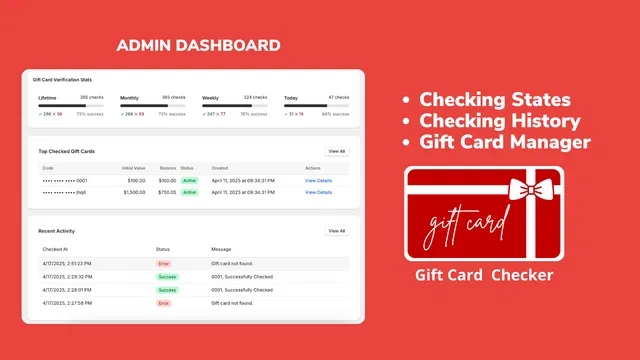
The beauty of this solution lies in its simplicity. During a shopify store setup, you don't want to spend days configuring complex logic. Maestro offers a one-click setup that integrates seamlessly with your existing theme.
Key Features of Maestro Gift Card Checker
- One-Click Installation: No coding knowledge or liquid file editing required.
- Real-Time Data: The app pulls directly from Shopify’s secure database to ensure accuracy.
- Customizable Design: Match the widget to your brand colors and fonts.
- Mobile Optimized: Works perfectly on smartphones, where most gift card users shop.
Enhancing Your Shopify Store Setup with Better UX
When you are planning your shopify store setup, every element should serve a purpose. Adding a balance checker is a proactive move that signals to your customers that you value their time. It also complements other ecommerce maintenance services by reducing the long-term burden on your customer service infrastructure.
 Visualizing a clean, customer-facing gift card balance widget on a Shopify storefront.
By embedding this tool into your footer, account page, or a dedicated "Gift Card Info" page, you create a central hub for all store credit needs. This level of organization is what separates amateur stores from professional, high-converting brands.
The Role of Customization and Branding
I always tell my clients that a tool is only as good as its integration. If a balance checker looks like a third-party plugin that doesn't fit your theme, customers will be hesitant to enter their codes.
Maestro understands this. The app provides robust customization options so you can ensure the widget looks like a native part of your website. Maintaining brand consistency is vital for building the trust necessary for repeat business. You can adjust:
- Button Colors: Use your primary brand colors for the "Check Balance" action.
- Typography: Align the widget text with your site's heading and body fonts.
- Language: Translate the labels to match your store’s primary language.
- Placement: Choose exactly where the widget appears to maximize visibility without cluttering the UI.
Fostering Loyalty and Repeat Purchases
Gift cards are one of the most powerful tools for customer retention. However, they only work if they are easy to use. A forgotten gift card with a $10 balance is a missed opportunity for a $50 sale.
When a customer checks their balance and sees they have a small amount left, it often triggers a "use it or lose it" mentality. They are far more likely to browse your collections and find something to buy, often spending well over the value of the card itself.
Driving Sales Through Convenience
- Encourage Discovery: A balance check often leads to a browsing session.
- Lower Abandonment: Knowing the exact balance helps customers plan their spending at checkout.
- Boost Loyalty: Easy tools make for happy customers who come back for more.

As shown in the admin dashboard, you can track how often customers are checking their balances. This data is gold. It helps you understand how active your gift card program is and whether you need to adjust your growth strategies to promote gift card usage more effectively.
Integrating with Ecommerce Maintenance Services
Maintaining a Shopify store isn't just about fixing bugs; it's about constant optimization. This is where ecommerce maintenance services come into play. A quarterly audit of your store’s apps and customer flow might reveal that your support team is still getting too many manual inquiries.
If you haven't yet automated your gift card balance checks, that should be your first step. By utilizing tools like Maestro, you are effectively "future-proofing" your store. As you scale from 100 orders a month to 10,000, your support needs won't grow at the same exponential rate because you have empowered your customers to help themselves.
Simple Steps to Get Started
- Navigate to the Shopify App Store: Search for "Gift Card Checker By Maestro."
- Install the App: Follow the prompt to authorize the app in your admin.
- Configure the Widget: Head to the app settings to customize the look and feel.
- Add to Navigation: Place a link to your balance checker page in your header or footer menu.
- Monitor Performance: Check the app dashboard regularly to see engagement levels.
 A step-by-step visual showing how to customize the Maestro widget colors to match a brand style guide.
Why Experience Matters in Shopify Development
As a CEO who oversees dozens of migration to shopify projects, I can tell you that the difference between success and failure is often found in the details. A store that handles the small things well, like gift card balances, is a store that customers will trust with their larger purchases.
We often integrate Maestro as part of our comprehensive shopify integrations package because we know it works. It is reliable, fast, and does exactly what it promises without adding bloat to your store's code.
Summary: A Vital Step for Professional Growth
Implementing a self-service gift card balance checker is a vital step for any merchant looking to professionalize their shopify store setup. It solves a recurring problem for customers, frees up your support staff, and maintains the high-quality branding you have worked so hard to build.
By prioritizing these small but impactful improvements, you are taking a proactive step toward building a more resilient and efficient e-commerce business. Don't let simple balance inquiries slow down your growth. Automate the process, empower your customers, and focus on what you do best: selling great products.
If you are looking to optimize your store further or need help with professional ecommerce maintenance services, our team at XCO Agency is here to guide you. From shopify speed optimization to full-scale digital marketing, we have the expertise to help your business thrive.
Ready to take your store to the next level? Book a meeting with us today to discuss your project.