
As a Shopify expert, I often work with merchants who are ready to scale their flash sales but keep hitting the same wall. The promotion is planned. The inventory is stocked. The marketing emails are queued. And then someone has to manually swap the theme at 3 AM.
Sound familiar?
Flash sales are powerful revenue drivers. But when you are running high-stakes promotions on Shopify Plus, the difference between a successful event and a chaotic mess often comes down to one thing: how you manage your theme swaps.
Today, I want to walk you through a blueprint for automated, zero-downtime theme swaps that removes the stress and risk from your flash sale operations.
The Real Cost of Manual Theme Publishing
Here is what I see all the time with growing Shopify Plus brands. The team builds a beautiful flash sale theme. Custom banners, countdown timers, sale-specific collections, the works. Launch time arrives, and someone has to:
- Log into the admin panel
- Navigate to themes
- Double-check the right theme is selected
- Hit publish
- Pray nothing breaks
The problem? Manual theme publishing introduces a 15 to 30 minute lag window. During peak traffic, that delay can mean thousands in lost revenue. Even worse, human error creeps in. Wrong theme published. Sale banner still showing hours after the event ends. Pricing not updated across all pages.
These are not hypothetical scenarios. They happen constantly.
| Approach | Time to Deploy | Risk of Error | Verified Preview |
|---|---|---|---|
| Manual | 15-30 minutes | High | No |
| Automated | 0 minutes | Minimal | Yes |
The numbers speak for themselves. When you are running a flash sale that might generate six figures in a few hours, you cannot afford lag or mistakes.
Why Zero-Downtime Theme Swaps Matter
Flash sales live and die by timing. Your customers expect the sale to start exactly when you promised. Not 15 minutes later. Not with a broken banner. Not with yesterday's pricing still showing.
Zero-downtime theme swaps mean:
- Your sale-specific theme goes live at the exact scheduled moment
- No manual intervention required
- Automatic rollback to your standard theme when the sale ends
- Preview verification before anything goes live
This is not just about convenience. It is about protecting your brand experience during your highest-traffic moments.
Introducing Maestro Theme Scheduler: A UI Walkthrough
Maestro Theme Scheduler was built specifically for Shopify Plus merchants who need precise control over their theme deployments. Let me walk you through how it works.
Setting Up Your Flash Sale Theme Swap
When you open Maestro Theme Scheduler, you will see a clean interface designed for one purpose: scheduling theme changes without the headache.
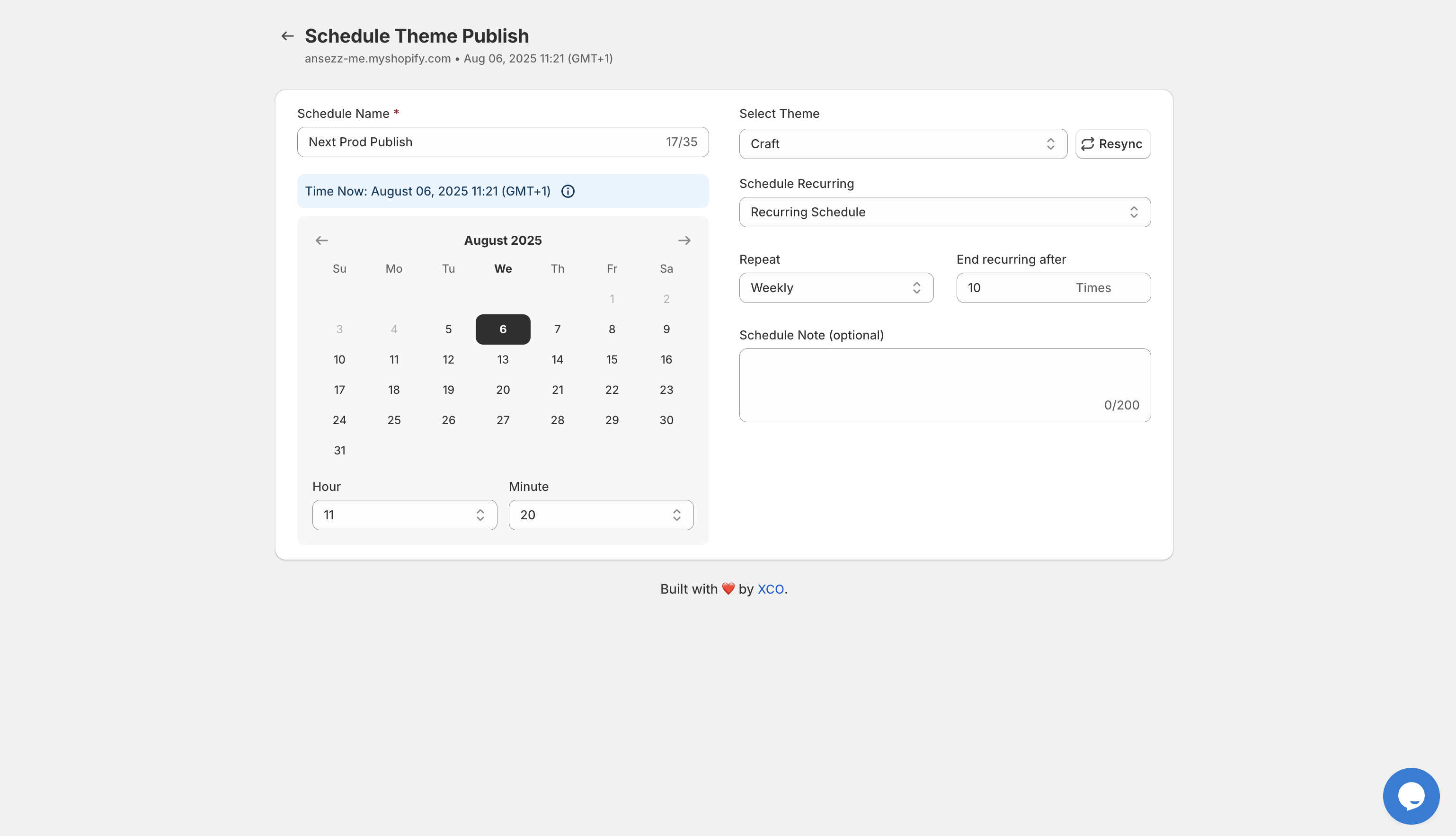
Here is the step-by-step process:
Step 1: Name Your Event
Give your schedule a clear name like "Black Friday Flash Sale" or "Summer Clearance Launch." This keeps your calendar organized, especially when you are running multiple campaigns.
Step 2: Select Your Theme
Choose the theme you want to publish. This could be your dedicated flash sale theme with promotional banners, urgency elements, and sale-specific navigation.
Step 3: Set Your Date and Time
Pick the exact moment you want the theme to go live. Down to the minute. No more watching the clock at midnight.
Step 4: Configure Recurring Options
Running weekly flash sales? Set up recurring schedules so your weekend promotions deploy automatically every Friday at 6 PM.
Step 5: Add Notes
Keep your team aligned by adding context. "This theme includes the 40% off homepage banner and updated collection pages."
Advanced Scheduling Features
The real power shows up when you dig into the advanced capabilities.

Maestro Theme Scheduler supports:
- Grouped schedules for coordinating multiple theme elements
- Content settings automation including text, images, product pickers, and color schemes
- Integration with Shopify Flow for triggering additional automations when themes publish
- Rich text and paragraph scheduling for dynamic content updates
This means you can schedule not just the theme swap, but specific content changes within your theme. Update your hero banner copy. Swap out product images. Change your color scheme for the sale period. All automated.
Building Your Flash Sale Automation Stack
Theme swaps are just one piece of the puzzle. Here is how I recommend merchants build a complete flash sale automation system.
1. Schedule Products With Product Maestro
Before your theme goes live, your products need to be ready. Product Maestro Scheduler lets you:
- Queue products for automatic publishing at sale start
- Schedule price changes and discount applications
- Set visibility rules by collection or tag
- Coordinate inventory updates across channels
Create a playlist for your flash sale products, set the timing to match your theme swap, and everything launches together.
2. Automate Theme Visuals With Maestro Theme Scheduler
Your theme swap handles the storefront experience. Sale banners appear. Navigation updates. The urgency messaging kicks in. And when the sale ends, everything reverts automatically.
3. Prepare Support Workflows With Claimify
Flash sales drive volume. Volume drives support tickets. Claimify helps you stay ahead by:
- Auto-routing flash sale order issues to dedicated workflows
- Triggering instant confirmation messages for high-demand items
- Managing oversell scenarios with pre-built resolution flows
This three-app stack gives you end-to-end automation from product prep through post-sale support.
Real Results: Manual vs Automated Flash Sales
I have seen merchants transform their flash sale operations with this approach. Here is what the before and after typically looks like:
| Metric | Manual Process | Automated Stack |
|---|---|---|
| Setup time per event | 4-6 hours | 45 minutes |
| Launch timing accuracy | Within 30 minutes | Exact to the second |
| Theme revert errors | 2-3 per quarter | Zero |
| Team stress level | High | Minimal |
The time savings alone justify the investment. But the real value is in the reliability. When your flash sale launches perfectly every single time, you build customer trust and protect your brand.
Best Practices for Flash Sale Theme Swaps
Based on working with dozens of Shopify Plus merchants, here are the practices that separate smooth flash sales from chaotic ones:
Preview everything before scheduling. Maestro Theme Scheduler gives you verified previews. Use them. Catch issues before they go live.
Build dedicated flash sale themes. Do not just edit your main theme. Create a separate theme specifically for promotions. This gives you clean rollback options.
Schedule your rollback in advance. Set up the theme swap back to your standard storefront at the same time you schedule the sale launch. Never rely on someone remembering to do it manually.
Test your timing with a dry run. Schedule a test swap during off-peak hours. Verify everything works before the high-stakes event.
Coordinate with your full stack. Make sure your product schedules, theme swaps, and support workflows all align. One app out of sync can create customer confusion.
Ready to Scale Your Flash Sales?
Flash sales should be exciting, not stressful. With the right automation in place, you can run high-converting promotions without the 3 AM alarm clocks and frantic Slack messages.
The blueprint is simple: automate your product launches, automate your theme swaps, and automate your support workflows. Let the tech handle the execution so your team can focus on strategy.
- Try Maestro Theme Scheduler for zero-downtime theme automation
- Explore Product Maestro for coordinated product launches
- Set up Claimify for streamlined post-sale support
Want a custom walkthrough for your next flash sale? Book a meeting with our team and we will help you build an automation stack tailored to your store.