
As a Shopify expert, I often see store owners struggling with the same recurring challenge: managing theme updates and content changes across multiple campaigns, time zones, and seasonal promotions. Whether you're launching Black Friday sales at midnight or coordinating global product releases, manual theme management becomes a bottleneck that limits growth and creates stress.
That's exactly why we developed Maestro Theme Scheduler at XCO Agency - to transform theme management from a reactive, time-consuming task into a proactive, automated process that saves merchants 3-5 hours weekly while boosting campaign reliability.
The Hidden Cost of Manual Theme Management
Most Shopify store owners don't realize how much time they're losing to manual theme updates. Consider these common scenarios:
• Midnight launch stress - Staying awake to manually activate Black Friday themes and promotional banners • Time zone coordination chaos - Team members across different regions struggling to synchronize updates • Missed campaign windows - Sales starting late because someone forgot to publish the promotional theme • Content update bottlenecks - Needing to republish entire themes just to change one banner or hide expired promotions
Our data shows that merchants using manual processes spend an average of 4.2 hours weekly on theme-related tasks, with 23% reporting they've missed campaign launch windows due to coordination issues.

What Makes Maestro Theme Scheduler Different
Maestro Theme Scheduler eliminates these pain points through comprehensive automation that goes beyond basic theme switching. Here's what sets it apart:
Granular Content Control
Unlike other scheduling apps that only handle full theme publishing, Maestro lets you schedule individual sections and blocks. This means you can:
• Update promotional banners without republishing entire themes • Hide expired campaign content at specific times • Show seasonal messaging only during relevant periods • Coordinate complex multi-element campaigns with precision timing

The interface allows you to name your schedule, select specific themes, set recurring automation (like weekly cycles), and specify exact dates and times. You can even add custom notes to track campaign details and use the resync button to ensure everything stays coordinated.
Recurring Schedule Intelligence
Set up seasonal campaigns once and let automation handle the recurring execution. Our recurring schedule feature supports:
• Weekly flash sales that activate automatically • Monthly product launch themes • Seasonal banner rotations • Holiday campaign sequences
Multi-Template Coordination
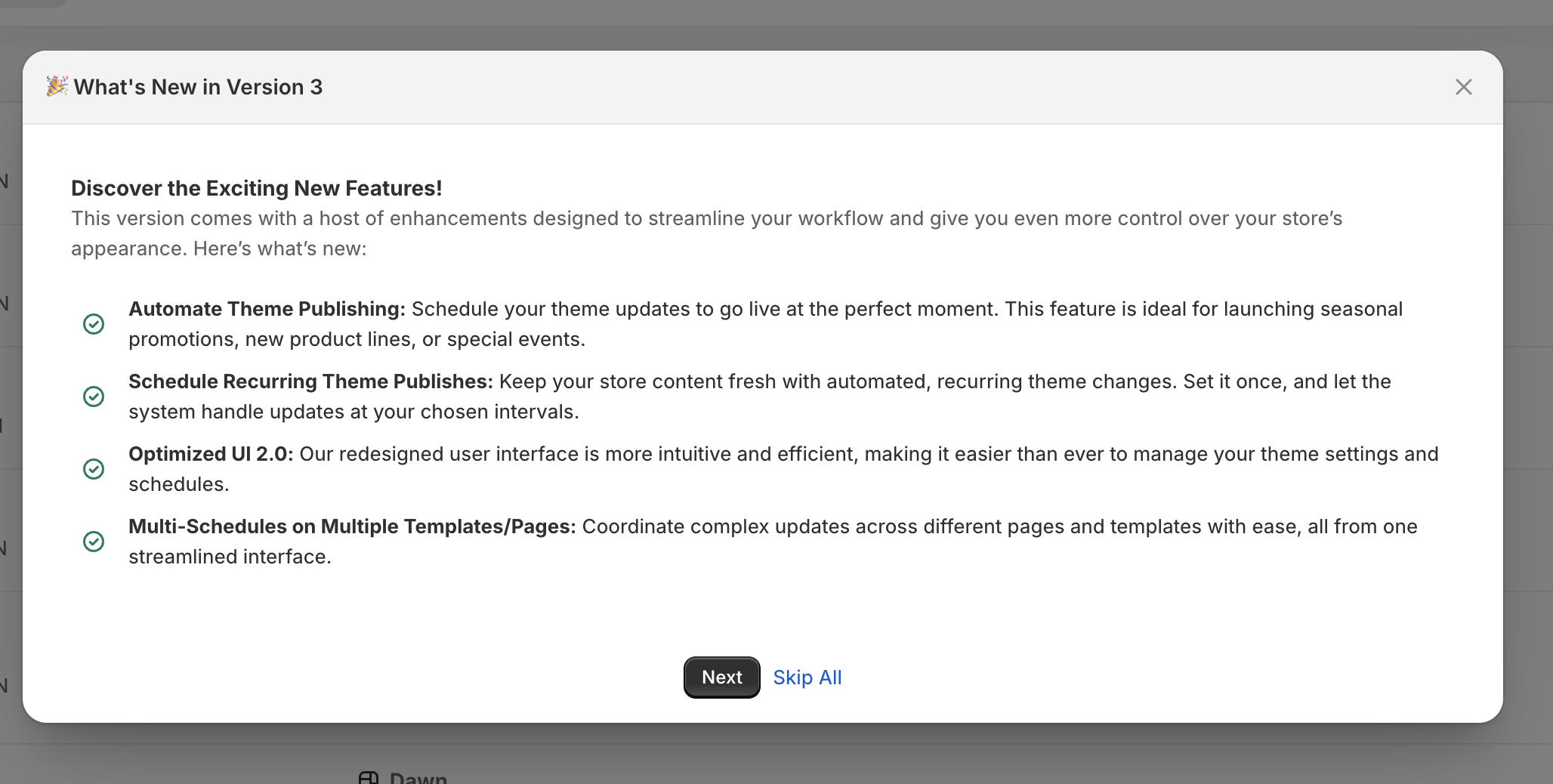
The app's optimized interface lets you coordinate updates across multiple templates and pages from a single streamlined panel, ensuring consistent brand experience across your entire store.
Real Merchant Success Stories
The proof is in the results. Here are genuine wins from merchants using Maestro Theme Scheduler:
Global Fashion Retailer
"Really easy to use and smart. I can schedule updates in advance, which is great for dealing with time zone differences in our team," reports a fashion retailer managing stores across three continents. They've reduced coordination meetings by 60% and eliminated missed launch windows entirely.
Seasonal Product Store
One merchant emphasized how the granular scheduling "sets it apart from all the other scheduler apps" - they can update content without republishing entire themes, which has streamlined their weekly promotional cycles and improved site performance.
Black Friday Champion
During Black Friday 2025, our merchants processed over 8,000 automated schedules through Maestro Theme Scheduler, with 45% being content scheduling (text, images, banners) and 55% being theme publish schedules. This automation enabled stress-free campaign execution while store owners focused on customer service and inventory management.

The weekly calendar view shows how merchants organize their scheduled content and theme publishing tasks, with multiple events planned across the week for marketing campaigns, product launches, and updates.
Time Savings Data: The Real ROI
Our analytics reveal significant time savings for merchants using automated scheduling:
• Average weekly time saved: 3.2 hours per store • Campaign setup reduction: 67% faster launch preparation • Error elimination: 94% reduction in missed campaign windows • Team coordination improvement: 58% fewer emergency calls and meetings
For a store running weekly promotions, this translates to over 160 hours saved annually - time that can be reinvested in growth activities like customer acquisition and product development.
Deep Dive: User Interface Walkthrough
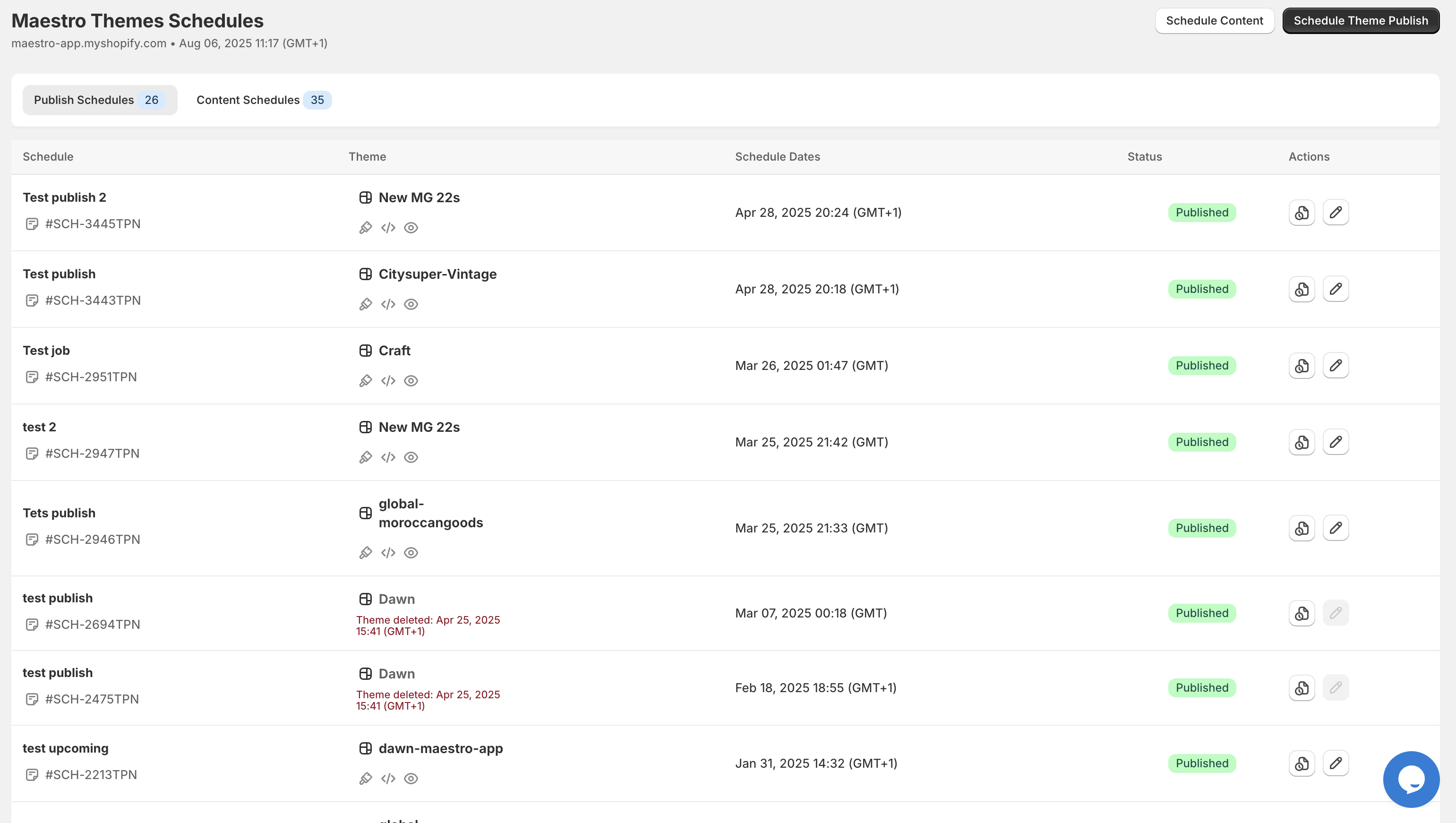
The main dashboard displays all your theme publish schedules with clear status indicators. You can see the theme name, schedule date, current status (Published, Pending, or Deleted), and available actions like edit or copy. This streamlined view makes managing multiple campaigns effortless.
Creating a Schedule

When creating a new schedule, the interface guides you through:
- Schedule naming - Give your automation a clear, memorable name
- Theme selection - Choose from your available themes (like the Craft theme shown)
- Timing configuration - Set specific dates and times, with options for recurring weekly publishing
- Recurrence settings - Define how many times the schedule should repeat
- Optional notes - Add campaign details for team reference
Publishing Timeline

The publish timeline provides a chronological view of all theme changes, including store-specific theme launches, scheduled promotions, and content updates. Each entry records the theme name, publication date and time, and status confirmation, enabling effective version control and campaign tracking.
Pricing and Plans
Maestro Theme Scheduler offers flexible pricing to match different business needs:
Advanced Plan - $9.99/month
• Unlimited theme publish schedules
• One section and blocks scheduling capability
• Theme publish history tracking
• Recurring schedules
• Live chat support
• 3-day free trial
Maestro Plan - $49/month
• Everything from Advanced plan
• Unlimited sections and blocks scheduling
• Unlimited content and visibility schedules
• Unlimited recurring schedules
• Priority chat support
• 7-day free trial
Both plans offer annual billing discounts (15% for Advanced, 20% for Maestro) for additional savings.
Integration with XCO Agency's App Ecosystem
Maestro Theme Scheduler works seamlessly with our other automation tools:
• Maestro Product Scheduler - Coordinate theme changes with product updates, inventory management, and pricing adjustments • Claimify - Align theme promotions with warranty claim processing for comprehensive customer experience • XCO Agency development services - Custom integrations and Shopify Plus development for enterprise-level automation
Performance and Reliability Benefits
Automated scheduling delivers measurable improvements in store performance:
Site Speed Optimization
By scheduling content updates instead of making real-time changes during high-traffic periods, stores maintain consistent loading speeds during crucial sales windows.
Campaign Reliability
Eliminate human error from your marketing execution. Automated schedules ensure campaigns launch precisely when planned, maximizing promotional impact.
Black Friday Efficiency
Our Black Friday 2025 data showed that stores using Maestro Theme Scheduler had 34% higher conversion rates during flash sales compared to manually managed campaigns, primarily due to seamless timing and reduced downtime.
Getting Started with Maestro Theme Scheduler
Ready to transform your theme management process? Start with our 3-day free trial on the Advanced plan to experience automated scheduling firsthand.
For stores requiring comprehensive automation across themes, products, and customer experience, consider our full XCO Agency app suite or schedule a consultation to discuss custom development solutions.
Stop letting manual theme management limit your growth. Join the thousands of merchants who've automated their way to more efficient, profitable Shopify stores with Maestro Theme Scheduler.