
As a Shopify expert, I often work with high-growth brands that treat their product launches as major cultural events. Whether it is a luxury fashion house dropping a 50-unit capsule or a streetwear brand launching a weekly collection, the common denominator for success is not just the product itself, but the psychological lever of scarcity. However, managing these high-pressure moments manually often leads to operational disasters, from broken links to items publishing ten minutes late.
To bridge the gap between hype and execution, top-tier merchants are moving away from manual updates and toward sophisticated automation. By utilizing a product scheduler Shopify owners can ensure their storefront remains perfectly synchronized with their marketing clock. This proactive approach allows teams to focus on customer engagement rather than frantic backend refreshes.
Implementing an automated strategy for limited drops provides several critical advantages:
- Eliminates Human Error: Automation ensures that every product, price change, and collection update happens at the exact millisecond intended.
- Maximizes Perceived Scarcity: Tight visibility windows and automated "Sold Out" tags reinforce the "buy now or miss out" mentality.
- Enhances Operational Scalability: Lean teams can manage complex, multi-product drops without increasing headcount.
- Synchronizes Multi-Channel Marketing: When your Shopify catalog updates automatically, your email and SMS campaigns hit a live store every single time.
The Operational Bottleneck of Manual Drops
Many store owners struggle with the technical friction of a limited drop. Typically, a team member must sit at a computer at 9:00 PM on a Friday to manually switch products from "Draft" to "Active." This process is fraught with risk. If the internet lags or a collection assignment is missed, the customer experience is ruined.
Furthermore, once a drop sells out, the manual cleanup process begins. Removing products from featured sections or updating tags to show "Sold Out" status can take hours of manual labor. This is where automation becomes a competitive necessity. By using tools like the Maestro Product Scheduler, brands can script the entire lifecycle of a product before the first customer even visits the site.
Step 1: Architecting the Pre-Launch Environment
The foundation of a successful limited drop lies in the preparation phase. You must ensure that your products are fully configured but invisible to the public and search engines until the precise moment of the launch.
- Configure Products in Draft Mode: Ensure all descriptions, high-resolution imagery, and variants are finalized.
- Assign Restricted Collections: Create specific collections for the drop that are not yet linked in your main navigation.
- Set Initial Inventory Levels: Upload your stock levels early to avoid last-minute inventory sync issues between your ERP and Shopify.
- Prepare Automated Product Tags: Establish the logic for your automated product tags such as "new-arrival" or "limited-edition" which will trigger specific UI elements once live.

Step 2: Automating the Launch Window
Once your infrastructure is ready, the next phase is to define the exact window of availability. High-end brands rarely leave a limited product on the site indefinitely. They define a clear start and end time to drive immediate action.
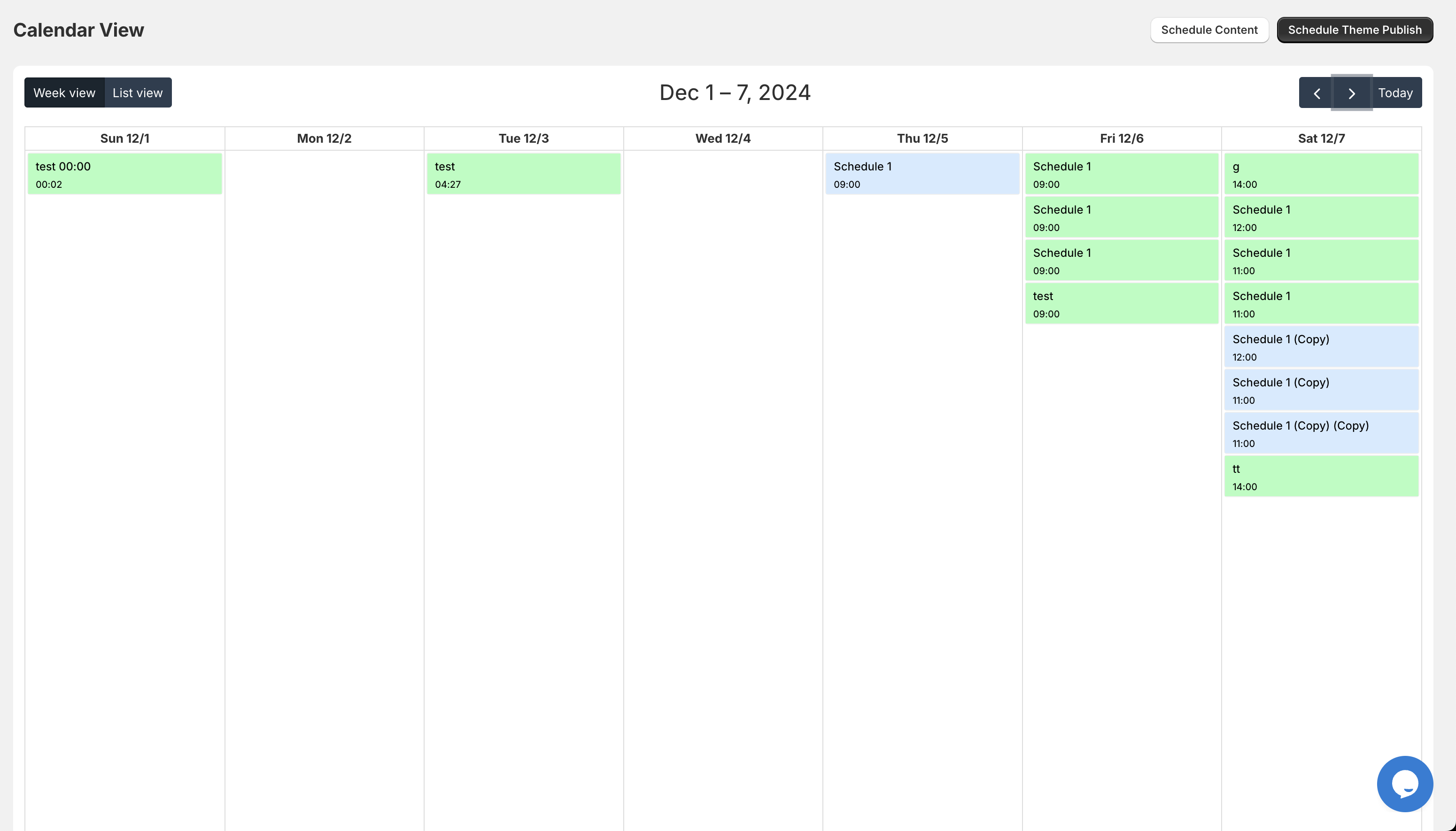
- Navigate to the Maestro Dashboard: Open the Maestro app to begin the scheduling process.
- Select the Targeted Products or Collections: Use the bulk selection tool to choose every item included in the upcoming drop.
- Define the Publication Start Time: Select the exact date, time, and time zone for the products to move from "Draft" to "Published."
- Schedule the Visibility End Time: If the drop is time-bound, schedule the products to move back to "Draft" or "Archived" automatically after the window closes.
By setting these parameters in advance, you create a "set it and forget it" workflow. This ensures that even if your team is offline, the store will perform its duties with robotic precision.
Step 3: Driving Urgency with Automated Product Tags
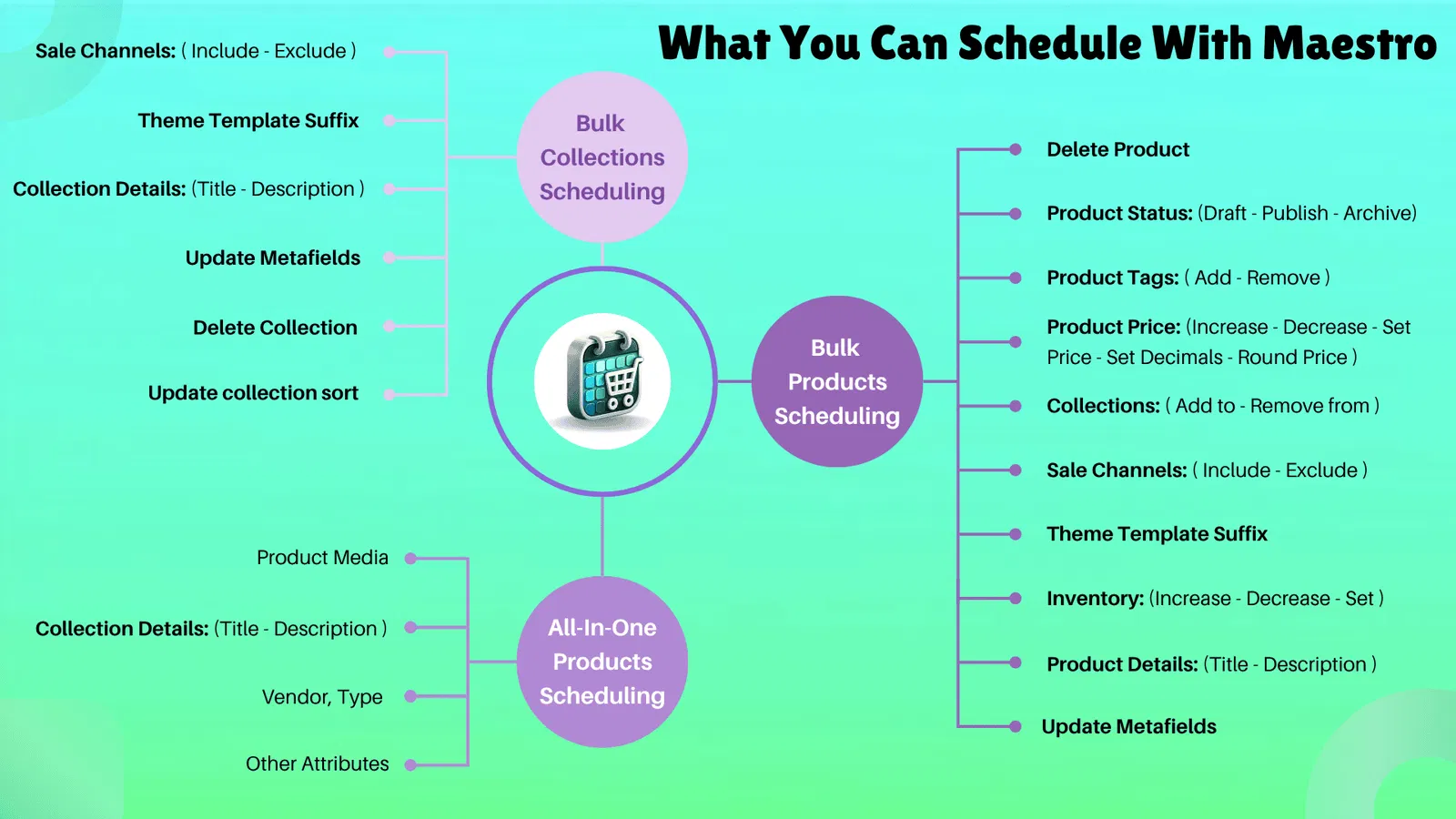
Visibility is only one part of the scarcity equation. To truly drive conversions, you need to communicate the status of the drop dynamically. This is where automated product tags become invaluable. Many modern Shopify themes use tags to trigger "Low Stock" badges, "Exclusive" ribbons, or "Members Only" labels.
- Schedule Tag Additions at Launch: Configure the scheduler to add a "drops-live" tag the moment the product goes active.
- Sync Tags with Theme Logic: Ensure your Shopify design is set up to display custom badges whenever these specific tags are present.
- Automate Price Adjustments: For early-bird drops, schedule a price increase to occur 24 hours after the launch to reward the fastest customers.
- Trigger Sold-Out Overlays: Use automation to switch tags when inventory hits zero, ensuring the "Sold Out" badge appears instantly without manual intervention.
Step 4: Synchronizing the Storefront Experience
A common mistake in limited drops is updating the products but forgetting the rest of the store. A "New Arrival" collection is useless if the homepage hero banner still shows last month's inventory. Top brands use Maestro’s theme scheduling capabilities to sync their entire storefront.
- Schedule Theme Section Visibility: Use Maestro to show the "Drop Announcement" banner only during the hours of the sale.
- Automate Navigation Menu Changes: Schedule your "Shop Now" link to point to the new collection exactly when it goes live.
- Update Promotional Blocks: Ensure that featured product sections on the homepage automatically refresh to show the newly published items.
- Prepare a Post-Drop Theme: Schedule a theme update for the conclusion of the drop that removes all mentions of the limited event and reverts to your evergreen catalog.

The Post-Drop Lifecycle Management
After the initial rush of a drop, the work is not finished. Managing the aftermath is vital for maintaining brand integrity. If a customer clicks an old ad link only to find a "404 Not Found" page or a messy, sold-out collection, you lose trust.
The product scheduler shopify brands rely on should handle the cleanup phase just as efficiently as the launch. By scheduling an "Archive" action for 48 hours after the drop, you ensure that sold-out items do not clutter your search results or internal collections. This keeps your store feeling fresh and curated at all times.
Furthermore, consider using this transition period to capture future demand. When products are scheduled to hide, you can simultaneously schedule a "Sign Up for Next Drop" section to appear on the homepage. This keeps the momentum moving forward and builds your email list for the next event.
Conclusion
Creating scarcity through limited drops is one of the most effective ways to drive rapid growth and brand loyalty in the e-commerce landscape. However, the complexity of managing these events manually often acts as a barrier for many merchants. By adopting an automated approach to product and theme scheduling, you remove the stress of manual launches and replace it with a scalable, professional system.
Using tools like the Maestro Product Scheduler allows you to plan your strategy weeks in advance, ensuring that every tag, price, and visibility setting is executed perfectly. This proactive step is vital for any brand looking to compete at the highest level of Shopify retail.
If you are ready to take your launch strategy to the next level and eliminate the chaos of manual updates, our team of Shopify Plus experts is here to help. We specialize in creating high-performance, automated e-commerce environments that drive results.
Contact XCO Agency today to learn how we can optimize your Shopify store for your next limited drop.