
As a Shopify expert who has helped hundreds of merchants scale their stores, I often see the same costly mistake: manually managing product launches. Store owners wake up at 3 AM to publish collections, frantically update pricing during flash sales, or worse: miss their launch window entirely because they forgot to hit "publish."
If you're seeking a more professional, reliable way to handle product launches without the stress and manual oversight, you're in the right place. Product scheduling isn't just a convenience feature: it's a strategic advantage that separates successful merchants from those constantly playing catch-up.
The Hidden Cost of Manual Product Launches
Manual product launches create significant risks that most merchants underestimate. When you're manually publishing products, updating prices, or managing collection visibility, you're vulnerable to human error, timezone confusion, and the simple reality that you can't be online 24/7.
Consider the typical product launch scenario: you've planned a major campaign for 9 AM EST, but you're traveling, dealing with a family emergency, or simply forgot. Your marketing emails go out, your social media posts publish, but your products remain hidden. The result? Confused customers, lost sales, and damaged credibility.
Even when manual launches go smoothly, they consume valuable time that could be spent on strategic growth activities. The average merchant spends 2-3 hours per week on routine product visibility tasks: time that adds up to significant opportunity cost over months and years.
Why Professional Scheduling Matters for Shopify Success
Strategic timing transforms product launches from reactive tasks into competitive advantages. When you can schedule launches with precision, you align product availability with your marketing campaigns, optimize for peak traffic hours, and maintain consistent customer experiences regardless of your personal schedule.
Professional scheduling also enables sophisticated launch strategies that manual approaches can't support. You can coordinate multi-product drops, schedule seasonal collection rotations, automate price adjustments for flash sales, and even sync product visibility with your email marketing campaigns: all without manual intervention.
Step-by-Step Guide to Professional Product Scheduling
Product Maestro Scheduler transforms complex launch coordination into straightforward automation. Here's how to set up your first professional product launch:

Step 1: Access Your Scheduling Dashboard
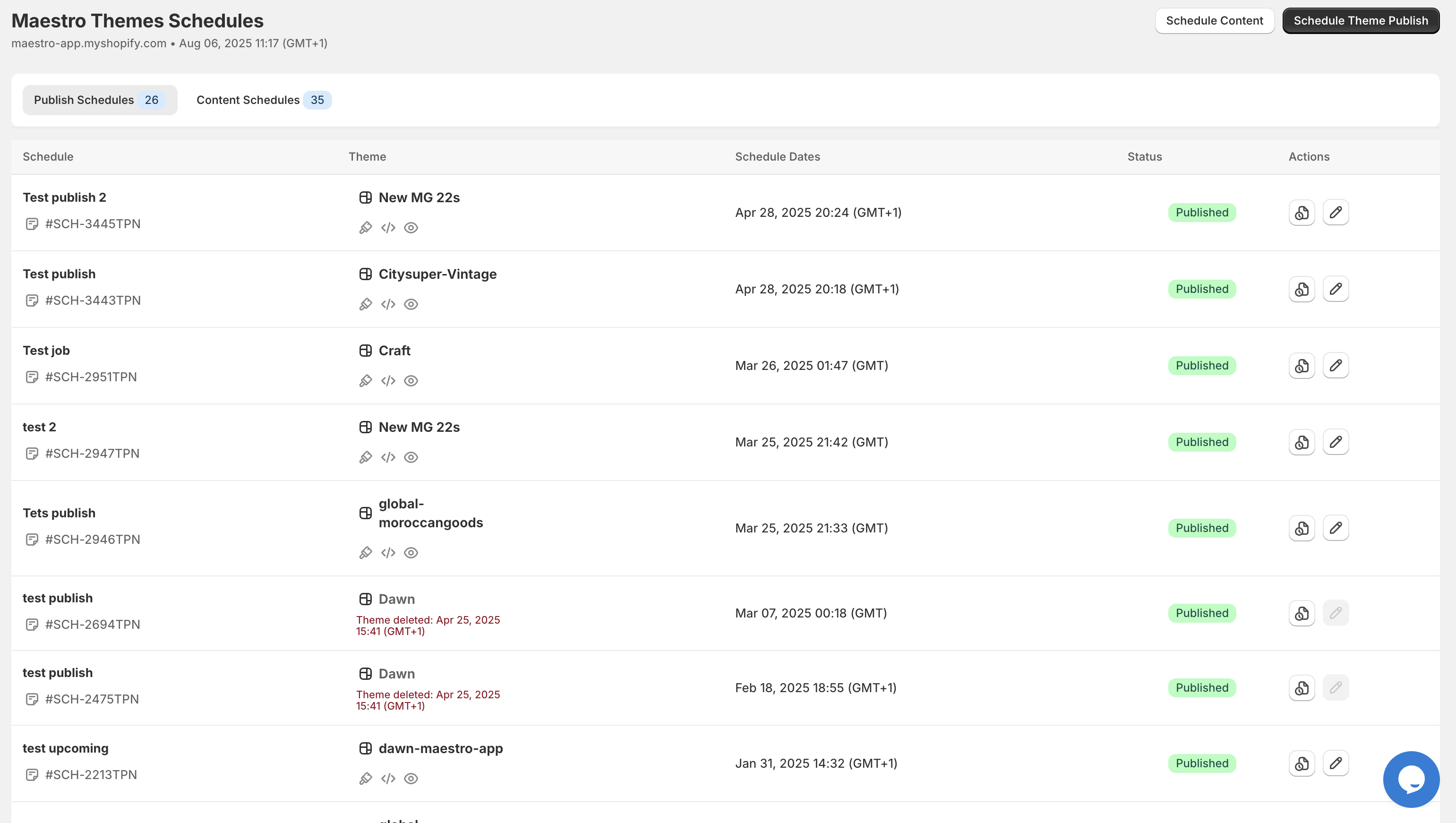
Navigate to the Product Maestro app in your Shopify admin panel. The clean, intuitive interface immediately shows your existing schedules and provides clear options for creating new ones. This centralized dashboard becomes your command center for all product scheduling activities.
Step 2: Create Your Product Schedule
Click "Create New Schedule" and you'll see options for single or recurring schedules. For product launches, you'll typically choose single-event scheduling unless you're managing weekly product drops or seasonal rotations. Name your schedule descriptively: something like "Holiday Collection Launch Dec 15" helps with organization.
Step 3: Select Products and Actions
Product Maestro allows you to schedule multiple product actions simultaneously. You can make products visible, add them to specific collections, update pricing, modify tags, and even change inventory settings. This bulk capability means coordinating complex launches requires just one schedule instead of multiple manual tasks.
For a typical product launch, you'll want to:
- Make products visible on your storefront
- Add products to relevant collections
- Apply promotional tags if needed
- Set launch pricing
Step 4: Set Your Launch Timeline
Choose your exact launch date and time, accounting for your target timezone. Product Maestro handles timezone calculations automatically, so you can set launches for peak shopping hours in your primary market without timezone math errors.
For international merchants, this feature proves invaluable. You can schedule the same products to launch at optimal times for different regions, maximizing visibility during each market's peak hours.
Advanced Scheduling Features for Professional Results
Product Maestro's advanced features enable sophisticated launch strategies that manual processes simply can't match. The recurring schedule functionality supports ongoing product rotation strategies: perfect for subscription box merchants, seasonal retailers, or stores with regular new arrivals.
The bulk scheduling capability handles complex product launches involving dozens or hundreds of items. Rather than scheduling each product individually, you can select entire collections, apply multiple actions simultaneously, and coordinate launches across various product categories.
Tag automation proves particularly powerful for dynamic collection management. You can schedule tags that automatically add products to collections, trigger email sequences, or modify how products appear in search results. This level of automation enables responsive, intelligent product management.
Real Results: Measurable Impact on Efficiency
Merchants using Product Maestro typically report saving 10-15 hours per week on routine product management tasks. More importantly, they eliminate launch errors that previously cost them sales and customer trust.
Consider Sarah, who runs a fashion boutique with weekly new arrivals. Before Product Maestro, she spent every Sunday evening manually updating her store for Monday launches. Now, she schedules the entire month's launches in under an hour, freeing her to focus on design, marketing, and customer relationships.

The timeline view shows exactly when your scheduled events will execute, providing confidence and visibility that manual processes can't offer. This audit trail also proves valuable for analyzing launch performance and refining your scheduling strategy.
Best Practices for Professional Product Launches
Plan Launches During Peak Hours: Schedule product visibility for times when your audience is most active. For most consumer brands, this means weekday mornings or early evenings in your primary market's timezone.
Coordinate with Marketing Campaigns: Align product launches with email campaigns, social media posts, and paid advertising. Product Maestro's precise timing ensures your products are available exactly when your marketing drives traffic.
Use Recurring Schedules for Consistency: If you regularly introduce new products, set up recurring schedules that automatically handle routine visibility tasks. This creates predictable launch patterns that customers begin to anticipate.
Monitor and Adjust: Review your launch timeline regularly and adjust timing based on performance data. Product Maestro's scheduling history helps identify optimal launch windows for different product categories.
Build in Buffer Time: Schedule launches a few minutes before your marketing campaigns go live. This ensures products are definitely available when traffic arrives, accounting for any potential delays.
Transform Your Product Launch Strategy Today
Professional product scheduling isn't just about convenience: it's about creating reliable, scalable systems that support your store's growth. When you eliminate manual launch tasks, you free up time and mental energy for activities that truly drive business results: product development, customer relationships, and strategic marketing.
Product Maestro Scheduler gives you the automation tools that enterprise retailers have used for years, now accessible to merchants of all sizes. Whether you're launching a single product or coordinating complex multi-product campaigns, professional scheduling ensures your launches execute flawlessly, every time.
Ready to schedule your next product launch like a pro? TRY PRODUCT MAESTRO FOR FREE and discover how automated scheduling can transform your store operations. Your future self: and your customers: will thank you for making the switch to professional product launch management.