
As a Shopify expert, I often see store owners struggling with a mountain of customer support tickets that could have been completely avoided. These inquiries are usually simple, repetitive, and time-consuming. One of the most common questions that clogs up a support queue is: "How much money do I have left on my gift card?"
While gift cards are a fantastic way to drive revenue and bring in new customers, the post-purchase experience often leaves much to be desired. If a customer has to email your support team, wait for a response, and then wait some more just to check a balance, you are creating friction in the shopping journey. This friction leads to abandoned carts and a decrease in brand loyalty.
In this post, I want to walk you through how implementing a self-service gift card checker can revolutionize your shopify store setup and significantly lower your operational overhead. By empowering your customers to find their own answers, you free up your support team to handle more complex issues that actually require a human touch.
The Hidden Cost of Manual Support Inquiries
Every time a member of your team has to manually look up a gift card balance in the Shopify admin, it costs your business money. It might only take two or three minutes per ticket, but when you multiply that by dozens or hundreds of customers per month, the numbers add up quickly.
Beyond the direct labor costs, there is the opportunity cost to consider. Your support staff could be spending that time on high-value tasks like proactive outreach, upselling, or solving complicated shipping disputes. Instead, they are stuck doing basic data entry.
From the customer's perspective, the experience is equally frustrating. Modern shoppers expect instant gratification. If they are ready to make a purchase at 10:00 PM on a Sunday and realize they do not know their gift card balance, they are unlikely to wait until Monday morning for an email reply. They will simply close the tab and forget about the purchase. This is where ecommerce maintenance services and smart app integrations become vital for maintaining conversion rates.
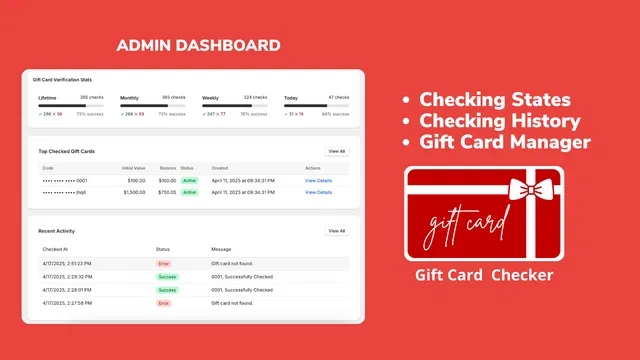
Introducing Gift Card Checker By Maestro
To solve this specific bottleneck, we developed Gift Card Checker By Maestro. This app was designed with one primary goal: to give customers a simple, branded way to check their own balances without ever needing to contact support.
The app provides a sleek self-service widget that you can place anywhere on your store. Whether it is in the footer, on a dedicated balance check page, or linked within your navigation menu, the widget is always there when the customer needs it.
Benefits of a Self-Service Model
Implementing a self-service tool offers several key advantages for growing Shopify brands:
- Immediate resolution for customers: No more waiting for email replies.
- Reduced support volume: Drastically cut down on repetitive "balance check" tickets.
- Increased sales: Customers who know their balance are more likely to spend it immediately.
- Enhanced professional image: A dedicated checker makes your store look more established and customer-centric.
Seamless Integration with Your Shopify Store Setup
One of the biggest hurdles merchants face when adding new features is the technical complexity. You do not want to spend hours fiddling with code or hiring expensive developers just to add a simple balance check tool.
As part of a professional shopify store setup, Gift Card Checker By Maestro offers a true one-click installation process. There is no need to edit your theme files manually or worry about breaking your site's layout. The app is built to work seamlessly with the latest Shopify themes, ensuring that the widget looks like a native part of your store from the moment you turn it on.
If you are currently looking into shopify design services, you know how important it is for every element of your site to feel cohesive. The Maestro app allows for deep customization, so you can adjust colors, fonts, and button styles to match your brand identity perfectly. This ensures that the self-service experience feels premium rather than like a clunky third-party add-on.

Boosting Loyalty and Repeat Purchases
Gift cards should not be viewed as a one-time transaction. Instead, think of them as a tool for long-term customer retention. When a customer uses a gift card, they are often trying out your brand for the first time or returning after a previous positive experience.
By providing a smooth, self-service balance checking experience, you are showing the customer that you value their time. This builds trust. When a customer feels that a brand is easy to interact with, they are far more likely to return for future purchases.
Furthermore, having a balance checker helps resurface "forgotten" money. Many customers have a gift card with a small remaining balance sitting in their inbox. If it is easy for them to check that balance while browsing your store, they are likely to apply that credit toward a new order, often spending more than the value of the card itself. This is a core component of effective growth strategies for e-commerce.
Step-by-Step: How to Implement the Checker
If you are ready to reclaim your support team's time, here is how you can get started with the Gift Card Checker By Maestro.
- Install the app from the Shopify App Store: The process is quick and requires no technical knowledge.
- Enable the widget in your theme: Use the simple toggle in the app dashboard to make the checker live.
- Customize the design: Navigate to the design settings to pick your brand colors and typography. This ensures the widget matches your shopify-design-services standards.
- Choose your placement: Decide if you want the checker on a standalone page or embedded in your footer.
- Monitor your results: Use the built-in dashboard to see how many customers are using the checker and how many support tickets you are saving.

Maintenance and Long-Term Strategy
Setting up the app is only the first step. To truly optimize your store, you should consider this part of your broader ecommerce maintenance services. Regularly checking your app performance and ensuring that the balance checker is easily discoverable is key to its success.
I recommend placing a link to your gift card checker in your order confirmation emails and your "Gift Card Issued" automated emails. This way, the customer knows exactly where to go the next time they want to shop. If you need help with these types of automations or general store upkeep, you can always check out our services to see how we can assist.
The Role of Branding in Self-Service
Design consistency is often overlooked in the world of utility apps. Many balance checkers look like generic forms that can actually scare customers away. If a customer is asked to enter a sensitive gift card code into a box that looks nothing like the rest of your site, they might hesitate due to security concerns.
The Maestro app focuses heavily on brand consistency. By ensuring the widget uses your exact HEX codes and font families, you maintain a high level of trust throughout the entire user journey. This professional touch is what separates successful Shopify Plus brands from the competition.

Conclusion: A Proactive Step for Your Business
Reducing support tickets is not just about ignoring customer needs; it is about meeting those needs more efficiently. A self-service gift card checker is a proactive solution that benefits both you and your customers. You get to reduce your support costs and focus on growth, while your customers get the instant information they desire.
As your business scales, these types of optimizations become even more critical. Managing a high-growth store requires a focus on efficiency and automation. Tools like Gift Card Checker By Maestro are essential building blocks for a modern, scalable e-commerce operation.
If you are interested in learning more about how to optimize your Shopify store or if you need help with a custom shopify store setup, we are here to help. At XCO Agency, we specialize in helping merchants streamline their operations and boost their bottom line through smart technology and expert design.
Ready to take the next step? You can book a meeting with us today to discuss your store's specific needs, or visit our FAQs for more information on how we work. Don't let your support team get buried under a mountain of balance check requests. Automate the process and get back to what you do best: growing your brand.