
As a Shopify expert, I often work with merchants who are scaling rapidly only to find their customer support teams drowning in repetitive, low-value inquiries. When you are focused on growth, your time and your team's energy are your most valuable resources. One of the most common drains on these resources is the simple, yet constant, question from customers: "How much money is left on my gift card?"
While Shopify is an incredible platform for shopify store setup, its native gift card functionality has a small but significant gap. Customers receive a gift card, they use a portion of it, and then the balance lives in a sort of digital limbo. To find out what is left, they usually have to email your support team, wait for a response, and then wait for an agent to look it up manually. This friction does more than just annoy the customer; it halts a potential sale and inflates your support costs.
In this post, I will show you how to eliminate this specific support category entirely. By implementing a self-service balance checker, you can empower your customers, boost your store's efficiency, and get back to high-level ecommerce maintenance services that actually drive revenue.
Why Support Tickets Are Killing Your Growth
Before we dive into the "how," we need to understand the "why." Every support ticket has a literal cost. Between the software seat for your helpdesk, the hourly wage of your agent, and the opportunity cost of not handling a more complex sales inquiry, a single "balance check" email can cost your business anywhere from five to fifteen dollars.
When you multiply that by dozens of inquiries a week, the math becomes staggering. More importantly, we live in an era of instant gratification. If a customer is ready to buy a new product on a Saturday night but cannot remember if they have twenty or fifty dollars on their gift card, they might wait for your support team to answer on Monday. By then, the impulse to buy has faded, or worse, they have purchased from a competitor.
Self-service solutions for gift cards are effective because:
- Immediate problem resolution: Customers get instant answers 24/7 without waiting for support agents.
- Reduces repetitive inquiries: Gift card balance checks represent high-volume, low-complexity requests that are ideal for automated deflection.
- Proven ticket reduction: Self-service implementations typically achieve 40 to 60 percent ticket deflection rates.
- Minimal operational cost: Once the tool is active, it maintains the same cost regardless of how many customers use it.
Introducing Gift Card Checker By Maestro
To solve this problem, we developed the Gift Card Checker By Maestro. This app was designed with one specific goal: to take the burden of balance inquiries off the merchant and put the power in the hands of the customer. It is a lightweight, high-impact addition to any shopify store setup that bridges the gap between a great gift card program and a seamless customer experience.

The app works by adding a simple, customizable widget to your storefront. Whether you want it on a dedicated page or linked in your footer, customers simply enter their gift card code and instantly see their remaining balance. No emails, no waiting, and no manual lookups for your team.
How to Set Up Gift Card Self-Service in 5 Minutes
The beauty of this solution is its simplicity. You do not need to be a developer or have an extensive background in ecommerce maintenance services to get this running. Here are the simple steps to reclaim your time:
Step 1: Install the App
Navigate to the Shopify App Store and search for Gift Card Checker By Maestro. Click "Install" and follow the standard Shopify authorization prompts. The app is built to integrate natively with your existing Shopify admin.
Step 2: Access the Dashboard
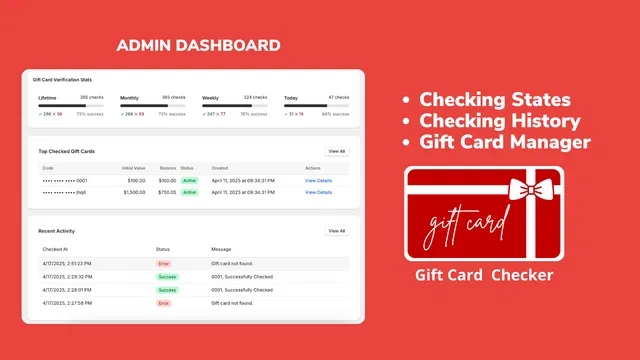
Once installed, open the app from your Shopify Admin. You will be greeted by a clean, intuitive dashboard that shows you exactly how many checks have been performed and which cards are being queried most often.
Step 3: Enable the Widget
Within the settings, you can enable the self-service widget. This is a one-click process. The app will automatically generate the interface where customers will input their codes.
Step 4: Customize the Design
As a Shopify expert, I know that brand consistency is everything. You do not want a tool that looks like a clunky add-on. The Gift Card Checker allows you to customize colors, fonts, and button styles to match your theme perfectly.
Step 5: Placement and Launch
Decide where you want the checker to live. Most successful merchants create a dedicated "Check Balance" page and add a link to their footer menu. Once the link is live, you are officially in the self-service business.

The Power of Analytics and Visibility
Managing a gift card program involves more than just issuing codes. You need to understand how those codes are being used. The Gift Card Checker dashboard provides valuable insights that can inform your marketing strategy.
By seeing "Top Checked Gift Cards" and "Recent Activity," you can gauge interest levels. For instance, if you see a spike in balance checks after a major holiday, you know that customers are looking for ways to spend their remaining credit. This is the perfect time to launch a targeted email campaign or a "Flash Sale" to encourage those customers to finish their balance and perhaps spend a little extra of their own money.
Fostering Loyalty Through Better UX
We often talk about loyalty programs in terms of points and rewards, but true loyalty is built through a frictionless user experience. When a customer finds it easy to interact with your store, they are more likely to return.
By providing a gift card checker, you are sending a message that you value the customer's time. You are removing a barrier to purchase and making the post-purchase experience just as smooth as the initial checkout. This level of professionalism is what separates top-tier Shopify Plus stores from the rest of the pack.
If you are looking to further optimize your customer journey, you might also consider how you handle returns and claims. Tools like Claimify can complement your self-service strategy by streamlining the claim process in a similar way.

Integrating with Your Broader Strategy
Implementing a gift card checker should be part of a larger conversation about your store's efficiency. At XCO Agency, we often help merchants with shopify design services to ensure that these self-service tools are placed where they will have the most impact.
If your support team is spending hours on repetitive tasks, it is a sign that your growth strategies need to include automation. Reducing support tickets is not just about cutting costs; it is about freeing up your team to provide high-touch, personalized service where it actually matters, such as helping a customer choose the right product or resolving a complex shipping issue.
Conclusion: A Proactive Step for Your Store
Reducing support tickets by 40 to 60 percent is a massive win for any ecommerce business. By spending five minutes today to set up a gift card self-service widget, you are making a long-term investment in your store's scalability and your customers' happiness.
The Gift Card Checker By Maestro is a vital tool for any merchant who takes their customer experience seriously. It is easy to set up, fully customizable, and delivers immediate ROI by deflecting the most common inquiries your team faces.
If you are ready to optimize your Shopify store but aren't sure where to start, you can always book a meeting with our team. We specialize in everything from migration to shopify to advanced shopify integrations.
Stop wasting time on manual balance checks and start focusing on what you do best: growing your brand. Install the Gift Card Checker today and see the difference a few minutes of automation can make. For more information on how we can help you scale, feel free to visit our contact page or explore our full range of our services.