
As a Shopify expert, I often work with merchants who are scaling fast but find themselves bogged down by a common, repetitive problem: the "What is my gift card balance?" support ticket. It sounds like a small issue, but when you are managing hundreds or thousands of orders, these inquiries accumulate. They eat away at your support team’s time, slow down your response rates for critical issues, and create unnecessary friction for your customers.
In the world of shopify store setup and long term ecommerce maintenance services, the goal is always to move toward automation and self-service. Merchants are seeking ways to empower their customers to find answers independently. By providing a simple, self-service balance check widget, you can reclaim hours of administrative work and significantly improve the post-purchase experience.
Here is why implementing a gift card checker is a vital step for your store:
- Drastic reduction in support volume: Automating balance checks can reduce related support tickets by up to 60 percent.
- Enhanced customer autonomy: Customers prefer finding answers themselves rather than waiting for a support agent to email them back.
- Increased repeat purchases: When a customer knows exactly how much they have left to spend, they are more likely to return to your store to use that balance.
- Maintained brand consistency: A customizable widget ensures that the self-service tool looks like a native part of your website.
The Hidden Cost of Manual Gift Card Management
When we talk about ecommerce maintenance services, we often focus on server uptime or theme updates. However, the true maintenance of a healthy store involves optimizing the customer journey. Every time a customer has to navigate to your contact page, fill out a form, and wait 24 hours just to know if they have $15 or $50 left on a gift card, you are losing momentum.
Most Shopify themes do not include a native way for customers to check their gift card balances. This creates a gap in the user experience. The customer is forced to treat a digital asset like a mystery, which leads to frustration. For the merchant, this translates to a bloated support queue filled with low-value tasks.
By shifting this responsibility from your support staff to a dedicated tool, you allow your team to focus on high-impact activities like closing sales or resolving complex shipping issues. This is a fundamental principle of efficient shopify store setup: build systems that run themselves.

Introducing Gift Card Checker By Maestro
To solve this specific pain point, we developed Gift Card Checker By Maestro. This app was designed with a single philosophy in mind: simplicity. We wanted to create a tool that any merchant could install and have running in under five minutes, without needing to touch a single line of code.
The Gift Card Checker provides a streamlined widget that lives on your storefront. Customers simply enter their gift card code, and the app fetches the real-time balance directly from your Shopify admin. It is secure, fast, and remarkably effective at silencing those "balance check" emails.
Why Merchants Choose Maestro
- One-click installation: The app integrates directly into your Shopify admin with minimal configuration required.
- Real-time data: It pulls information directly from Shopify’s backend, ensuring the balance is always accurate to the penny.
- No coding required: You do not need a developer to place the widget on your site; it works seamlessly with the latest Shopify themes.
- Mobile responsive: The widget looks and works perfectly on smartphones, where a large portion of your customers are likely shopping.
How to Set Up Your Gift Card Checker in 5 Minutes
Setting up a self-service portal shouldn't be a project that takes weeks of planning. With the right tools, it is a quick win that pays dividends immediately. Here are the simple steps to get your balance checker live.
Step 1: Install the App
Navigate to the Shopify App Store and add Gift Card Checker By Maestro to your store. The installation is instantaneous and requires no manual theme modifications for most modern stores.
Step 2: Access the Dashboard
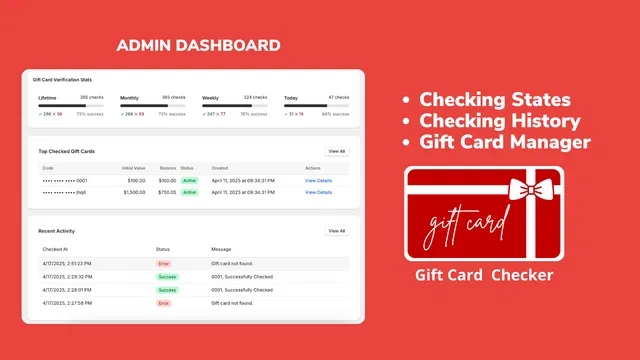
Once installed, open the app from your Shopify admin. You will see a clean, intuitive dashboard that gives you an overview of your gift card activity.
Step 3: Customize the Design
Navigate to the customization settings. Here, you can adjust the colors, fonts, and text of the widget. It is essential to ensure the widget matches your brand’s aesthetic to maintain a professional look. You can change the "Check Balance" button color to match your theme’s primary action color.
Step 4: Placement and Activation
Choose where you want the widget to appear. Common locations include the footer of your website, the account page, or a dedicated "Gift Card" page. After selecting the location, toggle the "Enable" switch.
Step 5: Test the Experience
Always test the tool from a customer's perspective. Grab a test gift card code from your admin, enter it into the widget on your live site, and ensure the balance displays correctly.
Maintaining Brand Consistency
One of the biggest concerns merchants have when adding apps is that the new features will look like a "clunky add-on." We understand that your brand identity is your most valuable asset. That is why the Gift Card Checker is built with flexibility in mind.
Whether you are using a minimalist theme or a bold, high-energy design, you can tailor the widget to disappear into your UI. This professional approach is what separates top-tier stores from the rest. If you need help with a more comprehensive brand overhaul, our shopify design services can help you create a cohesive look across your entire site.

Driving Loyalty Through Better Experiences
Reducing support tickets is the immediate benefit, but the long-term benefit is customer loyalty. A customer who can easily manage their own gift card is a customer who feels empowered. This positive interaction builds trust.
When a customer checks their balance and sees they have remaining funds, it acts as a nudge to shop again. It is essentially a "free" remarketing tool. Instead of the gift card sitting forgotten in an inbox, the ease of checking the balance brings the customer back to your storefront. This is a key component of modern growth strategies.
Furthermore, by offering a professional self-service tool, you signal to your customers that you are a sophisticated operation. It gives them the same level of service they would expect from major global retailers, which levels the playing field for boutique and medium-sized Shopify stores.
Integrating Self-Service into Your Maintenance Routine
Effective ecommerce maintenance services aren't just about fixing what is broken; they are about optimizing what is working. Regularly reviewing your support logs to identify repetitive questions is a great habit. If you find that gift card inquiries, order tracking questions, or return policy clarifications are taking up more than 20 percent of your support time, it is time to look for automated solutions.
For instance, many merchants use Claimify to handle returns and claims more efficiently. When paired with a gift card checker, you create a robust ecosystem of self-service that keeps your customers happy and your support team lean.
Conclusion: A Proactive Step for Your Shopify Store
Reducing support inquiries doesn't require a massive budget or a team of developers. Sometimes, the most significant improvements come from small, tactical changes. Installing a gift card balance checker is one of those high-impact, low-effort wins that every merchant should consider.
By empowering your customers to help themselves, you are not just saving time; you are creating a smoother, more professional shopping experience that fosters loyalty and encourages repeat business. As you continue to refine your shopify store setup, remember that the best support interaction is the one the customer never has to initiate.
If you are looking to further optimize your store or need help with complex shopify integrations, our team at XCO Agency is ready to help you scale. Whether it is through shopify speed optimization or a complete migration to shopify, we focus on making your ecommerce business as efficient as possible.
Ready to clear your support queue? Start by giving your customers the tools they need to succeed on their own. It only takes five minutes.
Ready to streamline your store? Book a meeting with us today or explore our full range of services to see how we can take your Shopify store to the next level.