
As a Shopify expert, I often see merchants standing at the edge of international expansion, feeling both excited and overwhelmed by the technical hurdles. The promise of global growth is immense, but the complexity of managing multiple currencies, languages, and regional regulations can quickly stall momentum. Merchants are seeking a way to unify their international operations without the headache of managing separate store instances for every country.
Integrating Shopify Markets with a robust global launch strategy is the solution to this fragmentation. By centralizing international management within a single Shopify admin, you can create localized experiences that build trust and drive conversions.
The Strategic Foundation of International E-Commerce
Before you click a single button in your Shopify admin, you must define the scope of your expansion. A global launch is not just about translating text; it is about creating a native-feeling experience for every visitor, regardless of their location.
Successful merchants use Shopify Markets to achieve several key objectives:
- Increased Conversion Rates: Displaying prices in local currencies and offering local payment methods significantly reduces cart abandonment.
- Operational Efficiency: Managing all regions from one dashboard eliminates the need for complex data syncing between multiple stores.
- Enhanced Brand Trust: Calculating duties and taxes upfront ensures there are no "hidden costs" for the customer upon delivery.
- Search Engine Visibility: Custom domains and subfolders for different markets help your store rank higher in local search results.
At XCO Agency, we focus on growth strategies that prioritize long-term scalability. The transition to a global model requires a blend of technical configuration and strategic timing.
Step 1: Configuring Your Core Markets in Shopify Admin
The first step in your integration process is defining your target regions. Shopify allows you to group countries into "Markets" to apply settings collectively or individually.
- Access the Markets Dashboard: Navigate to your Shopify Admin, click on Settings, and select Markets.
- Add a New Market: Click on Add Market. Give the market a descriptive name such as "European Union" or "North America."
- Select Countries and Regions: Choose the specific countries you wish to include in this market. For a focused launch, you might start with one or two high-potential countries before expanding to an entire continent.
- Assign a Domain Strategy: Decide if you will use subfolders (example.com/en-de), subdomains (de.example.com), or unique top-level domains (.de). Subfolders are generally recommended for SEO purposes as they consolidate domain authority.
Step 2: Localizing the Customer Experience
Once your markets are established, you must configure the regional settings that define the customer journey. This is where many merchants fail by offering a "one size fits all" approach that feels foreign to local shoppers.
Currency and Pricing
Shopify Markets allows you to set local currencies automatically. You can also implement price adjustments. For instance, if shipping costs to Australia are significantly higher, you can set a 10 percent price increase specifically for the Australian market to protect your margins.
Language and Content
Localized content is vital. Use the Shopify Translate & Adapt app or professional integration services to ensure your marketing copy resonates culturally. Remember that localization goes beyond translation; it involves using the correct terminology and cultural references.
Shipping and Duties
Shipping rates must be configured for every market before they can be activated. To provide total transparency, enable dynamic tax-inclusive pricing. This ensures that the price a customer sees on the product page is exactly what they pay at checkout, including all duties and local taxes.

Step 3: Coordinating the Launch with Precision Scheduling
A global launch strategy often involves coordinated marketing campaigns, seasonal sales, and product drops that happen at different times across the globe. As a CEO, I know that manual updates are the enemy of a smooth launch. If you are launching a collection at midnight in London and midnight in New York, you cannot rely on manual theme changes.
This is where XCO Agency’s expertise in automation becomes a competitive advantage. We developed the Maestro Theme Scheduler to solve this exact problem.
- Schedule Theme Sections: Use Maestro to hide or show specific promotional banners based on the time zone of your launch.
- Automate Product Visibility: Use Product Maestro Scheduler to ensure new inventory goes live exactly when your marketing emails hit the inbox.
- Regional Promotions: If you are running a "Singles' Day" sale in Asia but a "Pre-Black Friday" sale in Europe, you can schedule these theme variations to swap automatically.
Precision scheduling ensures that your brand remains consistent and professional, even when your team is offline.

Step 4: Connecting Your Global Tech Stack
Shopify Markets does not exist in a vacuum. To maximize its power, you must integrate it with your existing business tools.
- Email Marketing: If you use Klaviyo, ensure you enable the Sync Shopify Markets feature. This allows you to send automated emails with the correct localized pricing and product links based on the customer’s specific market.
- Analytics and Tracking: Tools like Elevar are essential for tracking server-side events across different regions. You can specify which markets' data should be sent to specific Google Analytics properties to maintain clean reporting.
- Checkout Extensibility: For Shopify Plus merchants, using Checkout Extensibility allows you to customize the checkout experience for specific markets, such as adding a custom field for regional identification numbers required in certain countries.
For complex setups involving multiple third-party tools, our Shopify integrations team can help ensure data flows seamlessly between your ERP, CRM, and storefront.
Step 5: Managing Post-Purchase Expectations Globally
A global launch strategy is only successful if you can handle the logistics that follow a sale. International returns and claims can be a major friction point.
If a customer in France receives a damaged item from your US-based warehouse, they need a simple way to report the issue. We recommend integrating Claimify into your workflow. Claimify provides a mobile-friendly interface where customers can submit claims, upload photos of damaged goods, and track the status of their resolution.
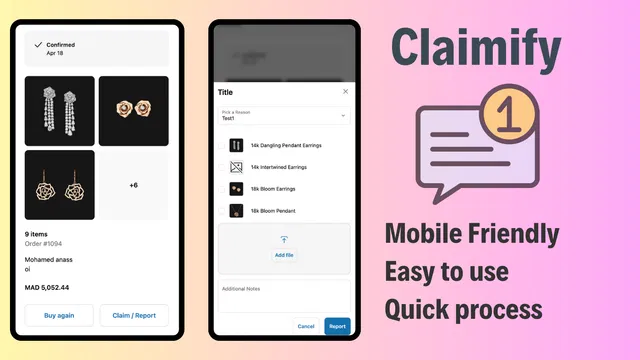
By simplifying the after-sales process, you turn a potentially negative experience into a demonstration of excellent customer service, which is critical for building a brand reputation in a new territory.
Step 6: Testing and Activation
Before you go live, you must rigorously test the experience.
- Preview the Market: Use the "Preview" function in the Markets settings to see how your store appears to a customer in that region.
- Test the Checkout: Perform test transactions using local payment methods to ensure that taxes, duties, and shipping rates are calculating correctly.
- Verify the Language Switcher: Ensure your theme's language selector is intuitive and correctly mapped to the market-specific URLs.
After completing these steps, return to the Markets page, select your market from the Inactive section, and switch the status to Active.
Conclusion
Integrating Shopify Markets with a global launch strategy is a vital step for any merchant looking to capture international demand. By moving away from fragmented store management and toward a centralized, automated approach, you free up your team to focus on brand building rather than technical troubleshooting.
The combination of Shopify's native Market features and XCO Agency’s automation tools, such as Maestro Theme Scheduler and Product Maestro Scheduler, provides a framework for professional, high-impact global expansions.
If you are ready to scale your business beyond borders and need a partner to navigate the technical complexities, XCO Agency is here to help. Whether you are looking for Shopify design services or a complete international migration, our team of experts can guide you through every stage of the journey.
Take the proactive step toward global dominance today. You can book a meeting with our strategy team to discuss your international roadmap and discover how we can optimize your store for a worldwide audience.