
As a Shopify expert, I often work with merchants who are scaling quickly and suddenly find their support inbox flooded with one specific, repetitive question: "How much balance is left on my gift card?" It is a common pain point for growing brands. While gift cards are a fantastic tool for driving revenue and loyalty, the standard Shopify setup often leaves customers in the dark. They are forced to email your team, wait for a response, and hope the information arrives before they lose interest in making a purchase.
When store owners are seeking ways to optimize their operations, they are usually looking for high impact, low effort solutions. They want to reduce the manual workload for their support staff while simultaneously improving the customer experience. This is where a self-service tool like the Gift Card Checker by Maestro becomes a vital addition to your Shopify store setup.
By empowering customers to check their own balances, you are not just saving time; you are removing a significant friction point in the sales funnel. A customer who knows they have $25 left on a card is far more likely to complete a purchase today than a customer waiting 24 hours for a support ticket to be resolved.
Why Merchants Are Switching to Self-Service Gift Card Balance Checks
Before we dive into the "how," it is important to understand the "why." Implementing a gift card checker is not just about adding a new feature; it is about strategic ecommerce maintenance services. Here are the key benefits of moving to an automated system:
-
Significant Reduction in Support Tickets
By providing a dedicated widget, you eliminate the need for manual balance lookups. This frees up your support team to handle more complex customer inquiries that actually require a human touch. -
Enhanced Customer Trust and Loyalty
Customers value transparency. When they can instantly verify their balance, it builds confidence in your brand. It shows that you value their time and have invested in a professional shopping experience. -
Boosted Conversion Rates
Instant information leads to instant action. When a customer sees their available balance right before checkout, it acts as a powerful psychological nudge to complete the transaction. -
Seamless Brand Integration
Unlike generic third-party tools, the Maestro Gift Card Checker is designed to match your existing theme. Maintaining brand consistency is crucial for building a professional online presence.

Step 1: Install the Gift Card Checker App
The first step in modernizing your Shopify store setup is to install the Gift Card Checker by Maestro. Navigation is straightforward. Head to your Shopify Admin and locate the app in your installed list or the Shopify App Store.
Once you click install, the app will request permissions to access your store's gift card data. This is a secure process that allows the app to pull real-time balances directly from Shopify's native system. Because it integrates directly with your existing gift card data, there is no need for manual data entry or complex syncing.
Step 2: Configure the Customer-Facing Widget
After installation, you need to decide where the checker will live. Most successful merchants place the balance checker in one of three locations:
- A dedicated "Check Balance" page linked in the footer.
- Inside the customer's "My Account" dashboard.
- Directly on the Gift Card product page itself.
Using the Shopify Theme Editor, you can add the Gift Card Checker block to any page. If you are using an Online Store 2.0 theme, this is a simple drag-and-drop process. You do not need to write a single line of code. Simply navigate to the page where you want the widget, click "Add Block," and select the Gift Card Checker.
Step 3: Customize the Design for Brand Consistency
A tool that looks out of place can actually hurt customer trust. That is why customization is a core feature of the Maestro ecosystem. You have full control over the visual presentation of the checker.
Navigate to the App Settings within your Shopify Admin. From here, you can:
- Adjust Colors and Fonts: Ensure the "Check Balance" button and text fields match your brand's primary color palette and typography.
- Edit Placeholder Text: You can change the default text to fit your brand's voice. Instead of "Enter Code," you might use "Paste your secret code here."
- Configure Error Messages: Create helpful, friendly error messages for when a code is mistyped or a card has expired.
Once your design is finalized, click save. The changes will reflect instantly on your live storefront, ensuring a cohesive look that aligns with your Shopify design services.

Step 4: Monitor Activity via the Admin Dashboard
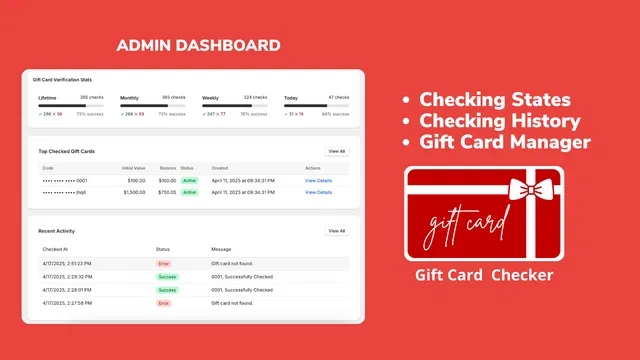
One of the most powerful features of the Gift Card Checker is the insight it provides into customer behavior. The admin dashboard gives you a high-level overview of how your gift cards are being used.
When you log into the dashboard, you can view real-time statistics, including the most frequently checked cards and the total number of inquiries handled by the app. This data is invaluable for your broader growth strategies. For example, if you notice a spike in balance checks during a specific holiday, you might decide to run a targeted email campaign encouraging those customers to spend their remaining balance.
The history log also serves as a security layer. You can see when and where balance checks are happening, which helps in identifying any unusual patterns or potential fraud attempts before they become a problem.
Step 5: Test the User Experience
Before you officially announce the new feature to your customers, it is vital to perform a quick test. Create a test gift card in your Shopify Admin with a specific balance. Navigate to your storefront and enter the card details into the new widget.
Ensure that the balance displayed matches the Shopify record exactly. Also, check the mobile view. A significant portion of your customers will be checking their balances on their phones while they shop. The Gift Card Checker is fully responsive, but it is always a proactive step to verify that the buttons are easy to click and the text is legible on smaller screens.
Integrating the Checker into Your Maintenance Routine
Successful e-commerce is not a "set it and forget it" endeavor. High-performing stores treat tools like the Gift Card Checker as part of their ongoing ecommerce maintenance services. Regularly reviewing your app performance and ensuring it stays updated with the latest Shopify theme changes is essential.
If you find yourself struggling with the technical side of these integrations, our team at XCO Agency offers comprehensive Shopify store setup and maintenance. We help merchants navigate the complexities of app management so they can focus on what they do best: growing their business.

Balancing Automation with Personalization
While automation is the goal, it is important not to lose the human touch. The Gift Card Checker handles the "low value" interactions, which actually allows your support team to provide better "high value" service. When a customer does reach out with a complex issue, your team will have more time and energy to solve it thoroughly because they are no longer bogged down by balance requests.
This balance is what separates good stores from great ones. By leveraging the right technology, you create a self-sustaining ecosystem where customers get the instant answers they crave, and your business operates with peak efficiency.
Conclusion: A Small Change with Big Impact
Implementing a gift card checker is one of those rare "quick wins" in the world of e-commerce. In just five minutes, you can install the app, place the widget, and significantly reduce the strain on your customer support team. It is a proactive step that pays dividends in both operational efficiency and customer satisfaction.
Reducing support inquiries is not just about saving money; it is about creating a smoother, more professional shopping experience. When you provide customers with the tools they need to help themselves, you are building a foundation for long-term loyalty and recurring revenue.
If you are ready to optimize your store or need help with a complex migration, book a meeting with our Shopify Plus experts today. We can help you identify more opportunities to automate your workflow and enhance your pricing strategy for maximum growth.