
As a Shopify expert, I often work with merchants who are looking for ways to streamline their operations while improving the customer experience. One of the most common bottlenecks in a growing online store is the influx of basic support inquiries. Among these, the question "How much is left on my gift card?" is a frequent offender. While it might seem like a small task to look up a balance for a customer, these minutes add up. When your support team is spending hours every week acting as a manual balance checker, they are not spending time on high-value sales or complex problem-solving.
I have seen firsthand how a lack of self-service options can lead to cart abandonment. A customer with a gift card wants to know their purchasing power right now. If they have to email a support desk and wait twenty-four hours for a response, the impulse to buy has likely vanished by the time they get their answer. This is why implementing a self-service gift card checker is not just a convenience: it is a vital part of your conversion rate optimization strategy.
The Hidden Cost of Manual Support
Many merchants underestimate the impact of "micro-tasks" on their bottom line. When you are initially handling your Shopify store setup, you might think that answering a few emails a day is no big deal. However, as you scale, these inquiries grow exponentially.
- Increased Support Costs: Every ticket has a price tag attached to it in terms of staff time and software seat costs.
- Customer Friction: Modern shoppers expect instant gratification. Any delay in the shopping journey is a reason to leave.
- Missed Revenue Opportunities: If a customer cannot easily check their balance, they are less likely to use that gift card, which means that the "second sale" (where they spend more than the card value) never happens.
By automating this process, you effectively move these inquiries from your support queue to a self-service widget. This allows your team to focus on more complex ecommerce maintenance services that actually drive growth.
Why You Need a Self-Service Gift Card Portal
The goal of any high-performing Shopify store is to reduce the number of steps between a customer entering the site and completing a purchase. A gift card checker is a powerful tool in this regard.
- Boosts Customer Confidence: When customers see a professional, branded tool for checking their balance, it increases their trust in your store.
- Encourages Higher Spending: Customers who know they have $25 left on a card are far more likely to browse for a $40 item, leading to an upsell.
- Reduces Bounce Rates: Providing all the tools a customer needs on-site keeps them within your ecosystem.
- Enhances UX: A dedicated balance checker is a standard feature for major retailers like Zara or H&M. Providing this same level of service levels the playing field for independent merchants.
For more insights on improving your store's performance, you might consider how a boost to your store's UX and conversion rate with an optimization audit report can identify other areas for automation.
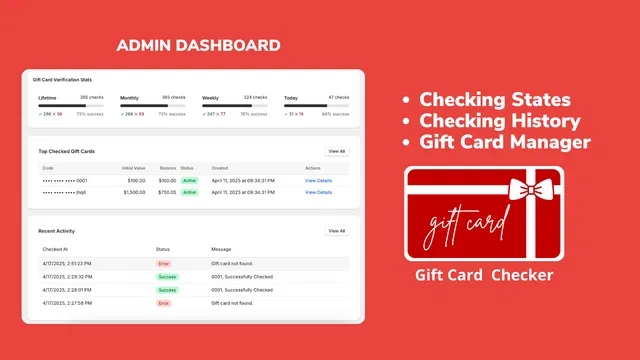
Introducing Gift Card Checker By Maestro
To solve the balance inquiry problem, I frequently recommend the Gift Card Checker By Maestro. It is designed specifically for Shopify merchants who want a professional solution without the headache of custom coding. The app provides a sleek, customizable widget that integrates directly into your store.
The beauty of this app lies in its simplicity. It was built with the understanding that store owners are busy. You do not need to be a developer to get this running. It offers a one-click setup that handles the technical heavy lifting, allowing you to focus on your brand.
How to Set Up Your Checker in 5 Simple Steps
Setting up a self-service portal should not be a weekend project. With the Maestro app, you can have this live before your next coffee break. Here are the steps to follow:
Step 1: Install the App from the Shopify App Store
Navigate to the Shopify App Store and search for Gift Card Checker By Maestro. Click "Install" to integrate it with your current Shopify store setup. The app will automatically sync with your existing gift card database.
Step 2: Access the Admin Dashboard
Once installed, open the app from your Shopify admin. You will be greeted by a clean dashboard that shows your verification stats and recent activity. This is your command center for managing how the checker behaves.
Step 3: Enable the Widget
In the settings tab, look for the toggle to enable the gift card checker widget. This is a one-click action. Once enabled, the basic functionality is live and ready to process requests.
Step 4: Customize the Design to Match Your Brand
This is a crucial step. You want the widget to look like a native part of your site, not a third-party add-on.
- Select colors that match your theme.
- Adjust the button text and labels to fit your brand voice.
- Ensure the fonts are consistent with your site's typography. If you are using unique branding, you might need to add a custom font to your store to ensure everything looks seamless.
Step 5: Choose Your Display Location
Decide where you want the checker to appear. Most merchants choose to put a link in the footer or create a dedicated page. You can also embed it directly into the customer account page, which is a highly effective spot for logged-in users.

Customizing Your Widget for Brand Consistency
Maintaining brand consistency is vital for building authority. If a customer clicks a link and is taken to a page that looks completely different from the rest of your store, they might feel hesitant to enter their gift card code.
The Maestro app allows for deep customization. You can change the background colors, the border radius of the input fields, and the style of the "Check Balance" button. By aligning these elements with your primary theme, you maintain a professional appearance. This attention to detail is what separates a standard store from a high-growth brand.
If you are looking to further enhance your brand's professional look, you might also want to enhance your website's usability by adding a favicon or remove the "Powered by Shopify" tag to claim full ownership of your site's aesthetic.
Driving Repeat Purchases and Customer Loyalty
A gift card checker is more than just a utility: it is a loyalty tool. When a customer checks their balance, they are expressing an intent to shop. This is a "warm" lead.
By providing a smooth experience, you are fostering loyalty. Customers appreciate brands that make their lives easier. When they see how easy it is to manage their balance at your store, they are more likely to return and buy more gift cards for friends and family. This creates a virtuous cycle of repeat purchases.
Furthermore, you can use the data from the app dashboard to see which gift cards are being checked most frequently. This insight can help you understand customer behavior and tailor your marketing efforts. For example, if you see a spike in checks after a holiday, you can trigger a specific email campaign to those customers.

Integrating Automation into Your Shopify Store Setup
As you look at your broader e-commerce strategy, automation should be at the forefront. A gift card checker is just one piece of the puzzle. Efficient ecommerce maintenance services involve looking for every opportunity to replace manual tasks with smart systems.
Using apps from the Maestro suite allows you to build a more resilient and scalable business. Whether it is scheduling product launches or automating balance checks, every automated task gives you back time to focus on growth. If you are interested in more advanced automation, exploring how to use the Maestro products scheduler can further optimize your store's workflow.

Best Practices for Gift Card Management
Once you have your checker live, there are a few best practices you should follow to ensure maximum impact:
- Promote the Checker: Do not hide the link. Mention it in your gift card delivery emails and put a clear link in your site's footer.
- Monitor the Dashboard: Regularly check the app's analytics to see if there are any issues or if certain codes are failing frequently.
- Test on Mobile: Ensure the widget is fully responsive. A significant portion of your customers will be checking their balance on their phones while on the go.
- Combine with Other Tools: Use the checker alongside other customer service tools. For instance, if you offer a gift wrapping option, make sure your gift card marketing highlights the complete "gifting" experience your store provides.
Conclusion: A Vital Step for Scalable Growth
Implementing a self-service gift card checker is a small change that yields significant results. It addresses a common customer pain point, reduces the burden on your support team, and keeps shoppers engaged with your brand. In the competitive world of e-commerce, these incremental improvements in user experience are what define successful stores.
By taking five minutes today to set up the Gift Card Checker By Maestro, you are taking a proactive step toward a more efficient and customer-centric business. You are moving away from reactive support and toward a proactive, automated environment that respects your customer's time and your team's resources.
If you are ready to optimize your store further or need assistance with your initial Shopify store setup, our team is here to help you navigate the complexities of e-commerce growth. Start by automating the simple things, and you will find you have much more energy for the big things. Summarizing the main benefit, a self-service portal is a vital step in modernizing your store. Take the leap and see the difference it makes in your daily operations.