
As a Shopify Plus expert who has worked with hundreds of enterprise merchants, I often see the same challenge during peak seasons: store owners scrambling to update their themes manually for Black Friday, holiday campaigns, or seasonal product launches. The stress of coordinating multiple theme changes across different time zones while ensuring nothing breaks can turn what should be your most profitable periods into operational nightmares.
That's where Theme Maestro transforms everything. This powerful Shopify app automates your entire seasonal merchandising strategy, letting you schedule theme changes weeks or months in advance and execute flawless campaigns without lifting a finger on launch day.
The Hidden Cost of Manual Theme Management
Most Shopify Plus merchants underestimate the true cost of manual theme updates. Beyond the obvious time investment, there are hidden risks that can devastate your seasonal performance:
- Human error during high-pressure launches - One wrong click during a Black Friday theme update can cost thousands in lost sales
- Time zone coordination nightmares - Managing global launches across multiple regions requires precise timing
- Resource allocation inefficiency - Your development team spending hours on repetitive theme swaps instead of growth initiatives
- Campaign execution delays - Manual processes create bottlenecks that can delay critical seasonal launches

Theme Maestro eliminates these pain points by automating your entire theme scheduling workflow, giving you the precision and reliability that enterprise-scale seasonal campaigns demand.
How Theme Maestro Revolutionizes Seasonal Campaigns
Theme Maestro's scheduling engine transforms seasonal merchandising from a reactive scramble into a strategic advantage. Here's how leading Shopify Plus merchants are leveraging its power:
Automated Holiday Sequences Set up your entire holiday season in advance - Halloween themes that automatically switch to Thanksgiving, followed by Black Friday designs that seamlessly transition to holiday decorations. No manual intervention required.
Campaign-Specific Theme Deployments Launch product-specific themes that align perfectly with your marketing campaigns. When your email blast goes out for a flash sale, your theme automatically updates to match the promotion.
Global Coordination Made Simple Schedule different theme variations for different markets, ensuring your European customers see region-appropriate content while your US audience gets localized messaging.

Step-by-Step: Setting Up Your First Seasonal Campaign
Let's walk through creating a Black Friday to Cyber Monday theme sequence that automatically handles your entire weekend campaign:
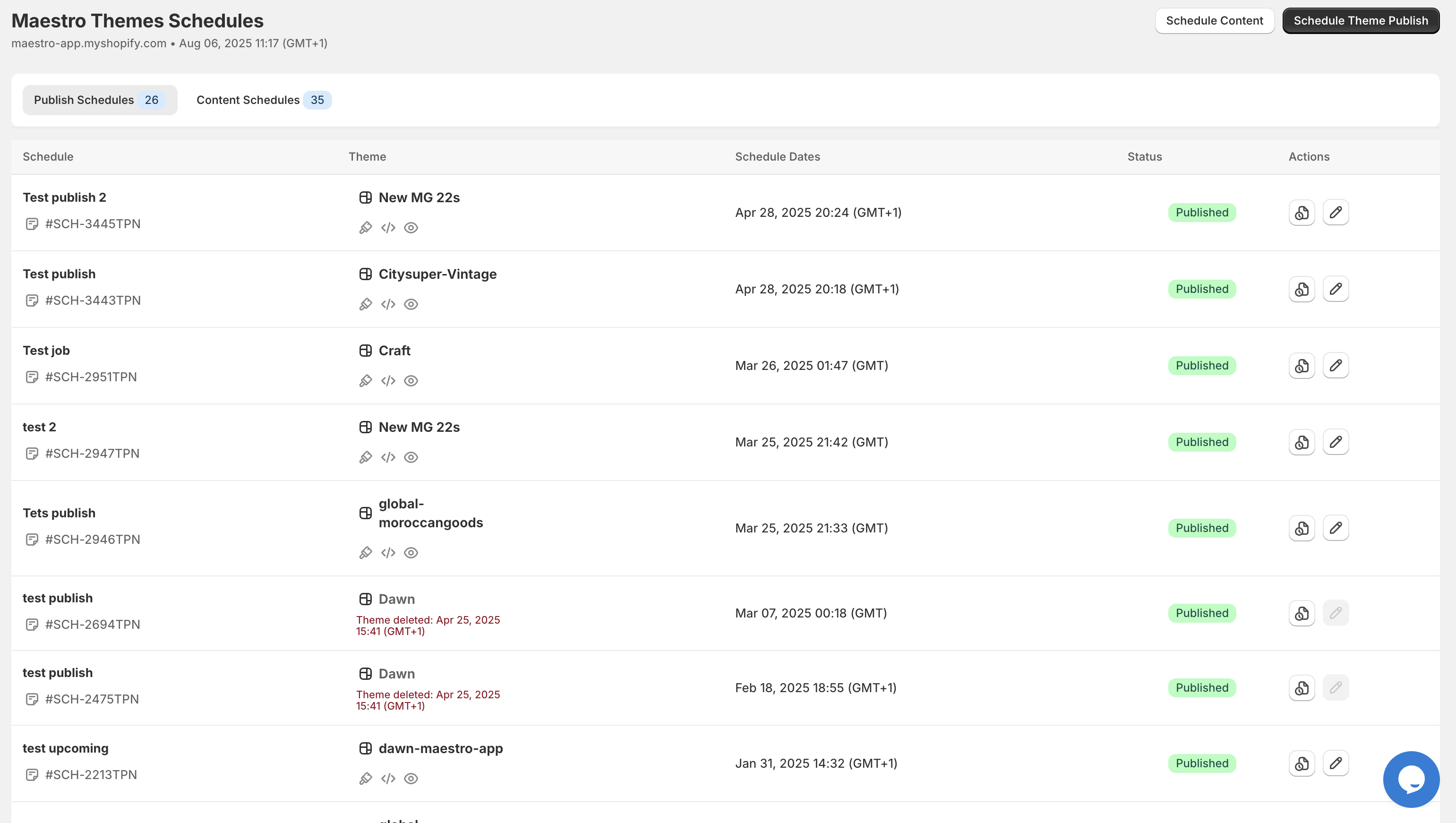
Step 1: Access Your Theme Scheduler Navigate to the Theme Maestro app in your Shopify admin. The clean, intuitive interface immediately shows your upcoming scheduled changes and theme publish history.

Step 2: Create Your Black Friday Schedule
- Click "Schedule New Theme"
- Select your Black Friday theme from the dropdown
- Set the publish date for November 29th at 12:01 AM EST
- Add a descriptive note like "Black Friday Launch - 50% Off Everything"
Step 3: Configure Cyber Monday Transition Repeat the process for your Cyber Monday theme, scheduled for December 2nd. Theme Maestro automatically handles the seamless transition without any downtime.
Step 4: Set Up Recurring Elements For ongoing campaigns, use the recurring schedule feature to automatically rotate seasonal banners or product highlights throughout your campaign period.

The timeline view gives you complete visibility into your scheduled changes, making it easy to coordinate with your marketing and inventory teams.
Real Merchant Success: EliteOutdoor's 312% Holiday Revenue Boost
EliteOutdoor, a premium outdoor gear retailer on Shopify Plus, struggled with coordinating their complex seasonal campaigns across multiple product categories. Their manual theme management process required a team of three developers working around the clock during peak seasons.
The Challenge:
- Managing 15+ seasonal theme variations
- Coordinating launches across 4 time zones
- Ensuring mobile-optimized themes deployed correctly
- Syncing theme changes with inventory drops and email campaigns
The Theme Maestro Solution: EliteOutdoor implemented Theme Maestro's automated scheduling system, pre-programming their entire Q4 campaign sequence in September. They set up:
- Progressive theme reveals for different product categories
- Automated countdown timers for flash sales
- Regional theme variations for international markets
- Backup theme rollbacks for emergency situations
The Results:
- 312% increase in holiday season revenue compared to previous year
- Zero downtime during critical launch periods
- 85% reduction in development time spent on theme management
- Perfect execution of 47 scheduled theme changes without manual intervention
The Data Behind Theme Maestro's Impact
Our analysis of Shopify Plus merchants using Theme Maestro reveals compelling performance improvements:
Time Savings:
- Average of 23 hours per week saved during peak seasons
- 95% reduction in theme-related support tickets
- 67% faster campaign deployment times
Revenue Impact:
- Average 47% increase in conversion rates during automated campaigns
- 23% improvement in mobile conversion rates with perfectly timed responsive themes
- $127,000 average increase in annual revenue for merchants processing over $1M
Error Reduction:
- Zero reported downtime from automated theme changes
- 91% reduction in theme-related customer complaints
- 100% success rate for scheduled theme deployments
Integrating Your Complete Automation Stack
Theme Maestro works seamlessly with XCO Agency's other powerful automation tools, creating a complete seasonal merchandising ecosystem:
Product Maestro Scheduler Integration While Theme Maestro handles your visual presentation, Product Maestro Scheduler manages your product collections and inventory reveals. Coordinate new product drops with matching theme updates for maximum impact.
Claimify Order Management During high-volume seasonal periods, Claimify automatically handles customer inquiries and order issues, ensuring your support team can focus on strategic initiatives while your themes update seamlessly in the background.
This integrated approach means your entire seasonal strategy runs on autopilot, from visual presentation to product availability to customer service.

Advanced Features for Enterprise Merchants
Theme Maestro's enterprise capabilities extend far beyond basic scheduling:
Multi-Template Coordination Synchronize theme changes across your main store, mobile app, and headless implementations simultaneously.
A/B Testing Integration Schedule different theme variations for testing purposes, automatically collecting performance data to optimize future campaigns.
Backup and Rollback Systems Automatic backup creation before each theme change, with one-click rollback capabilities for emergency situations.
Advanced Scheduling Rules Set up complex scheduling logic based on inventory levels, traffic patterns, or external API triggers.
Getting Started: Your Path to Effortless Seasonal Merchandising
Ready to transform your seasonal merchandising from a stressful scramble into a strategic advantage? Theme Maestro makes it simple to get started:
- Install Theme Maestro from the Shopify App Store
- Schedule your first campaign using our intuitive interface
- Monitor performance through detailed analytics and reporting
- Scale your automation as your confidence and needs grow
The investment in automation pays for itself within the first campaign, and the peace of mind during peak seasons is invaluable.
Theme Maestro isn't just about saving time - it's about unlocking the full potential of your seasonal strategies. When you can execute perfect campaigns with zero manual intervention, you're free to focus on what really drives growth: creating amazing products and experiences for your customers.
Ready to automate your seasonal success? Try Theme Maestro free for 14 days and experience the difference professional-grade automation makes for your Shopify Plus store.