
As a Shopify expert, I often work with merchants who dread one thing above all else: the midnight theme swap. You know the scenario. Your Valentine's Day sale launches at 12:01 AM, and you're sitting at your desk with a coffee, finger hovering over the "Publish" button, praying nothing breaks when you go live. Then, 48 hours later, you're back at your computer at midnight again, manually reverting everything back to your base theme.
Sound familiar? It's exhausting, error-prone, and completely unnecessary in 2026.
This is where Maestro Theme Scheduler changes everything. Instead of manual midnight launches and stressed-out store owners, you get automated theme publishing that runs 24/7 without you lifting a finger. Let me walk you through how this app transforms seasonal campaign management for Shopify and Shopify Plus stores.
The Problem with Manual Theme Publishing
Before we dive into the solution, let's be honest about what manual theme management actually costs you:
- Sleep deprivation - Launching campaigns at optimal times often means staying up late or waking up early
- Human error - When you're tired and rushing, mistakes happen (wrong theme published, broken links, missing content)
- Missed opportunities - If you're managing multiple seasonal campaigns, coordinating them manually becomes nearly impossible
- Team bottlenecks - Someone always has to be "on duty" for theme changes, which doesn't scale
- Reversion stress - Remembering to turn off seasonal themes is just as critical as turning them on
For Shopify Plus merchants running high-traffic stores with complex promotional calendars, this manual approach simply doesn't work. One mistake during a Black Friday launch can cost thousands in lost revenue.
Enter Maestro Theme Scheduler: Automation That Actually Works
Maestro Theme Scheduler is built specifically to solve this problem. Instead of manually publishing themes, you schedule theme changes weeks or months in advance. The app handles the rest, automatically publishing and reverting themes at exactly the right moment.
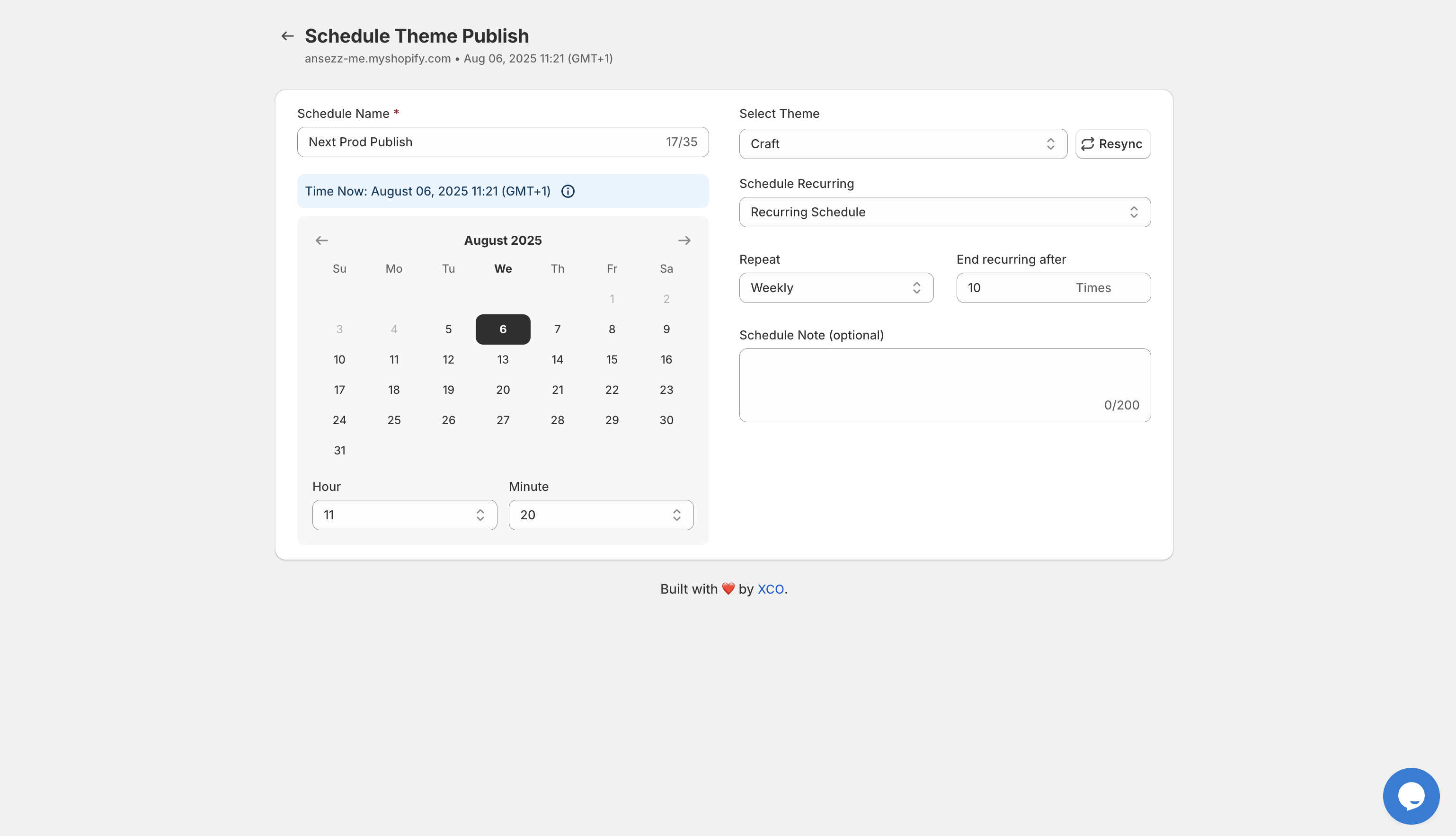
Here's what makes it powerful:
- Schedule theme publishes with precision - Set exact dates and times for theme changes to go live
- Automatic reverts - Schedule your store to return to the base theme when campaigns end
- Recurring schedules - Create weekly, monthly, or custom recurring theme rotations
- Section-level control - Publish specific sections or blocks instead of entire themes
- Multi-template coordination - Manage updates across multiple pages simultaneously
- Publish history tracking - Monitor all scheduled changes and maintain a complete audit trail
The beauty of this approach is simple: you plan once, and the system executes perfectly every time.
Real Use Case: The 48-Hour Flash Sale That Runs Itself
Let me share a real-world scenario that demonstrates the power of automation. Imagine you're running a 48-hour Valentine's Day flash sale. Here's how Maestro Theme Scheduler handles it:
Traditional Manual Approach:
- Stay up until midnight on February 14th
- Manually publish your Valentine's theme
- Monitor for issues
- Set a reminder for February 16th at midnight
- Stay up again to revert to your base theme
- Hope nothing broke in the process
Maestro Automated Approach:
- Three weeks before the sale, schedule your Valentine's theme to publish on February 14 at 12:01 AM
- In the same workflow, schedule an automatic revert to your base theme on February 16 at 12:01 AM
- Go about your life while Maestro handles everything
- Check the publish timeline to confirm execution

The time savings are obvious, but the real benefit is peace of mind. You're not wondering if you remembered to turn off the sale. You're not panicking about timezone confusion. You're not losing sleep over campaign launches.
Why Shopify Plus Merchants Depend on Theme Automation
For Shopify Plus stores, theme automation isn't just convenient, it's mission-critical. Here's why:
Performance During High-Traffic Events When your Black Friday sale launches automatically at the optimal moment, your team can focus on customer service, inventory management, and conversion optimization instead of technical publishing tasks.
Brand Consistency Across Markets If you're running multiple storefronts in different regions, Maestro lets you coordinate theme updates across time zones. Your Australian store launches at midnight Sydney time while your US store launches at midnight EST, all without manual intervention.
Campaign Complexity at Scale Shopify Plus merchants often run overlapping campaigns: weekly promotions, seasonal themes, holiday countdowns, and flash sales. Manually managing these becomes impossible. Maestro's recurring schedules handle the complexity automatically.
Risk Mitigation Manual publishing introduces risk. Automated publishing eliminates it. Your themes change exactly when planned, every single time.
How to Set Up Your First Automated Theme Schedule
Setting up Maestro Theme Scheduler is straightforward. Here's how to schedule your first automated campaign:
Step 1: Install Maestro Theme Scheduler Navigate to the Maestro Theme Scheduler app page and install it on your Shopify store. The app integrates seamlessly with your existing theme library.
Step 2: Create Your Schedule Click "Schedule Content" and name your schedule (example: "Valentine's Day 2026 Flash Sale"). Select the theme you want to publish from your theme library.
Step 3: Set Your Publish Date and Time Choose the exact date and time for your theme to go live. Maestro supports precise scheduling down to the minute, so you can launch at 12:01 AM or any other optimal moment.

Step 4: Configure Recurring Options (Optional) If you're running a weekly promotion or rotating seasonal content, set up recurring schedules. Choose daily, weekly, monthly, or custom intervals, and specify how many times the schedule should repeat.
Step 5: Schedule the Revert Create a second schedule to automatically revert back to your base theme when the campaign ends. This ensures your store doesn't stay in "sale mode" longer than intended.
Step 6: Review and Activate Check your publish timeline to confirm everything is scheduled correctly. Once activated, Maestro handles the rest automatically.
Advanced Features for Power Users
Once you've mastered basic scheduling, Maestro offers advanced capabilities that take automation even further:
Section and Block Visibility Control Instead of publishing entire themes, schedule specific sections or blocks to appear or disappear. Show a promotional banner during your sale, then automatically remove it when the promotion ends, all without touching your live theme.
Grouped Schedules Across Templates Coordinate content updates across your homepage, collection pages, and product pages simultaneously. Launch a cohesive campaign with one click instead of managing multiple manual updates.
Shopify Flow Integration For Shopify Plus merchants, Maestro integrates with Shopify Flow to trigger automated workflows based on theme publishing events. Automatically send email campaigns, update inventory rules, or adjust pricing when themes change.

30-Day Schedule History If you temporarily uninstall the app, Maestro retains your schedule data for 30 days, making it easy to pick up where you left off without rebuilding everything.
The Bottom Line: Automation Equals Freedom
Theme automation isn't about being lazy. It's about being strategic. When you're not staying up late for manual theme changes, you can focus on what actually grows your business: product development, customer experience, marketing strategy, and revenue optimization.
For seasonal campaigns, flash sales, holiday promotions, and recurring content updates, Maestro Theme Scheduler eliminates stress and maximizes reliability. Your store stays fresh 24/7, your campaigns launch exactly on time, and you get your evenings back.
If you're ready to automate your seasonal pivots and stop losing sleep over theme publishing, check out Maestro Theme Scheduler or book a consultation with our team at XCO Agency to discuss how automation can transform your Shopify Plus store operations.