
As a Shopify expert, I often work with high-volume merchants who treat their product catalog like a living, breathing organism. It grows, it changes, and if you do not keep a close eye on it, it eventually becomes a chaotic mess that eats up your entire afternoon. Most store owners are seeking a way to streamline their operations, yet they continue to fall into the same manual traps that lead to missed sales and customer frustration.
Managing a Shopify store involves more than just uploading a few photos and hitting save. It requires strategic updates for seasonal shifts, flash sales, and inventory restocks. When these tasks are handled manually, the margin for error is astronomical. This is why many brands are turning to automated solutions like the Product Scheduler by Maestro to handle the heavy lifting.
Implementing a hands-off catalog strategy provides several key advantages:
- Eliminates the need for midnight "go-live" sessions
- Reduces the risk of human error during bulk price changes
- Ensures consistent branding across collections and tags
- Boosts conversion rate optimization by keeping the store fresh and relevant
- Saves hours of administrative time every single week
1. The Midnight Launch Madness
One of the most common mistakes I see is the "alarm clock method" of product launches. Merchants stay up until midnight or wake up at 4 AM to manually flip products from draft to active status for a new drop. This is not only exhausting but also incredibly risky. If you oversleep or your internet goes down, your launch is dead in the water.
The Draft Helper feature in the Product Scheduler app is your solution. It allows you to prepare all your product listings in advance and set a specific timestamp for them to go live. You can even schedule them to move back to draft or archive status once a sale is over. This ensures your Shopify store setup remains professional and punctual without requiring your constant presence.
2. The Tangled Web of Manual Tagging
Tags are the invisible engine behind your store's organization. They power your filters, your automated collections, and even your marketing segments. However, many merchants forget to remove "Sale" or "Winter" tags once a promotion ends. This results in customers seeing "New Arrival" badges on items that have been in stock for six months.
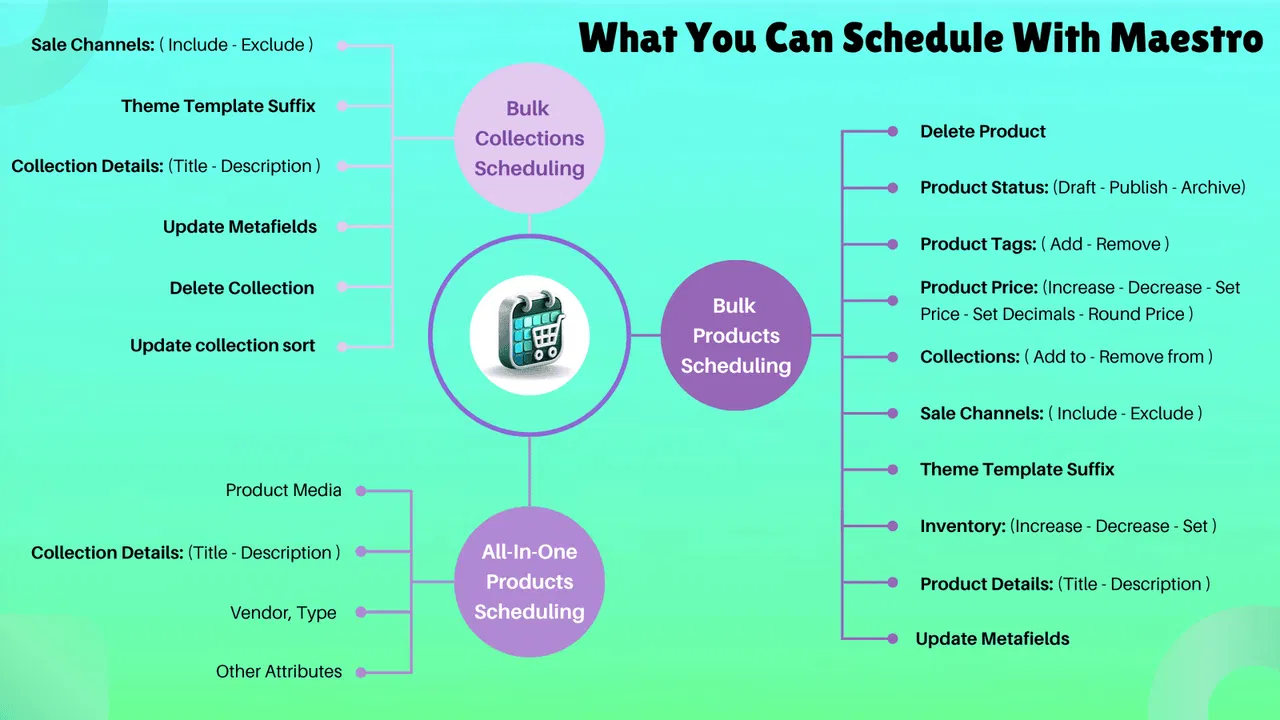
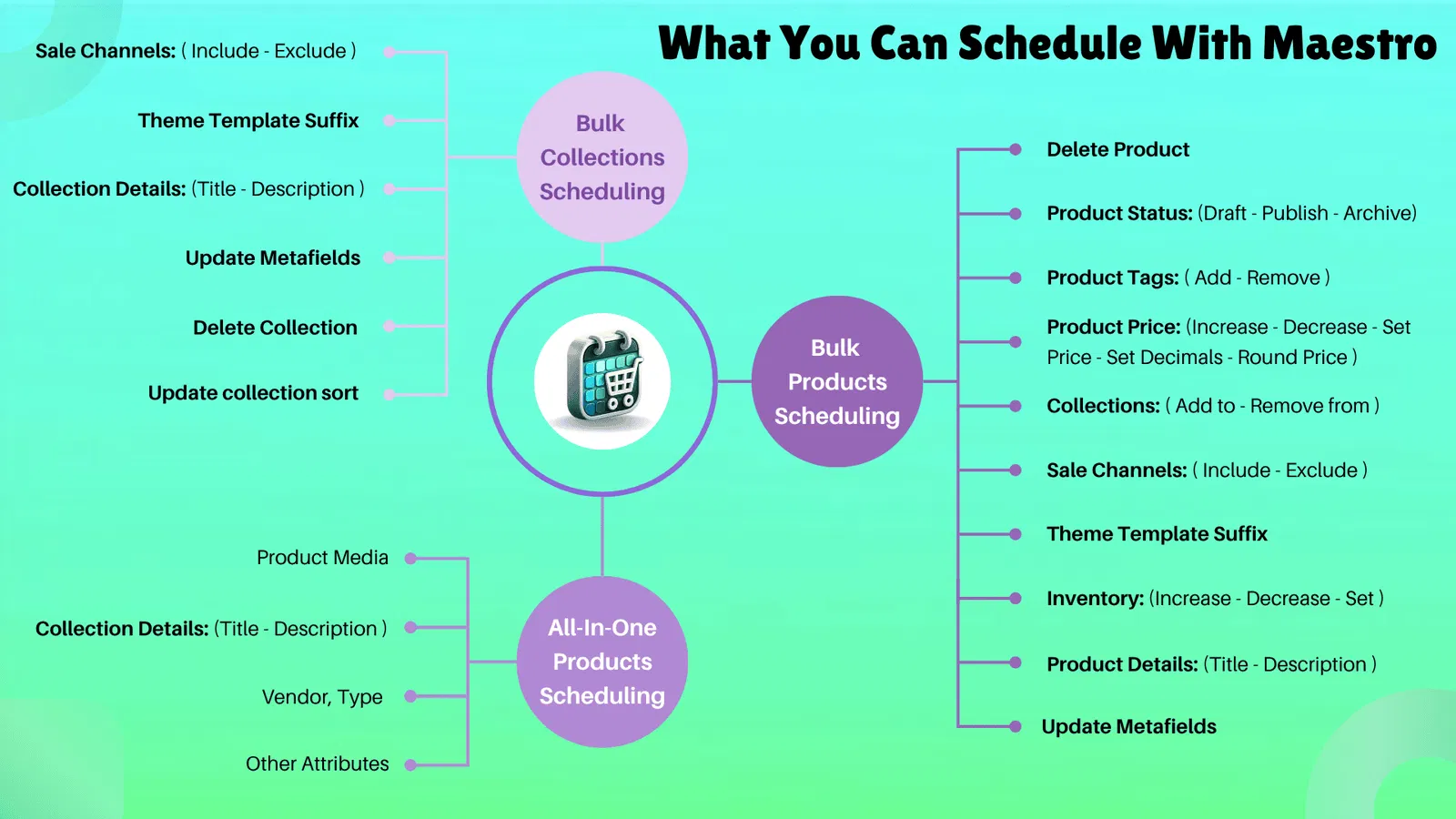
Automated tag management is a game-changer for ecommerce maintenance services. By using Maestro, you can schedule the addition of specific tags (like "FlashSale") at the start of an event and automatically remove them the second the event ends. This keeps your automated collections clean and ensures that your site search remains accurate for your customers.
3. Pricing Panics and Rounding Errors
Have you ever tried to change the prices for 500 items manually during a Black Friday rush? It is a recipe for disaster. Whether it is a typo that lists a $100 item for $10 or forgetting to update the "compare at" price, pricing mistakes can hurt your bottom line and your brand reputation.
The Product Scheduler allows you to schedule price changes across your entire catalog or specific collections. Even better, it includes sophisticated rounding rules. If your 20 percent discount results in a messy price like $43.67, you can set a rule to automatically round it to $43.99 or $44.00. This level of precision is vital for maintaining a premium brand feel and significantly impacts your conversion rate optimization.
4. The Ghost Town of Out of Stock Items
Nothing kills a shopping experience faster than a collection page full of "Sold Out" buttons. While Shopify handles basic inventory, merchants often struggle with the timing of restocks. If you have a shipment arriving on Friday, you want those products to appear at the top of your collections the moment they are scanned in.
Inventory automation within the Maestro app helps you manage these transitions smoothly. You can schedule products to become visible or move to specific "Back in Stock" collections based on your expected delivery timelines. This keeps your store looking fresh and prevents customers from bouncing because they cannot find anything available to purchase.

5. Messy Collection Visibility and Sorting
As a Shopify Plus expert, I find that many merchants ignore their collection sorting until it becomes a problem. New products get buried at the bottom of page five, while old, low-margin items sit at the top. Manually re-sorting collections every week is a tedious task that most people eventually stop doing.
With the Product Scheduler, you can manage collection visibility and sorting on a recurring basis. You can set rules to hide entire collections once a season ends or change the sorting order to highlight "Best Sellers" or "Newest" during specific hours of the day. This proactive step ensures that your most profitable items are always front and center, which is a core component of effective Shopify design services.
6. Small Batch Syndrome
Many store owners suffer from what I call "Small Batch Syndrome." They are so afraid of making a massive mistake that they only update 5 or 10 products at a time. While this is understandable, it is incredibly inefficient. It prevents you from scaling your business and focusing on high-level growth strategies.
The solution is to utilize bulk and batch scheduling. The Plus plan of the Maestro app allows you to schedule updates for an unlimited number of products in a single task. By grouping your updates into large, scheduled batches, you can review everything in a timeline view before it goes live. This gives you the confidence to manage a massive catalog without the fear of breaking your store.
7. Ignoring the Feed Sync Lag
A common technical mistake is forgetting that Shopify does not live in a vacuum. Your catalog is likely synced to Meta (Facebook and Instagram), Google Merchant Center, and email platforms like Klaviyo. If you schedule a price change to happen exactly when your ad campaign starts, you might run into issues. These external channels often take a few hours to sync.
As a Shopify expert, I recommend scheduling your catalog updates at least four to six hours before your marketing campaigns go live. This "buffer time" allows the Shopify API to push updates to all your connected sales channels. The Product Scheduler makes this easy by allowing you to set these lead times in advance, ensuring that your customers see the same price on an Instagram ad as they do on your checkout page.
How to Set Up Your First Scheduled Update
Getting started with automation does not have to be intimidating. Follow these simple steps to move your store toward a hands-off management model:
- Navigate to the Product Scheduler app in your Shopify admin.
- Select the specific products or collections you want to modify.
- Choose the action you want to perform, such as "Add Tag," "Update Price," or "Change Status."
- Define your parameters, such as the new price value or the specific tag name.
- Select the "Schedule" option and pick your desired date and time.
- Review the task in your Timeline view to ensure there are no conflicting schedules.
- Click "Confirm" and let the app handle the rest.
Conclusion
Mastering your Shopify catalog is a vital step in moving from a struggling startup to a thriving enterprise brand. By avoiding these common mistakes and embracing the power of the Product Scheduler by Maestro, you can reclaim your time and ensure your store always looks its best. Whether you are preparing for a major migration to Shopify or simply looking to optimize your current store speed, automation is the key to sustainable growth.
Do not let manual updates hold your business back. Take a proactive step today and start scheduling your success. If you need help building a more robust ecommerce strategy, our team at XCO Agency is ready to guide you through every step of your digital journey.