
As a Shopify expert, I often see merchants spending a fortune on customer acquisition only to drop the ball the second something goes wrong after the sale. You have spent weeks perfecting your Facebook ads and optimizing your product pages, but when a customer receives a faulty item or needs a warranty replacement, they are met with a clunky email process that feels like it belongs in 1998. This friction is a silent killer for brand loyalty.
I often work with growing brands that are seeking ways to scale without ballooning their support costs. They find themselves buried under a mountain of support tickets, manual spreadsheets, and messy Gmail threads. If you are looking to graduate from reactive support to proactive brand building, you need to look at enterprise ecommerce solutions that prioritize the post-purchase experience.
Automating your warranty claims is not just about saving your support team some time; it is about building trust. When a customer knows that a return or a claim will be handled in minutes rather than days, they are far more likely to click that "Buy Again" button. Here is why you should consider making the switch:
- Reduce Support Overhead: Cut down manual data entry by up to 80 percent.
- Improve Customer Satisfaction: Provide instant feedback on claim eligibility.
- Enhance Data Accuracy: Eliminate human error in recording serial numbers or purchase dates.
- Boost Lifetime Value: Turn a negative experience (a broken product) into a positive one (a seamless replacement).
Here are the five essential steps to automate your warranty claims and transform your post-purchase UX.
Step 1: Implement a Unified Data Platform
The first step in any automation journey is consolidating your data. As a Shopify expert, I have noticed that the biggest bottleneck in support is the "data hunt." Your support agent has to look at Shopify for the order, check a spreadsheet for the warranty terms, and then check a third system to see if the customer has contacted you before.
By using a tool like Claimify, you create a single source of truth. This foundation automatically links customer contact details, purchase history, and active warranty policies. When a customer initiates a claim, the system already knows who they are and what they bought.
- Centralize information: Move away from siloed data and ensure all product information is accessible in one place.
- Pre-populate forms: Reduce customer frustration by automatically filling in order numbers and product details.
- Eliminate manual hunting: Save your team hours of searching through different tabs and browser windows.
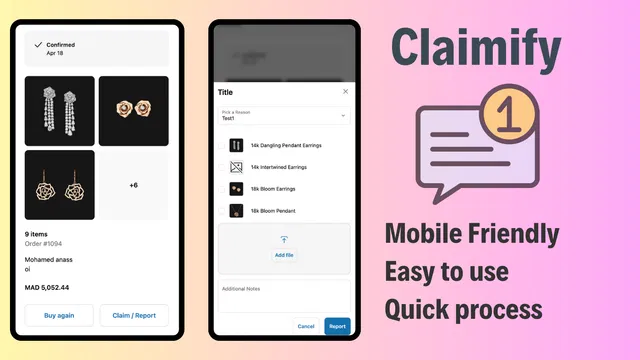
Step 2: Deploy Intelligent Data Capture via Storefront Portals
Once your data is centralized, you need to make it easy for the customer to give you the information you need. Instead of asking them to "email us a photo," you should provide a dedicated portal directly on your storefront or thank-you page.
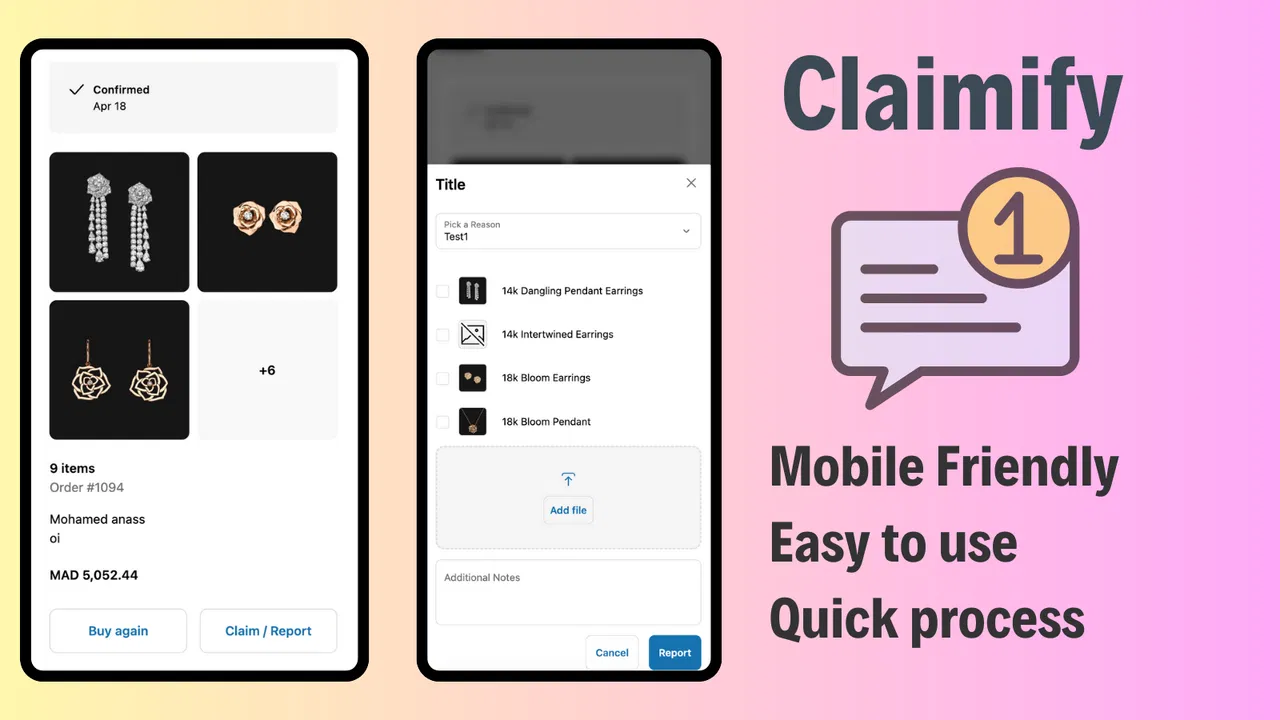
I often recommend placing a "File a Claim" link in the footer or within the customer account page. This is where intelligent data capture comes into play. A well-designed portal should allow users to select the specific item from their order history, choose a reason for the claim, and upload photos or videos of the defect right from their mobile device. This is a vital part of modern ecommerce maintenance services.
- Use a mobile-friendly UI: Most customers will take photos of damaged goods on their phones, so your portal must work perfectly on mobile.
- Standardize inputs: Use dropdown menus and checkboxes to ensure you get clean, actionable data.
- Provide immediate confirmation: Let the customer know their submission was successful the moment they hit submit.
Step 3: Apply Rule-Based Eligibility Checks and Triage
This is where the real magic of automation happens. You do not need a human to look at every single claim to see if a product is still under warranty. You can establish predefined business rules that do the heavy lifting for you.
For example, if a customer tries to file a claim for a product purchased three years ago, but your warranty is only for one year, the system can automatically inform them that the warranty has expired and perhaps offer a discount code for a replacement. Conversely, if a VIP customer files a claim for a low-cost item, you might set a rule to "auto-approve" it to maintain high levels of satisfaction.
- Set date-based triggers: Automatically validate if the claim falls within the eligible window.
- Categorize by risk: Route high-value claims to a senior manager while automating low-risk approvals.
- Optimize workflows: Use these rules to triage tickets so your team focuses on the most complex cases first.

Step 4: Automate Workflow Orchestration and Dashboard Management
Moving support requests from a messy email inbox to a unified dashboard is a game-changer for team productivity. When you use enterprise ecommerce solutions, claims are not just "emails"; they are structured tasks with statuses, owners, and deadlines.
After completing the initial setup, you should route claims intelligently based on product category or geographic location. If you have a specific technician who handles electronics and another who handles apparel, the system should route those claims automatically. This ensures that the right person is looking at the right claim without any manual intervention.
- Track claim lifecycles: Use a dashboard to see exactly where each claim stands in the process.
- Eliminate bottlenecks: Identify which stages of the process are taking the longest and optimize them.
- Coordinate updates: Ensure that when a claim is approved, the inventory or warehouse team is notified immediately to send out a replacement.

Step 5: Enable Real-Time Monitoring and Proactive Communication
The final step in boosting your post-purchase UX is transparency. The number one reason customers contact support after filing a claim is to ask for an update. You can eliminate these "check-in" tickets by providing real-time status updates.
Automated systems can trigger notifications at every milestone: "Claim Received," "Claim Approved," "Replacement Shipped." This keeps the customer in the loop and reduces anxiety. If you want to dive deeper into how site usability affects customer behavior, you might consider how to boost your stores UX and conversion rate with an optimization audit report.
- Automate status emails: Send triggered updates so customers never have to guess the status of their claim.
- Provide a tracking portal: Allow customers to log in and see the history and current state of their requests.
- Identify delays early: Use reporting tools to see if a specific batch of products is seeing a high volume of claims, allowing you to address manufacturing issues proactively.
Why This Matters for Your Brand
In the competitive world of Shopify Plus and enterprise ecommerce, the products are often similar, but the service is what sets you apart. Implementing a system like Claimify allows you to treat every customer like a VIP without needing a massive support staff.
Automating your warranty claims is a proactive step that protects your brand reputation. It turns a potentially frustrating moment into a demonstration of efficiency and care. By following these five steps, you move away from the chaos of manual support and toward a scalable, professional operation.
If you are struggling with the technical setup of your store or need help integrating these types of advanced workflows, our team at XCO Agency is here to help. Whether it is setting up your domain for maximum impact or implementing complex ecommerce maintenance services, we focus on the technical details so you can focus on growth.
Automating your post-purchase experience is not just a "nice to have" anymore; it is a vital step for any merchant serious about long-term success. Start by centralizing your data, making your claim portal accessible, and letting automation handle the repetitive tasks. Your customers and your support team will thank you.
Ready to take your store to the next level? Explore how our enterprise ecommerce solutions can help you optimize every touchpoint of the customer journey. Reach out to us today to see how we can help you streamline your operations and boost your bottom line.